EasyManua.ls Logo

Commando COMMANDO-COMBO - User Manual

Commando COMMANDO-COMBO
6 pages
Print Icon
To Next Page IconTo Next Page
Loading...
REMOTE AUTO ALARM STARTER
&
PAGER SYSTEM
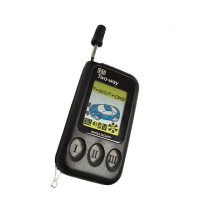
2-WAY TRANSCEIVER WITH LCD MONITOR
INSTALLATION MANUAL
This vehicle security systems is warranted to the original consumer purchaser, to
be free from defects in material and workmanship. The manufacturer will repair or
replace, at it's option, and free of charge during the first 12 months of the warranty
period, any part which prove defective in material or workmanship under normal
installation, use and service, provided the product is returned to our factory,
transportation charges prepaid. Products returned to our factory must be accom-
panied by copy of purchase receipt. Warranty is limited to defective parts and/or
replacement parts only and excludes any incidental and consequential damages
connected therewith. The manufacturer, of this theft deterrent systems makes no
warranty against the theft of vehicle or its content. This warranty is not to be construed
as an insurance policy against loss.
After the first 12 months of the warranty period there will be a charge. ( required) for
repairing and/or replacing any defective parts.
WARRANTY ON INSTALLATION LABOR, REINSTALLATION AND REMOVAL CHARGES
ARE NOT THE RESPONSIBILITY OF THE MANUFACTURER.
OPTIONAL ACCESSORIES
Glass Break Sensor
Interior Radar Sensor
Window Roll-Up Module
Trunk Release Solenoid
Rechargeable Back-Up Battery Siren
* One 3 Channel (FM LCD) Transmitter
* 2nd Channel Output for Trunk release
* Door Entry Protection
* Personal Panic Feature
* Shock Sensor / Dual Zone Dual Adjust
* Remote Trigger Disable
* Dome Light Supervision
* Five Function LED Plug-In
* 120dB 6 Tone Siren
* Last Door Automatic Arming
* Remote Start
* Vacuum System Sense (Optional )
* Factory Alarm Disarm
* Double Pulse Unlock
* 2nd Ignition Relay On Board
* Tach & Spark Plug Sense
* Flashing Parking Lights
* Valet Override Switch Plug-In
* Door Locking & Unlocking w/ Ign. Key
* Remote Door Lock/Unlock Plug-In
MADE IN USA
LIMITED WARRANTY
COMMANDO-COMBO
c 12-2000
Vehicle Security Systems
COMMANDO
Thank You For Choosing
COMMANDO VEHICLE SECURITY
GNU Industries INC.
Technical Support (954)741-5191
SUPPORT@auto-starter.com
info@auto-starter.com

Questions and Answers

Summary

Trouble Shooting

Passkey & P.A.T.S. Bypass

Remote Alarm Functions

Transmitter Button Operation

Explains functions of transmitter buttons for arming, disarming, and panic modes.

Alarm Triggered

Describes system response to violations and parking light flashing.

Intrusion Alert

Details LED and siren feedback for sensor violations upon disarming.

Status Check of System

How to check system status via the remote.

Valet Mode

Procedure to enable/disable Valet mode for temporary system deactivation.

Emergency Override Switch

Steps to disarm the system using the override switch if the transmitter is lost.

Driver Calling

How to page the remote from the vehicle using the Valet switch.

Before Installation

1- Before You Start Installation

Pre-installation checks for vehicle type, transmission, and factory alarm.

2- Remote Start Overview

Basic functions of the remote start module, including accessory outputs and safety inputs.

3- Remote Start Basic Notes

How the module senses successful starts and dip switch configurations.

Low Battery Indicator

Indicator for transmitter battery replacement.

Replacing the Battery

Instructions for replacing the transmitter battery with a 1.5V AAA battery.

Programming the Unit

1- Code Teaching

Process to program transmitters to the system by teaching codes.

2- Remote Programmable Features

Guide to entering program mode and selecting features via the remote.

Program Location

Table detailing programmable features and their ON/OFF states.

Reset to Factory Default Setting

Procedure to reset all programmable features to factory default settings.

Door Lock Wiring Diagram

Stop-N-Go Feature

Cold Start Feature

Remote Start Features

Remote Start Functions

Detailed steps for remote start activation, including ignition and accessory outputs.

Valet Mode

Steps to enter and exit Valet mode for temporary system deactivation.

Longer Crank Times

How to adjust crank time using dip switch #2.

Diesel Mode

Procedure for setting up remote start for diesel engines using dip switch #3.

Bypassing Factory Theft Deterrent Systems

Explanation of factory anti-theft systems and how to bypass them for remote start.

Remote Alarm & Starter Wiring

Dip Switch Settings

Table explaining the function of each dip switch for configuration.

Yellow: Vacuum (Optional)

Instructions for optional vacuum system hookup and wiring.

Note

Important notes regarding factory alarm disarm, horn output, and ground output usage.

Commando COMMANDO-COMBO Specifications

General IconGeneral
Type2-Way
Remote StartYes
Engine ImmobilizerYes
Shock SensorYes
LCD RemoteYes
Keyless EntryYes
Panic ModeYes
Starter KillYes
Valet ModeYes
CompatibilityUniversal
Remote Control Range3000 ft

Related product manuals