EasyManua.ls Logo

Commax CCU-208AGF - User Manual

Commax CCU-208AGF
11 pages
Print Icon
To Next Page IconTo Next Page
Loading...
Thank you for purchasing COMMAX products.
Please carefully read this User’s Guide (in particular, precautions for safety) before using a product and follow
instructions to use a product exactly.
The company is not responsible for any safety accidents caused by abnormal operation of the product.
Thank you for purchasing COMMAX products.
Please carefully read this User’s Guide (in particular, precautions for safety) before using a product and follow
instructions to use a product exactly.
The company is not responsible for any safety accidents caused by abnormal operation of the product.
COMMAX CONVERTER UNIT CCU-208AGF
User Manual
Question and Answer IconNeed help?

Do you have a question about the Commax CCU-208AGF and is the answer not in the manual?

Overview

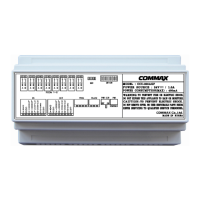
COMMAX Converter Unit CCU-208AGF

The COMMAX Converter Unit CCU-208AGF is an 8-channel distributor designed for layer 1 power distribution within interphone systems, specifically for use with 2-wire loop type interphones like the COMMAX AP-2SAG. This unit facilitates communication and power distribution for up to two devices within a 30-meter range.

Function Description

The CCU-208AGF acts as a central hub for managing communication and power within an interphone system. It connects to a lobby phone using 6 wires and to other distributors using 8 wires. Its primary functions include:

  • Common Line Input Terminal: Serves as the input terminal for both the lobby common line and distributor common line.
  • Common Line Output Terminal: Functions as the output terminal for the distributor common line.
  • Household In & Output Terminal: Handles household call line input and output.
  • Program Terminal: Provides a terminal for program download, allowing for system configuration and updates.
  • RS-232 Connection Terminal: Enables connection to a PC for changing settings, facilitating advanced configuration and diagnostics.
  • Power Switch: An ON/OFF switch for controlling the unit's power.
  • Power Input Terminal: Connects to the RF-24AS Adaptor for power supply.
  • Status LED: Provides visual feedback on the unit's operational status, indicating:
    • Power LED: On when the unit is powered.
    • Lobby Call LED: On during calls between a household and the lobby.
    • Guard Call LED: On during calls between a household and the guard station, or between households.
    • Data LED: On when data is being transferred between devices.
    • Error Check LED: On when an error occurs.
  • ID Switch (DIP Switch): Used to set the device ID using BCD code. The DIP switch is divided into two parts: lower 4 bits (1-4) for the unit's place and upper 4 bits (5-8) for the ten's place, allowing for up to 99 unique IDs.

Important Technical Specifications

  • Model: CCU-208AGF
  • Wiring:
    • To Lobby: 6 Common Wires
    • To Floor Distributor: 8 Common Wires
  • Power Source: 24V / 1.5A (with COMMAX RF-24AS Power Adapter)
  • Power Source (Other Venders): DC24V / 3A
  • Power Consumption:
    • Standby: 210mA
    • Maximum: 400mA
  • Range: 200 meters / Ø ±0.65mm wire (Household ↔ CCU-208AGF ↔ Guard)

Usage Features

The CCU-208AGF supports several key operational features:

  • Door Open Function (Lobby Control):
    • Method using Hook Switch: While talking to the lobby phone, press and release the hook switch for 1 second to open the door. Then, place the handset down to end the call. (Caution: If the handset is not hung up within a certain period, the guard room will be called).
    • Method using Door Open Button: If the household interphone has a dedicated door open button, press it while talking to the lobby to open the door. Then, place the handset down to end the call.
  • Guard Phone Integration: The unit can be integrated with a guard phone system, and its operation may be influenced by changes made via the guard phone (refer to the linkage guard phone manual for details).
  • Device ID Setting: The device ID is set using a BCD code via the 8-bit DIP switch. The lower 4 bits (1-4) represent the unit's place, and the upper 4 bits (5-8) represent the ten's place, allowing for IDs from 0 to 99.
  • Remote Updating: The unit supports remote updating via the guard phone, allowing for firmware or software updates without direct physical access to the unit.

Maintenance Features

Proper installation and maintenance are crucial for the longevity and safe operation of the CCU-208AGF.

  • Installation Precautions:
    • Avoid installing the product in areas with excessive oil, smoke, or humidity, as this can lead to electric shock or fire.
    • Do not install the product during lightning and thunder, as it may cause electric shock or fire.
    • Ensure proper ventilation by installing the product at least 10cm away from walls, especially for heat-generating components, to prevent increased internal temperature and potential fire.
    • Do not install the product on unstable surfaces or small support boards to prevent injury from falling objects.
    • Always ensure the power is off before installing or repairing the unit.
  • Power Connection:
    • Plug the power cable firmly into the inner end to prevent fire.
    • Hold the plug tightly when unplugging the power cable to avoid disconnecting copper wires and potential electric shock.
    • Do not handle the power cable with wet hands to prevent electric shock.
    • Unplug the power cable from the socket when not in use for extended periods to prolong product lifespan and prevent fire.
    • Ensure the power cable is not excessively bent or damaged, as this can cause electric shock or fire.
    • When connecting power cables after cutting, install the product with the power off to prevent electric shock.
    • Use only the designated connection cable within the maximum specified distance to maintain product performance.
  • General Usage and Safety:
    • Do not use several products simultaneously on a single power socket to prevent abnormal overheating and fire.
    • Do not insert metallic or flammable materials into ventilation holes to prevent electric shock or fire.
    • Use only designated batteries for DC-powered products to prevent electric shock or fire.
    • Avoid direct sunlight or heating devices during installation to prevent fire.
    • Do not drop the product or apply excessive shock, as this may cause failure.
    • Do not use or connect this product with other products that have different rated voltages, as it may cause disorder or fire.
    • Be careful when using an AC circuit breaker due to the possibility of electric shock.
    • Check the use voltage and current for DC-only products and use the appropriate rectifier to prevent fire.
    • A proper cutoff (breaker) must be used for indoor wiring to mitigate fire or equipment risks. Press down the building's breaker as soon as possible if such risks occur.
  • Cleaning: When cleaning the product, unplug the power cable and wipe it with a soft, dry cloth. Do not use chemical products such as wax, benzene, alcohol, or cleanser.
  • Troubleshooting and Repair:
    • Do not disassemble, repair, or rebuild the product arbitrarily. Contact the service center if a repair is needed, as unauthorized tampering may cause electric shock or fire.
    • If abnormal sounds, burning smells, or smoke emanate from the product, immediately unplug the power cable and contact the service center.
    • Before making a service call for faulty equipment, thoroughly read the manual and check all status indicators.
    • If the product is damaged or an error occurs, contact the customer support team directly.
  • Environmental: Do not place a flower vase or bottle on the product.

COMMAX emphasizes that the company is not responsible for any safety accidents caused by abnormal operation of the product due to failure to follow instructions.

Commax CCU-208AGF Specifications

General IconGeneral
BrandCommax
ModelCCU-208AGF
CategoryMedia Converter
LanguageEnglish