1.
Red: Talk (Audio)
2. Blue: GND
3. Yellow: Power (+12V)
4. White: Video
▷
Polarity of the camera connector
1.
Red: Talk (Audio)
2. Blue: GND
3. Yellow: Power (+14V)
4. White: Call signal
▷
Polarity of interphone connector
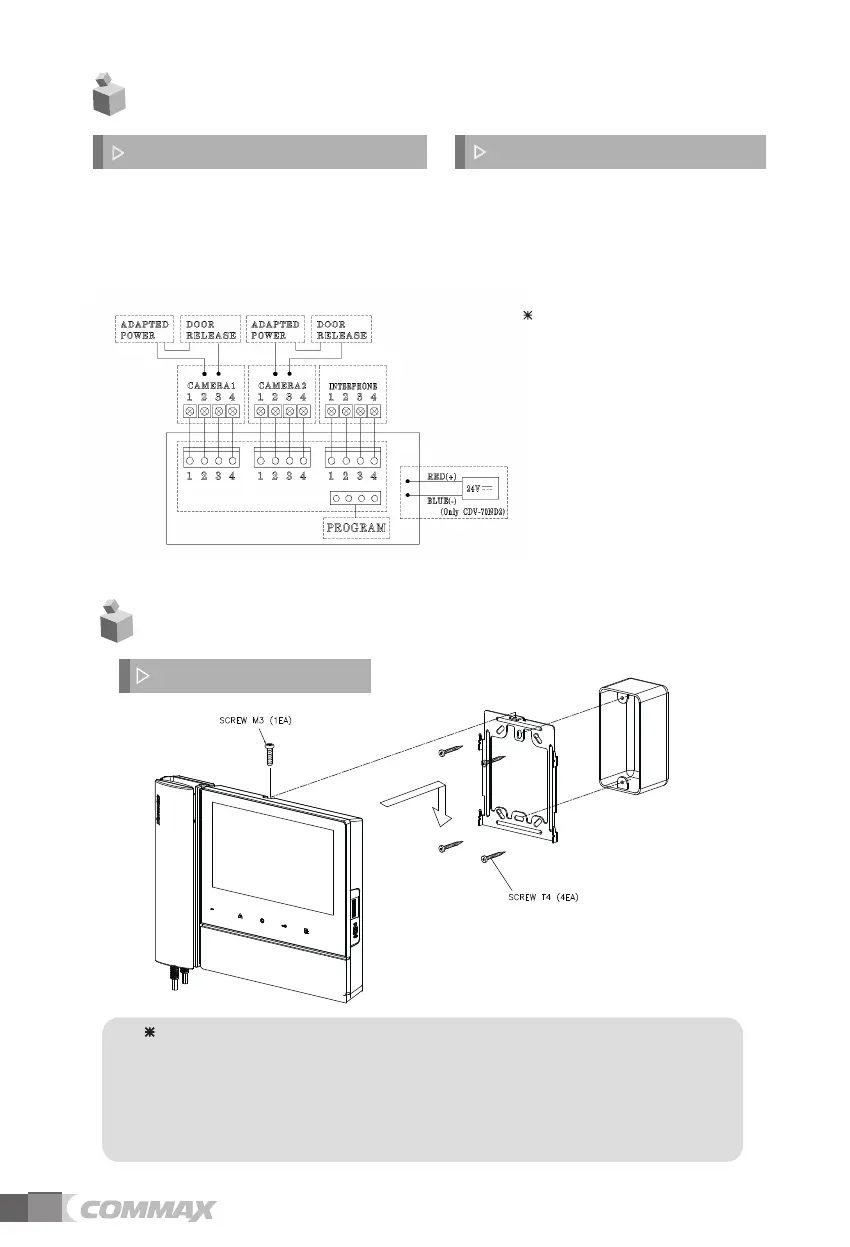
4. Wiring and Connection Instructions
4
4
. Installation
▷
Monito
r installation
No
te
Avoid installing the product in the area of direct sunlight.•
• The position of the unit's body should fit the standard height range
(Recommended height range is 1450 ~ 1500mm.)
• Avoid installing the product exposed to gas exposure, magnetic force,
in humid temperatures, as it may damage the condition and
performance of the product.
5
Each device should be connected by
If you use UTP CABLE[CAT.5] for
separated cables.
CAMERA1and CAMERA2, 2 lines of
UTP cable are required.


 To Next Page