C128/1541
modes-Tum
on or reset the computer, and when the cursor appears,
tum on the drive. In this case, the first disk access will switch
the drive
to
1571
mode, so send the BASIC command given on
the previous page
to
lock the drive into
1541
mode.
C64!1571 modes
-Tum
on the drive, then tum on or reset the computer and type:
GO 64
C64!1541 modes
-Tum
on the drive, then hold down the COMMODORE key
while you tum on or reset
the
computer.
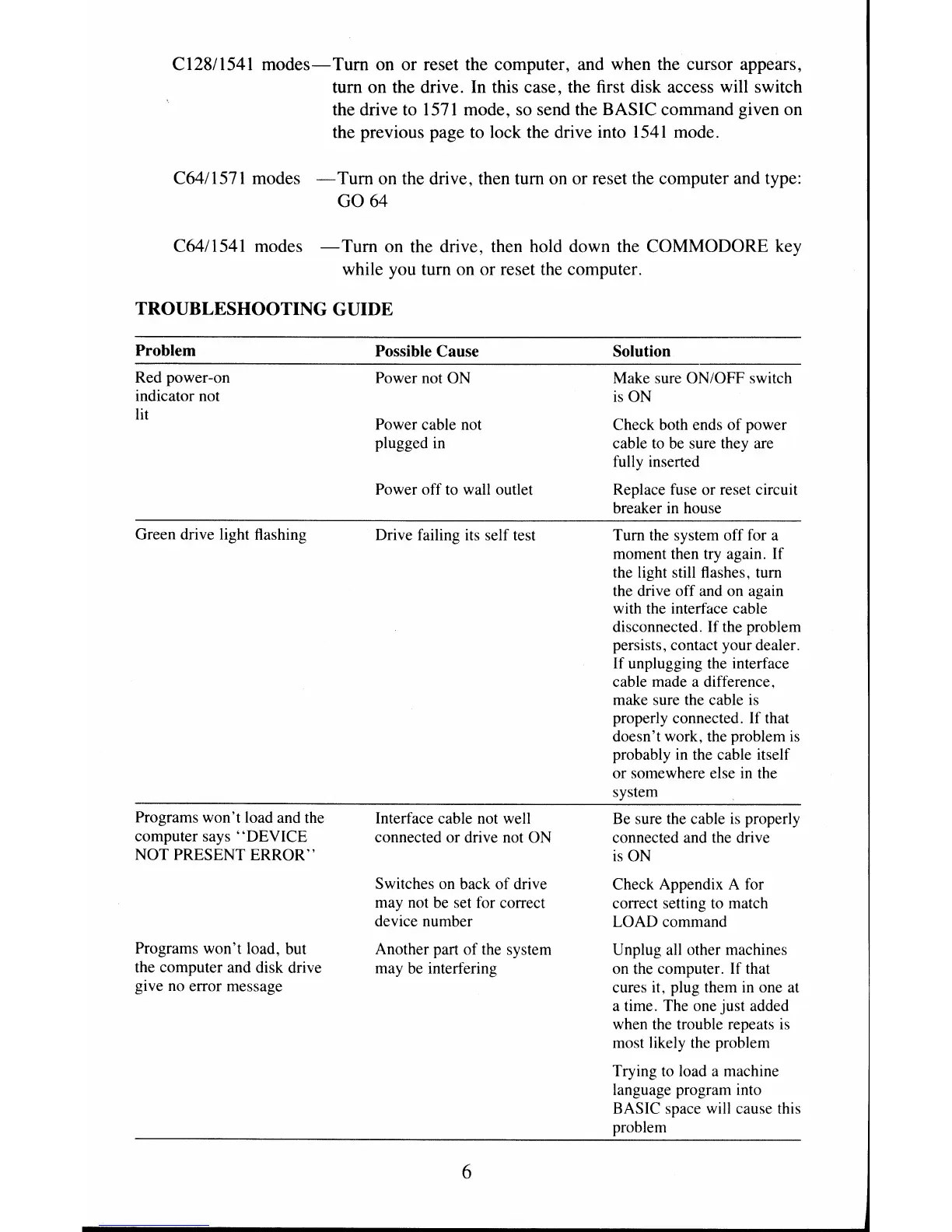
TROUBLESHOOTING GUIDE
Problem
Red power-on
indicator not
lit
Green drive light flashing
Programs won't load and the
computer says
"DEVICE
NOT PRESENT
ERROR"
Programs won't load, but
the computer and disk drive
gi ve no error message
Possible Cause
Power not
ON
Power cable not
plugged
in
Power off to wall outlet
Drive failing its self test
Interface cable not well
connected or drive not ON
Switches on back
of
drive
may not
be
set for correct
device number
Another part
of
the system
may
be
interfering
6
Solution
Make sure ON/OFF switch
is
ON
Check both ends
of
power
cable to be sure they are
full y inserted
Replace fuse or reset circuit
breaker
in
house
Turn the system off for a
moment then try again. If
the light still flashes. turn
the drive off and on again
with the interface cable
disconnected.
If
the problem
persists. contact your dealer.
If unplugging the interface
cable made a difference.
make sure the cable is
properly connected. If that
doesn't work, the problem
is
probably
in
the cable itself
or somewhere else
in
the
system
Be sure the cable
is
properly
connected and the drive
is
ON
Check Appendix A for
correct setting
to
match
LOAD command
Unplug
all
other machines
on the computer. If that
cures it, plug them
in
one at
a time. The one just added
when the trouble repeats
is
most likely the problem
Trying
to
load a machine
language program into
BASIC space will cause this
problem


 To Next Page
 Loading...






