EasyManua.ls Logo

Commodore PC - Page 191

Commodore PC
414 pages
Print Icon
To Next Page IconTo Next Page
To Previous Page IconTo Previous Page
Loading...
n
n
n
n
n
n
MS-DOS
Editing
and
Function
Keys
119
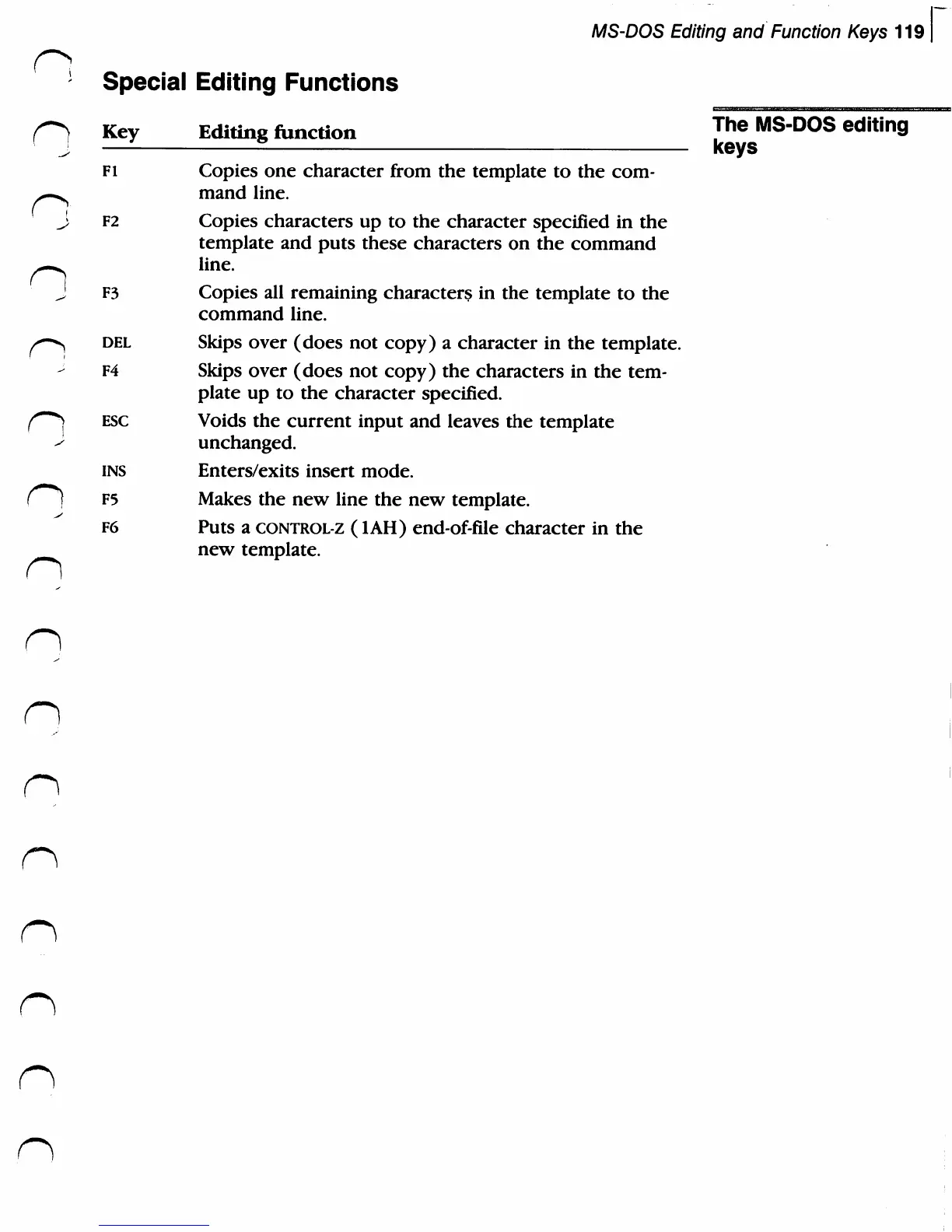
Special
Editing
Functions
r>
Key
Editing
function
Jhe
MS-DOS
editing
(
J
-
keys
fi
Copies
one
character
from
the
template
to
the
com-
^—^
mand
line.
J
F2
Copies
characters
up
to
the character
specified
in
the
template
and
puts
these
characters
on
the
command
n
line.
J
F3
Copies
all
remaining
characters
in
the
template
to
the
command
line.
/*-^
del
Skips
over
(does
not
copy)
a
character
in
the
template.
¥4
Skips
over
(does
not
copy)
the
characters
in
the
tem
plate
up
to
the character
specified.
f"**}
esc
Voids
the
current
input
and
leaves
the
template
<s
unchanged.
ins
Enters/exits
insert
mode.
r**)
F5
Makes
the
new
line
the
new
template.
F6
Puts
a
control-Z
(1AH)
end-of-file
character
in
the
new
template.

Related product manuals