EasyManua.ls Logo

Commodore PC - Page 375

Commodore PC
414 pages
Print Icon
To Next Page IconTo Next Page
To Previous Page IconTo Previous Page
Loading...
P
—R303
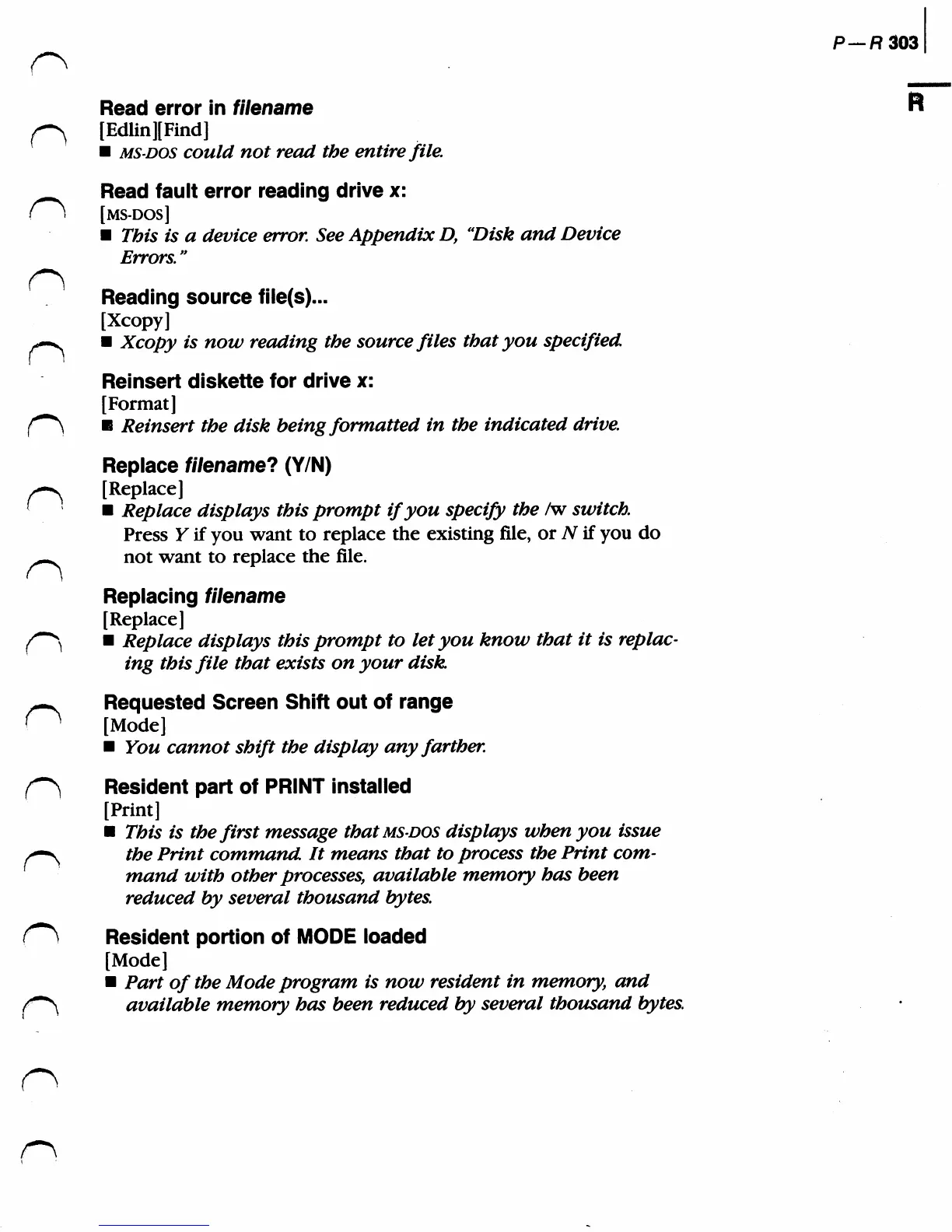
Read
error
in
filename
/-^
[Edlin][Find]
MS-DOS
could
not
read
the
entire
file.
Read
fault
error
reading
drive
x:
(\
[ms-dos]
This
is
a
device
error.
See
Appendix
D,
'Disk
and
Device
Errors."
Reading
source
file(s)...
[Xcopy]
-—^
Xcopy
is
now
reading
the
source
files
that
you
specified
Reinsert
diskette
for
drive
x:
[Format]
f~*\
Reinsert
the
disk
being
formatted
in
the
indicated
drive.
Replace
filename?
(YIN)
>^
[Replace]
(
Replace
displays
this
prompt
if
you
specify
the
/w
switch.
Press
Y
if
you
want
to
replace
the
existing
file,
or
AT
if
you
do
^■^
not
want
to
replace
the
file.
Replacing
filename
[Replace]
(//-""^
Replace
displays
this
prompt
to
let
you
know
that
it
is
replac
ing
this
file
that
exists
on
your
disk.
-^
Requested
Screen
Shift
out
of
range
(
"
[Mode]
You
cannot
shift
the
display
any
farther.
f^)
Resident
part of
PRINT
installed
[Print]
This
is
the
first
message
that
ms-dos
displays
when
you
issue
/—^
the
Print
command
It
means
that
to
process
the
Print
com
mand
with
other
processes,
available
memory
has
been
reduced
by
several
thousand
bytes.
(~^
Resident
portion
of
MODE
loaded
[Mode]
Part
of
the
Mode
program
is
now
resident
in
memory,
and
f~*\
available
memory
has
been
reduced
by
several
thousand
bytes.