EasyManua.ls Logo

Commodore PC - Page 378

Commodore PC
414 pages
Print Icon
To Next Page IconTo Next Page
To Previous Page IconTo Previous Page
Loading...
1306
Appendix
E
MS-DOS
Message
Directory
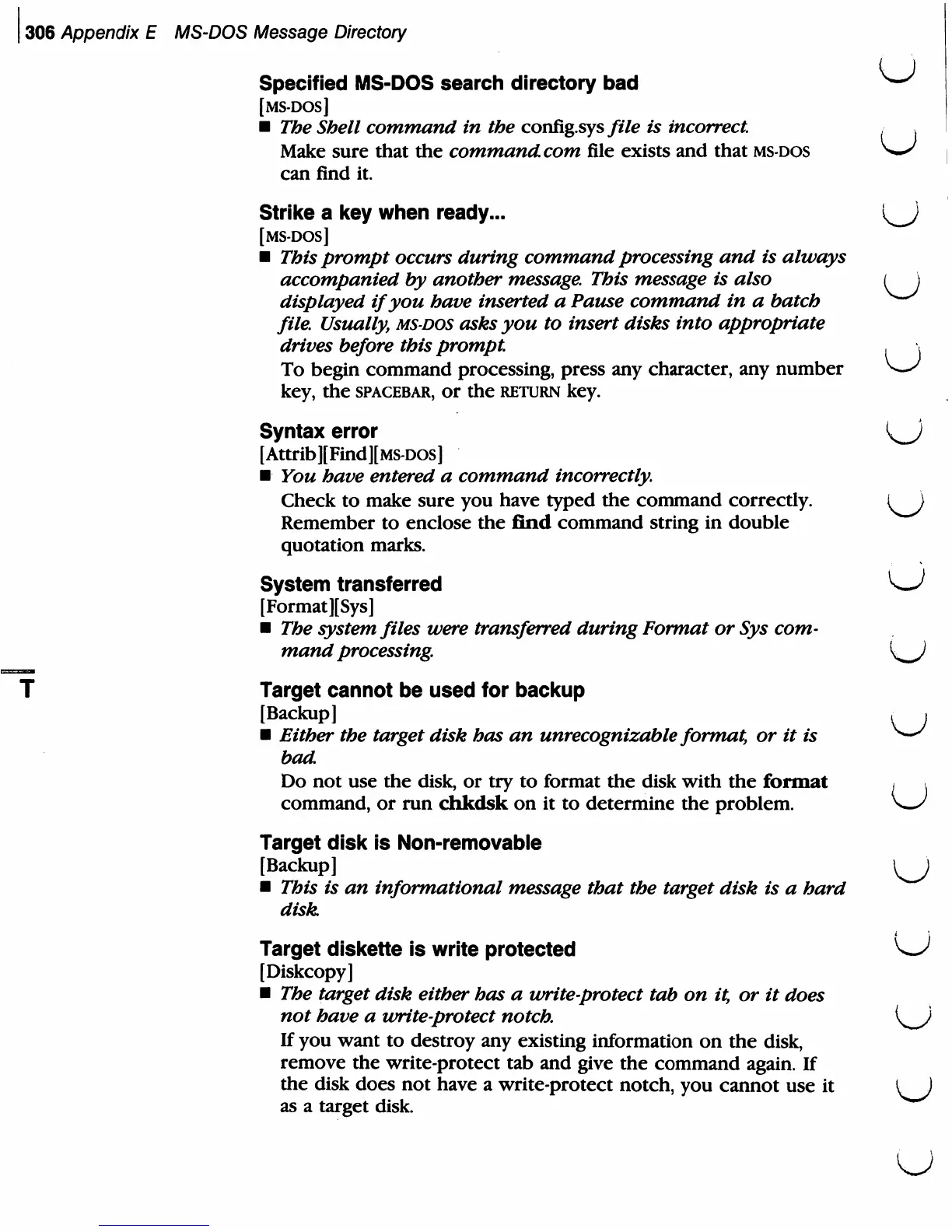
Specified
MS-DOS
search
directory
bad
^
[MS-DOS]
The
Shell
command
in
the
config.sys/i/e
is
incorrect
,
Make
sure
that
the
command.com
file
exists
and
that
ms-dos
^—^
can
find
it.
Strike
a
key
when
ready...
l^J
[MS-DOS]
This
prompt
occurs
during
command
processing
and
is
always
accompanied
by
another
message. This
message
is
also
(
\
displayed
if
you
have
inserted
a
Pause
command
in
a
batch
^~"^
file.
Usually,
ms-dos
asks
you
to
insert
disks
into
appropriate
drives
before
this
prompt.
,
To
begin
command
processing,
press
any
character,
any
number ^—'
key,
the
spacebar,
or
the
return
key.
Syntax
error
{K_J
[Attrib][Find][MS-DOS]
You
have
entered
a
command
incorrectly.
Check
to
make
sure
you
have
typed
the
command
correctly.
I
}
Remember
to
enclose
the
find
command
string
in
double
quotation
marks.
System
transferred
^J
[Format
][Sys]
The
system
files
were
transferred
during
Format
or
Sys
com
mand
processing.
K^J
Target
cannot
be
used
for
backup
[Backup]
,
.
Either
the
target
disk
has
an
unrecognizable
format,
or
it
is
Vw/
bad
Do
not
use
the
disk,
or
try
to
format
the
disk
with
the
format
*
v
command,
or
run
chkdsk
on
it
to
determine
the
problem.
\w/
Target
disk
is
Non-removable
[Backup]
\^J
This
is
an
informational
message
that
the
target
disk
is
a
hard
disk
Target
diskette
is
write
protected
w'
[Diskcopy]
The
target
disk
either
has
a
unite-protect
tab
on
it,
or
it
does
not
have
a
ivrite-protect
notch.
i^^i
If
you
want
to
destroy
any
existing
information
on
the
disk,
remove
the
write-protect
tab
and
give
the
command
again.
If
the
disk
does
not
have
a
write-protect
notch,
you
cannot
use
it
M
as
a
target
disk.
U