EasyManua.ls Logo

Commodore PC - Page 382

Commodore PC
414 pages
Print Icon
To Next Page IconTo Next Page
To Previous Page IconTo Previous Page
Loading...
1310
Appendix
E
MS-DOS
Message
Directory
U
W
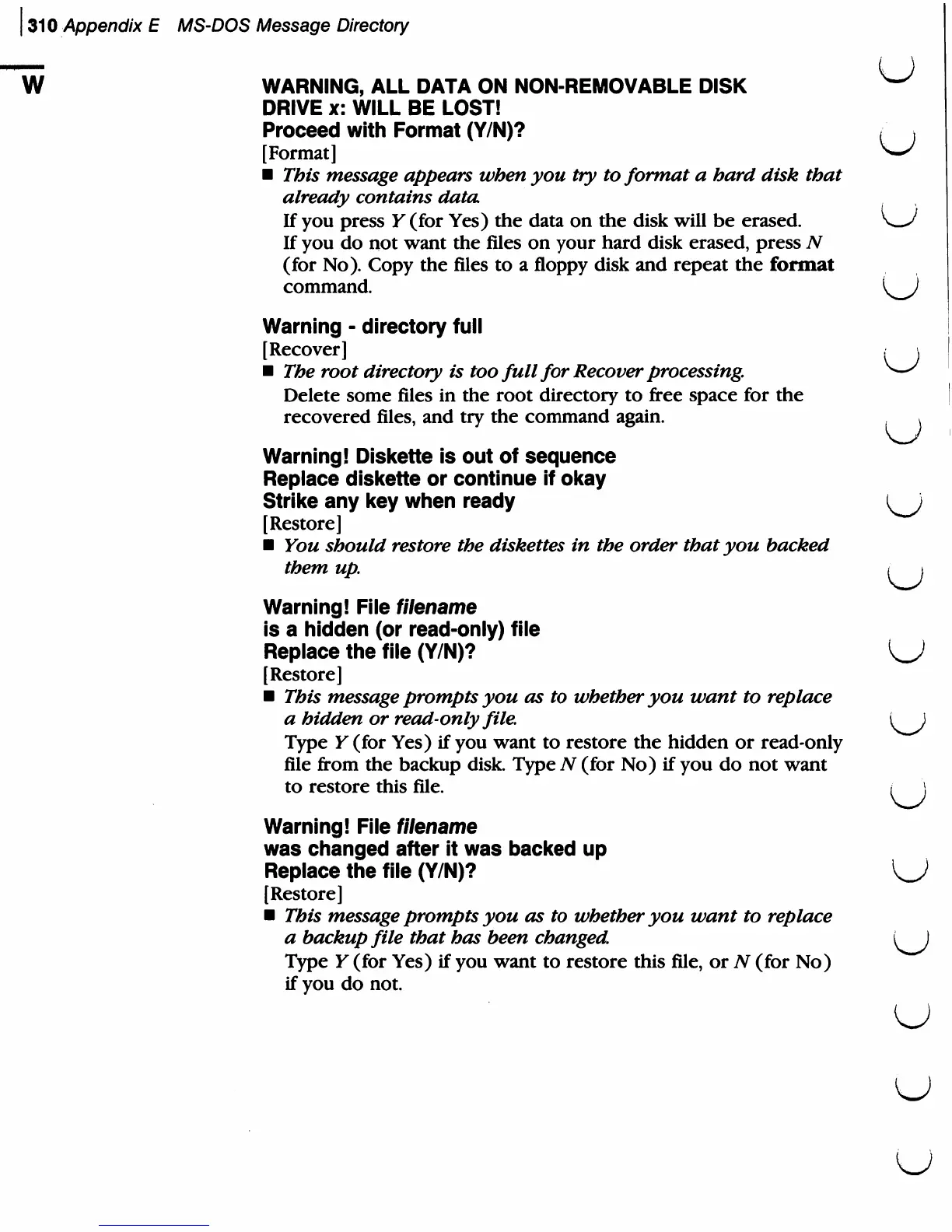
WARNING,
ALL
DATA
ON
NON-REMOVABLE
DISK
W
DRIVE
x:
WILL
BE
LOST!
Proceed
with
Format
(Y/N)?
t
}
[Format]
w
This
message
appears
when
you
try
to
format a
hard
disk
that
already
contains
data.
If
you
press
Y
(for
Yes)
the
data
on
the
disk
will
be
erased.
If
you
do
not
want
the
files
on
your
hard
disk
erased,
press
N
(for
No).
Copy
the
files
to
a
floppy
disk
and
repeat
the
format
command.
^
)
Warning
-
directory
full
[Recover]
The
root
directory
is
too
full
for
Recover
processing.
Delete
some
files
in
the
root
directory
to
free
space
for
the
recovered
files,
and
try
the
command
again.
v
Warning!
Diskette
is
out
of
sequence
Replace
diskette
or
continue
if
okay
Strike
any
key
when
ready
[Restore]
You
should
restore
the
diskettes
in
the
order
that
you
backed
them
up.
t
\
Warning!
File
filename
is
a
hidden
(or
read-only)
file
Replace
the
file
(Y/N)?
[Restore]
This
message
prompts
you
as
to
whether
you
want
to
replace
a
hidden
or
read-only
file.
1
)
Type
Y
(for
Yes)
if
you
want
to
restore
the
hidden
or
read-only
file
from
the
backup
disk.
Type
N
(for
No)
if
you
do
not
want
to
restore
this
file.
/
\
Warning!
File
filename
was
changed
after
it
was
backed
up
Replace
the
file
(Y/N)?
[Restore]
This
message
prompts
you
as
to
whether
you
want
to
replace
a
backup
file
that
has been
changed.
i)
Type
Y
(for
Yes)
if
you
want
to
restore
this
file,
or
TV (for
No)
if
you
do
not.
U
U
u