EasyManua.ls Logo

Commodore PC - Page 387

Commodore PC
414 pages
Print Icon
To Next Page IconTo Next Page
To Previous Page IconTo Previous Page
Loading...
Appendix
F
Configuring
Your
Hard
Disk
(Fdisk)
315
D
Choice
1
Creating
a
DOS
Partition
/^-n
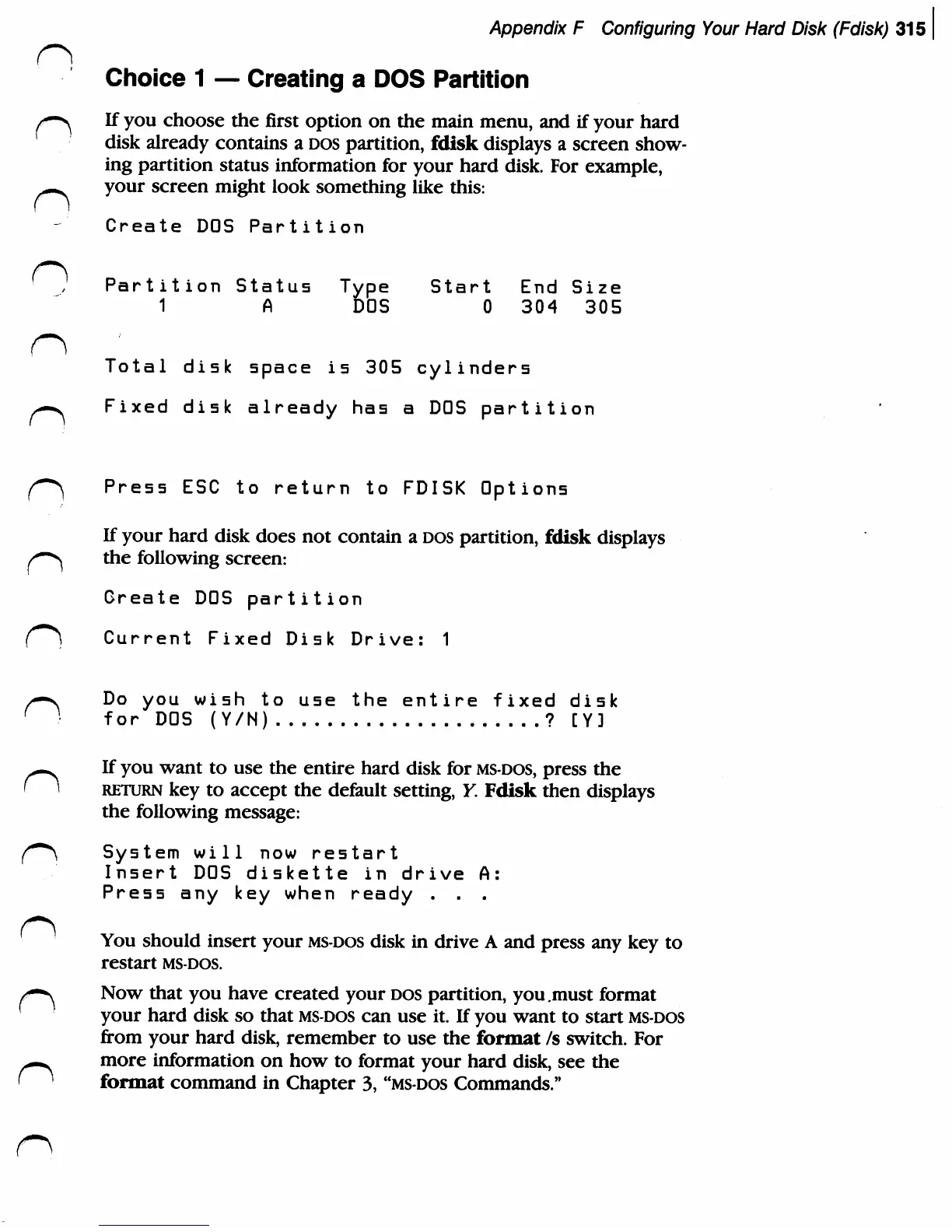
If
you
choose
the
first
option
on
the
main
menu,
and
if
your
hard
disk
already
contains
a
DOS
partition,
fdisk
displays
a
screen
show
ing
partition
status
information
for
your
hard
disk.
For
example,
-■^
your
screen
might
look
something
like
this:
Create
DOS
Partition
Partition
Status
Type
Start
End
Size
1
A
DOS
0
304
305
Total
disk
space
is
305
cylinders
m~*.
Fixed
disk
already
has
a
DOS
partition
Press
ESC
to
return
to
FDISK
Options
If
your
hard
disk
does
not
contain
a
DOS
partition,
fdisk
displays
the following
screen:
Create
DOS
partition
Current
Fixed
Disk
Drive:
1
,—*s
Do
you
wish
to
use
the
entire
fixed
disk
[ )
for
DOS
(Y/N)
?
[Y]
If
you
want
to
use
the
entire
hard
disk
for
ms-dos,
press
the
return
key
to
accept
the
default
setting,
Y.
Fdisk
then
displays
the
following
message:
(~*\
System
will now
restart
Insert
DOS
diskette
in
drive
A:
Press
any
key
when
ready
.
.
.
You
should
insert
your
ms-dos
disk
in
drive
A
and
press
any
key
to
restart
ms-dos.
/*-s
Now
that
you
have
created
your
DOS
partition,
you.must
format
your
hard
disk
so
that
ms-dos
can
use
it.
If
you
want
to
start
ms-dos
from
your
hard
disk,
remember
to
use
the
format
/s
switch.
For
^m*.
more
information
on
how
to
format
your
hard
disk,
see the
f
^
format
command
in
Chapter
3,
"ms-dos
Commands."