EasyManua.ls Logo

Commodore Plus 4 - Page 212

Commodore Plus 4
464 pages
Print Icon
To Next Page IconTo Next Page
To Previous Page IconTo Previous Page
Loading...
800
Programming
Graphics
Custom
Character
Sets
The
characters
you
see
on
your
computer
monitor
or
TV
are
formed
by
a
pattern
of
dots.
Each
character
occupies
a
cell
eight
dots
(pixels)
wide
and
eight
dots
high.
Each
dot
is
either
on
or
off.
Because
each
dot
is
individually
controlled,
the
graphics chip
is
said
to
be
in
high-resolution
mode.
The
pattern
of
dots
that
are
on
form
the
character
you
see.
The
patterns
for
the
built-in
characters
are
stored
in
your
computer
on
a
permanent
memory
chip
(the
character
ROM).
Each
dot
in
the
character's
pattern
is
represented
by one
bit
in
the
character
ROM.
Since
there
are
8
bits
in
one
byte
(or
memory
location),
it
takes
8
bytes
to
specify
each
character's
pattern.
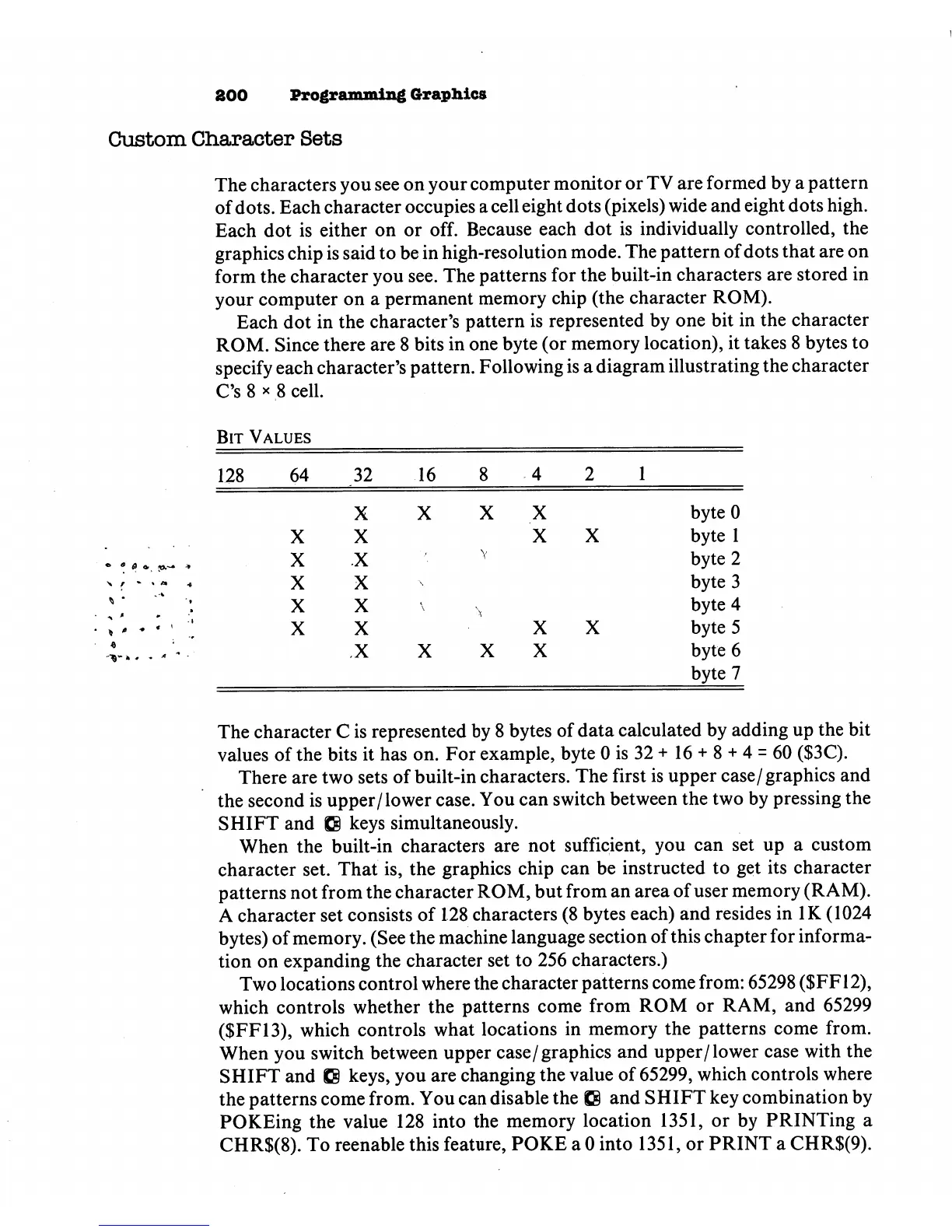
Following
is
a
diagram
illustrating
the
character
C's
8
x
8
cell.
Bit
Values
128
64
32
16
8
4
2
1
«
0
,
X
X
X
X
X
X
X
X
X
X
X
X
X
X
X
X
X
X
byteO
byte
1
byte
2
byte
3
byte
4
byte
5
byte
6
byte
7
The
character
C
is
represented
by
8
bytes
of
data
calculated
by
adding
up
the
bit
values
of
the
bits
it
has
on.
For
example,
byte
0
is
32
+
16
+
8
+
4
=
60
($3C).
There
are
two
sets
of
built-in
characters.
The
first
is
upper
case/graphics
and
the
second
is
upper/lower
case.
You
can
switch
between
the
two
by
pressing
the
SHIFT
and
IS
keys
simultaneously.
When
the
built-in
characters
are
not
sufficient,
you
can
set
up
a
custom
character
set.
That
is,
the
graphics chip
can
be
instructed
to
get
its
character
patterns
not
from
the
character
ROM,
but
from
an
area
of
user
memory
(RAM).
A
character
set
consists
of
128
characters
(8
bytes
each)
and
resides
in
IK
(1024
bytes)
of
memory.
(See
the
machine
language
section
of
this
chapter
for
informa
tion
on
expanding
the
character
set
to
256
characters.)
Two
locations
control
where
the
character
patterns
come
from:
65298
($FF12),
which
controls
whether
the
patterns
come
from
ROM
or
RAM,
and
65299
($FF13),
which
controls
what
locations
in
memory
the
patterns
come
from.
When
you
switch
between upper
case/
graphics
and
upper/lower
case
with
the
SHIFT
and
Q
keys,
you
are
changing
the
value
of
65299,
which
controls
where
the
patterns
come
from.
You
can
disable
the
£8
and
SHIFT
key
combination
by
POKEing
the
value
128
into
the
memory
location
1351,
or
by
PRINTing
a
CHR$(8).
To
reenable
this
feature,
POKE
a 0
into
1351,
or
PRINT
a
CHR$(9).

Other manuals for Commodore Plus 4

Related product manuals