EasyManua.ls Logo

Commodore Plus 4 - Page 24

Commodore Plus 4
464 pages
Print Icon
To Next Page IconTo Next Page
To Previous Page IconTo Previous Page
Loading...
12
The
BASIC
Language
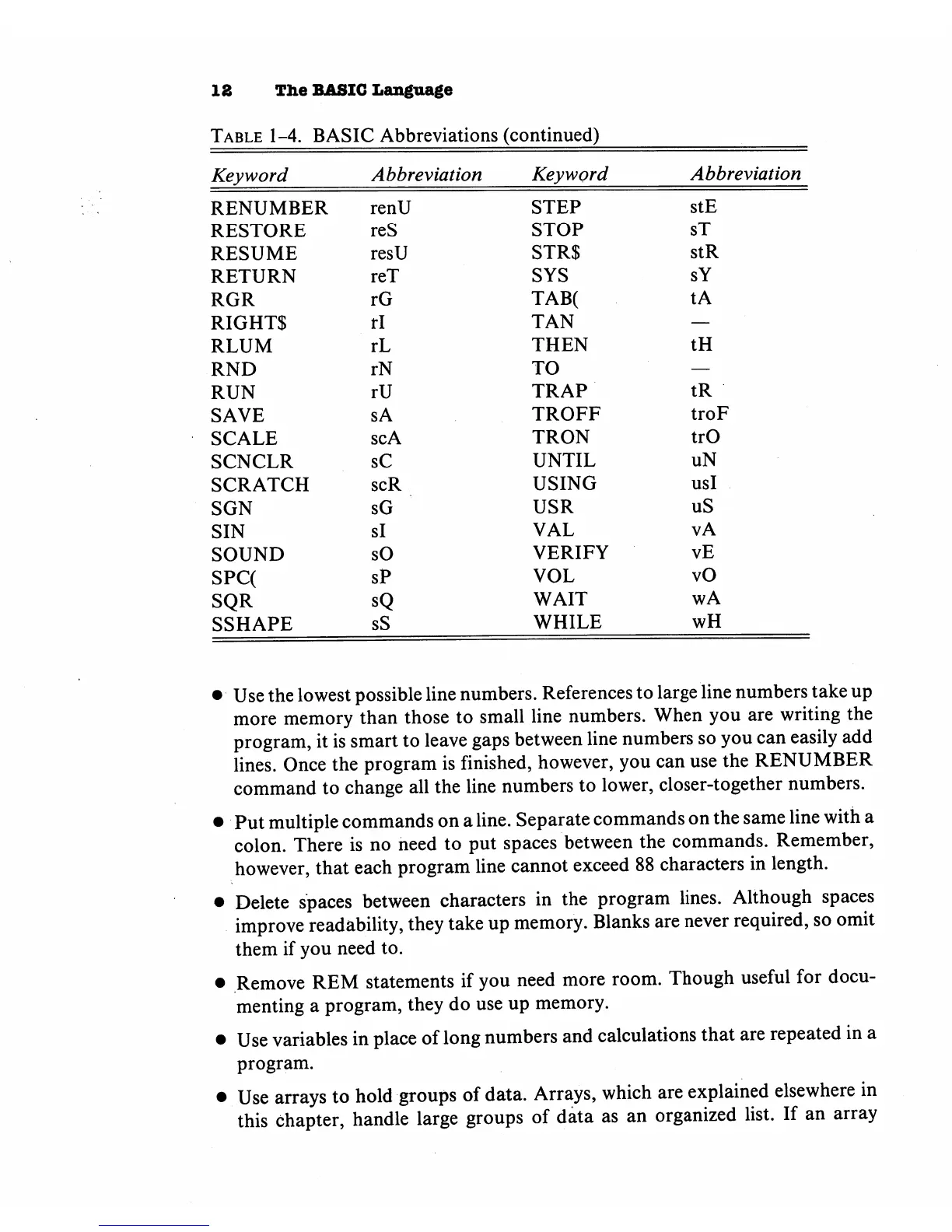
Table
1-4.
BASIC
Abbreviations
(continued)
Keyword
Abbreviation
Keyword
Abbreviation
RENUMBER
RESTORE
RESUME
RETURN
RGR
RIGHTS
RLUM
RND
RUN
SAVE
SCALE
SCNCLR
SCRATCH
SGN
SIN
SOUND
SPC(
SQR
SSHAPE
renU
reS
resU
reT
rG
fl
rL
rN
rU
sA
scA
sC
scR
sG
si
sO
sP
sQ
sS
STEP
STOP
STR$
SYS
TAB(
TAN
THEN
TO
TRAP
TROFF
TRON
UNTIL
USING
USR
VAL
VERIFY
VOL
WAIT
WHILE
stE
sT
stR
sY
tA
tH
tR
troF
trO
uN
usi
uS
vA
vE
vO
wA
wH
Use
the
lowest
possible
line
numbers.
References
to
large
line
numbers
take
up
more
memory
than
those
to
small
line
numbers.
When
you
are
writing
the
program,
it
is
smart
to
leave
gaps
between
line
numbers
so
you
can
easily
add
lines.
Once
the
program
is
finished,
however,
you
can
use
the
RENUMBER
command
to
change
all
the
line
numbers
to
lower,
closer-together
numbers.
Put
multiple
commands
on
a
line.
Separate
commands
on
the
same
line
with
a
colon.
There
is
no
need
to
put
spaces
between
the
commands.
Remember,
however,
that
each
program
line
cannot
exceed
88
characters
in
length.
Delete
spaces
between
characters
in
the
program
lines.
Although
spaces
improve
readability,
they
take
up
memory.
Blanks
are
never
required,
so
omit
them
if
you
need
to.
Remove
REM
statements
if
you
need
more
room.
Though
useful
for
docu
menting
a
program,
they
do
use
up
memory.
Use
variables
in
place
of
long
numbers
and
calculations
that
are
repeated
in
a
program.
>
Use
arrays
to
hold
groups
of
data.
Arrays,
which
are
explained
elsewhere
in
this
chapter,
handle
large
groups
of
data
as
an
organized
list.
If
an
array

Other manuals for Commodore Plus 4

Related product manuals