EasyManua.ls Logo

Commodore Plus 4 - Page 268

Commodore Plus 4
464 pages
Print Icon
To Next Page IconTo Next Page
To Previous Page IconTo Previous Page
Loading...
Operation:
A
-
M
Addressing
Mode
Immediate
Zero
page
Zero
page,
X
Absolute
Absolute,
X
Absolute,
Y
(Indirect,
X)
(Indirect),
Y
Syntax
CMP
#$hh
CMP
$hh
CMP
$hh,X
CMP
$hhhh
CMP
$hhhh,X
CMP
$hhhh,Y
CMP
($hh,X)
CMP
($hh),Y
*
Add
1
when
a
page
boundary
is
crossed.
F/a^
Affected:
N,
Z,
C
Opcode
C9
C5
D5
CD
DD
D9
Cl
Dl
.Bytes
2
2
2
3
3
3
2
2
Cycles
2
3
4
4
4*
4*
6
5*
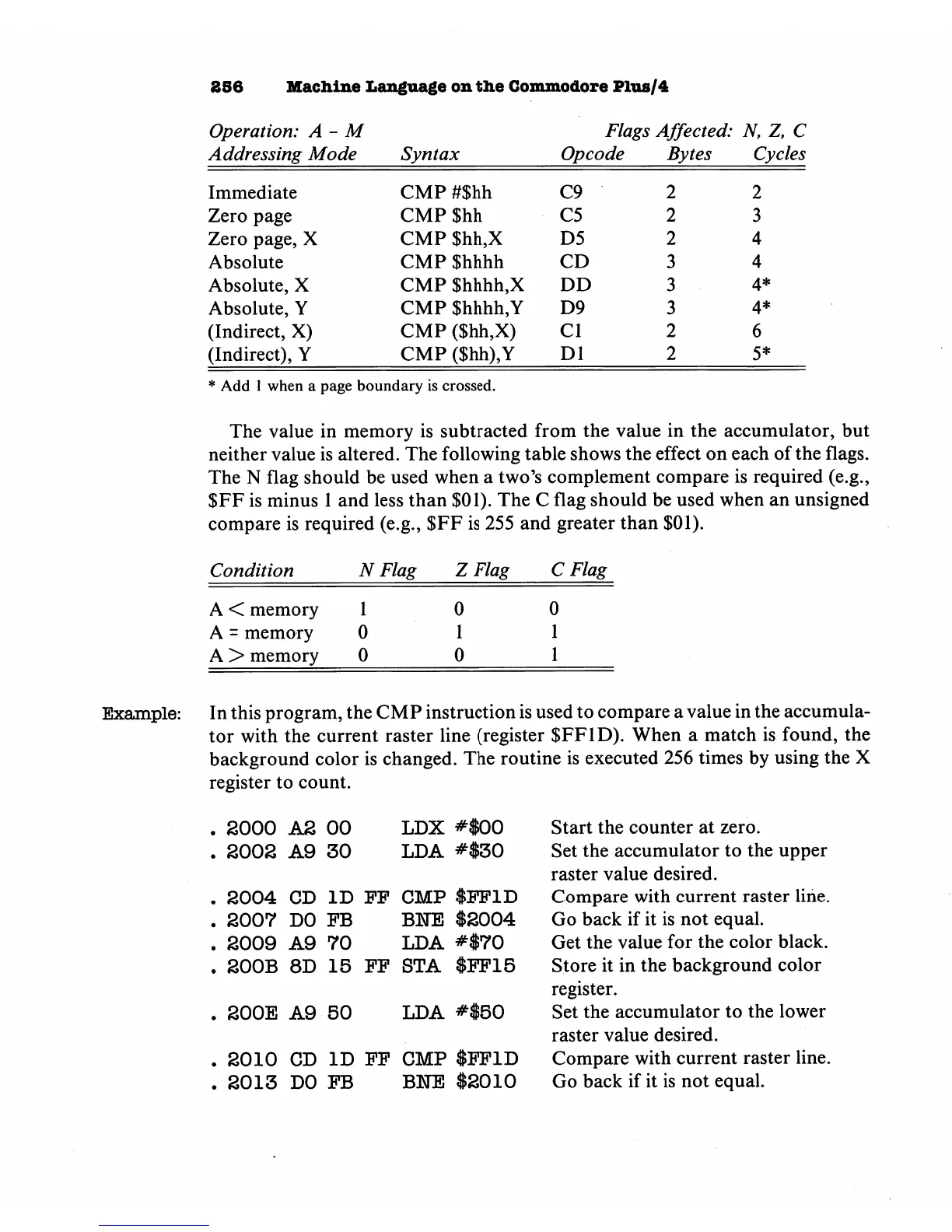
The
value
in
memory
is
subtracted
from
the
value
in
the
accumulator,
but
neither
value
is
altered.
The
following
table
shows
the
effect
on
each
of
the
flags.
The
N
flag
should
be
used
when
a
two's
complement
compare
is
required
(e.g.,
$FF
is
minus
1
and
less
than
$01).
The
C
flag
should
be
used
when
an
unsigned
compare
is
required
(e.g.,
$FF
is
255
and
greater
than
$01).
Condition
NFlag
ZFlag
C
Flag
A
<
memory
A
=
memory
A
>
memory
1
0
0
0
1
0
0
1
1
Example:
In
this
program,
the
CMP
instruction
is
used
to
compare
a
value
in
the
accumula
tor
with
the
current
raster
line
(register
$FF1D).
When
a
match
is
found,
the
background
color
is
changed.
The
routine
is
executed
256
times
by
using
the
X
register
to
count.
2000
A2
00
S002
A9
30
LDX
#$00
LDA
#$30
.
2004
CD
ID
FP
CMP
$FF1D
.
2007
DO
FB
BETE
$2004
.
2009
A9
70
LDA
#$70
.
200B
8D
15
FF
STA
$FF15
.
200E
A9
50
LDA
#$50
.
2010
CD
ID
FF
CMP
$FF1D
.
2013
DO
FB
BNE
$2010
Start
the
counter
at
zero.
Set
the
accumulator
to
the
upper
raster
value
desired.
Compare
with
current
raster
line.
Go
back
if
it
is
not
equal.
Get
the
value
for
the
color
black.
Store
it
in
the
background
color
register.
Set
the
accumulator
to
the
lower
raster
value
desired.
Compare
with
current
raster
line.
Go
back
if
it
is
not
equal.

Other manuals for Commodore Plus 4

Related product manuals