EasyManua.ls Logo

Commodore Plus 4 - Page 107

Commodore Plus 4
234 pages
Print Icon
To Next Page IconTo Next Page
To Previous Page IconTo Previous Page
Loading...
~
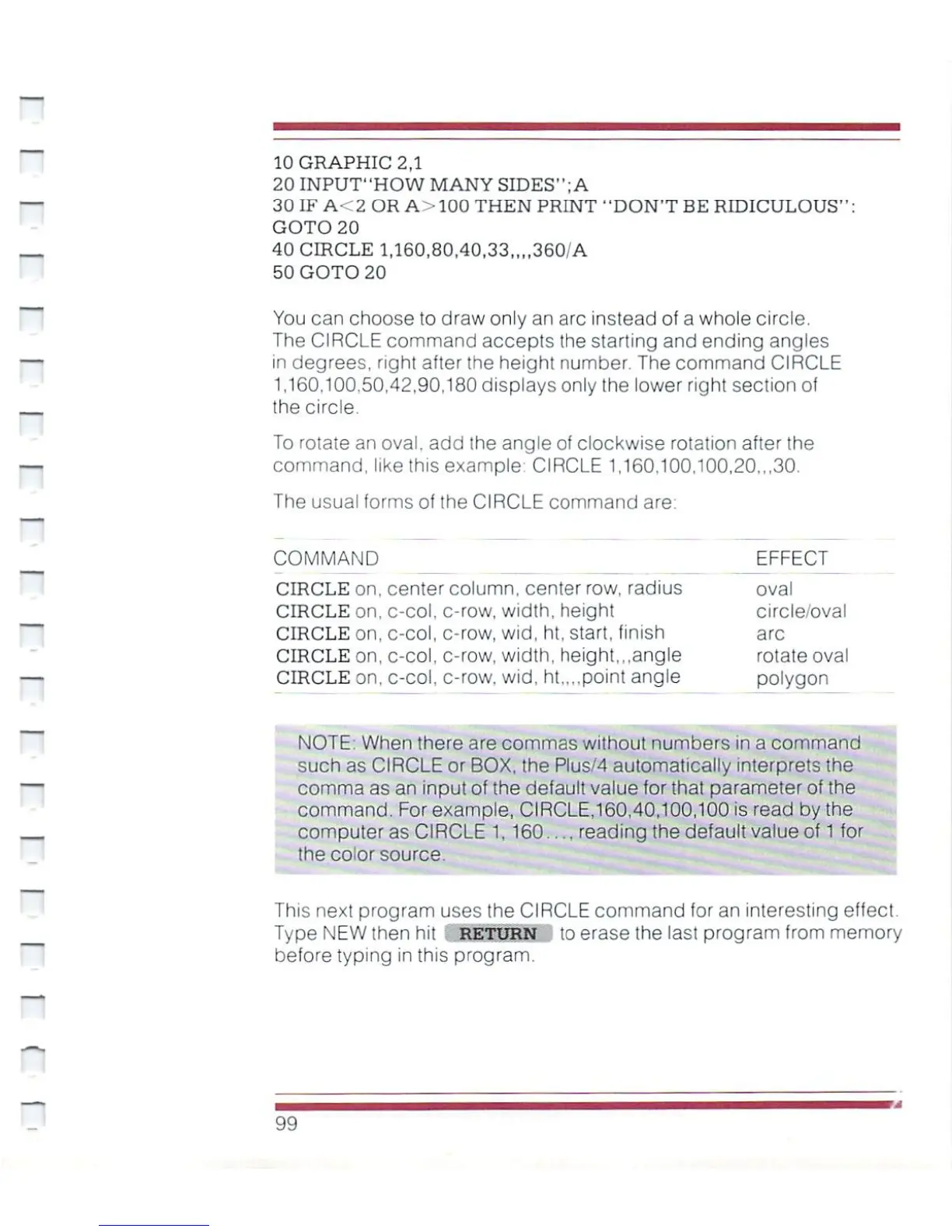
10
GRAPHIC
2,1
20
INPUT-HOW
MANY
SIDES'1;
A
30
IF
A<2
OR
A>100
THEN
PRINT
"DON'T BE
RIDICULOUS"
GOTO
20
40
CIRCLE
1,160,80,40,33,,,,360/A
50
GOTO
20
You can
choose
to
draw
only
an
arc
instead
of
a
whole
circle.
The
CIRCLE
command
accepts
the
starting
and
ending
angles
in
degrees,
right
after
(he
height
number.
The
command
CIRCLE
1,160,100.50,42,90,180
displays
only the
lower
right
section
of
the
circle.
To
rotate
an
oval,
add
the
angle
of
clockwise
rotation
after
the
command,
like
this
example-
CIRCLE
1,160,100,100,20,,,30.
The
usual
forms
of
the
CIRCLE
command
are:
COMMAND
CIRCLE
on.
CIRCLE
on,
CIRCLE
on,
CIRCLE
on,
CIRCLE
on,
center
column,
center
row,
c-col,
c-col,
c-col,
c-col,
c-row,
c-row,
c-row,
c-row.
width,
height
wid,
ht,
start,'
width,
height,
radius
inish
,.angle
wid,
ht,,.,point
angle
EFFECT
oval
circle/oval
arc
rotate
oval
polygon
NOTE:
When
there
are
commas
without
numbers
in
a
command
such
as
CIRCLE
or
BOX,
the
Plus/4
automatically
interprets
the
comma
as
an
input
of
the
default
value
for
that
parameter
of
the
command.
For
example,
CIRCLE,160,40.100,100
is
read by
the
.
computer
as
CIRCLE
1,
160....
reading
the
default
value
of
1
for
the color
source.
This
next
program
uses
the
CIRCLE
command
for
an
interesting
effect.
Type
NEW
then
hit
RETURN
to
erase
the
last
program
(rom
memory
before
typing
in
this
program
99

Other manuals for Commodore Plus 4

Related product manuals