EasyManua.ls Logo

Commodore Plus 4 - Page 96

Commodore Plus 4
234 pages
Print Icon
To Next Page IconTo Next Page
To Previous Page IconTo Previous Page
Loading...
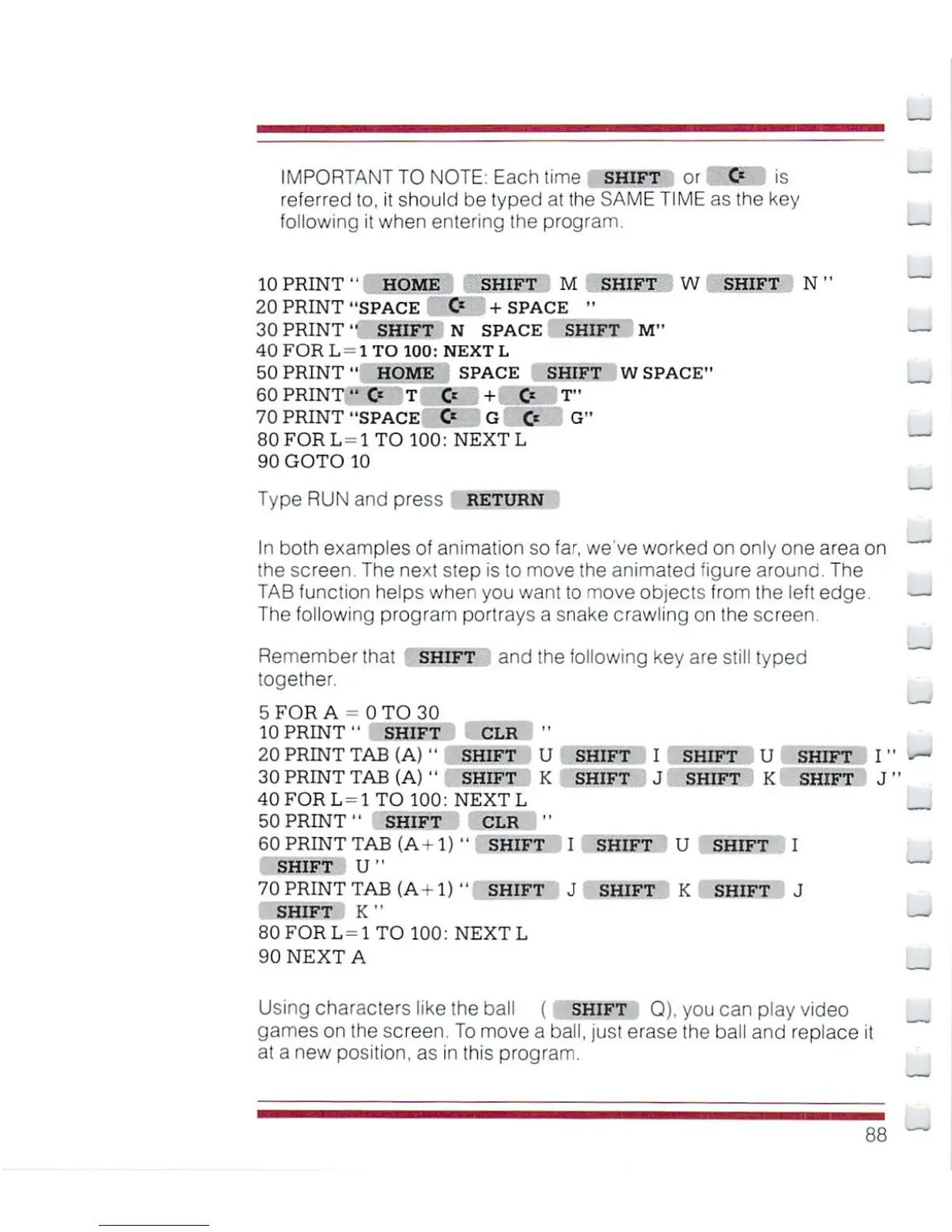
IMPORTANT
TO
NOTE:
Each
time
SHIFT
or
O
is
referred
to,
it
should
be
typed
at
the
SAME
TIME
as
the
key
following
it
when
entering
the
program.
10
PRINT1'
HOME
SHIFT
M
SHIFT
W
SHIFT
N"
20
PRINT
"SPACE
O
+
SPACE
"
30
PRINT"
SHIFT
N
SPACE
SHIFT
M"
40
FOR
L=
I
TO
100:
NEXT
L
50
PRINT"
HOME
SPACE
SHIFT
W
SPACE"
60
PRINT
"O
T
O
+
C<
T"
70
PRINT
"SPACE
C*
G
O
G"
80
FOR
L -1
TO
100:
NEXT
L
90
GOTO
10
Type
RUN
and
press
return
In
both
examples
of
animation
so
far,
we
ve
worked
on
only
one
area
on
the
screen.
The
next
step
is
to
move
the
animated
figure
around.
The
TAB
function
helps
when
you
want
to
move
objects
from
the
left
edge.
The
following
program
portrays
a
snake
crawling
on
the
screen.
Remember
that
SHIFT
and
the
following
key
are
still
typed
together.
5
FOR
A-
0TO30
^^^
10
PRINT"
SHIFT
CLR
"
20
PRINT
TAB
(A)
"
SHIFT
30
PRINT
TAB
(A)
''
SHIFT
40FORL=1TO
100:
NEXT
L
50
PRINT"
SHIFT
CLR
"
60
PRINT
TAB
(A+l)
"
SHIFT
I
SHIFT
U
SHIFT
I
SHIFT
U"
70PRINTTAB
(A-l)
"
SHIFT
J
SHIFT
K
SHIFT
J
SHIFT
K
"
80
FOR
L
=
1
TO
100:
NEXT
L
90
NEXT
A
Using
characters
like
the
ball
(
SHIFT
Q).
you
can
play
video
games
on
the
screen.
To
move
a
ball,
just
erase
the
ball
and
replace
it
at
a
new
position,
as
in
this
program.
u
K
SHIFT
SHIFT
I
J
SHIFT
SHIFT
U
K
SHIFT
SHIFT
1
I
1
J

Other manuals for Commodore Plus 4

Related product manuals