3
SECTION TWO
THE COMMANDS OF
PROGRAMMER’S AID
2.1 Introduction
In Section Two, the two modes of
PROGRAMMER’S AID are described. The AID
commands are listed in the order in which they
might be used when writing a BASIC program
such as the one in Section Three. The use of the
function keys is detailed and instructions are
given to enable the programmer to assign his
own values to these keys.
2.2 Function Keys
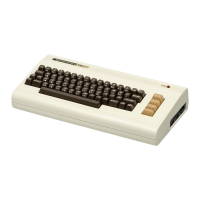
PROGRAMMER’S AID makes extensive use
of the VIC’s function keys. There are only four
function keys on the keyboard but there are
many more functions than keys.
Pressing the keys normally, you obtain
functions F1, F3, F5 and F7. Holding down the
SHIFT key and pressing these same keys, you
get functions F2, F4, F6 and F8. By holding down
the CTRL key and pressing the keys, you obtain
functions F9, F10, F11 and F12. (Note that this
last group of numbers is not printed on the
function keys.)
2.3 PROGRAM and EDIT Modes
PROGRAMMER’S AID has two modes of
operation each of which assigns different
commands to the function keys on the right of the
VIC’s keyboard. When you initialize the
PROGRAMMER’S AID CARTRIDGE, the VIC
is automatically in PROGRAM mode.
2.3.1 PROGRAM MODE
In this mode, PROGRAMMER’S AID assigns
the following BASIC keywords to the function
keys:
NOTE: The (RETURN) indicated below will
appear on the screen as a left-arrow in reverse-
field following the last character inside the
quotation marks.
KEY 1, “LIST”
KEY 2, “MID$(“
KEY 3, “RUN (RETURN)”
KEY 4, “LEFT$(“
KEY 5, “GOTO”
KEY 6, “RIGHT$(“
KEY 7, “INPUT”
KEY 8, “CHR$(“
KEY 9, “EDIT (RETURN)”
KEY 10/ , “GOSUB”
KEY 11, “RETURN (RETURN)”
KEY 12, “STR$(“
By pressing the CTRL and F1 keys together or
typing EDIT and pressing RETURN, the mode
changes to EDIT mode.
2.3.2 EDIT MODE
In this mode, the following program editing
commands are assigned to the function keys:
KEY 1, “LIST”
KEY 2, “AUTO“
KEY 3, “RUN (RETURN)”
KEY 4, “DELETE“
KEY 5, “FIND”
KEY 6, “CHANGE“
KEY 7, “TRACE (RETURN)”
KEY 8, “STEP (RETURN)“
KEY 9, “PROG (RETURN)”
KEY 10/ , “RENUMBER”
KEY 11, “MERGE”
KEY 12, “OFF (RETURN)“
NOTE: Commands in one mode can be typed in
full whilst you are in the other mode, i.e. the
PROGRAMMER’S AID modes do not limit the
commands available. They simply enable you to
use the shorthand form of one set or the other.
Here is a summary of the points to remember
about PROGRAM and EDIT modes:
1. The primary importance of both PROGRAM
and EDIT modes is to assign special commands
to the VIC’s function keys in order that you can
write, edit and debug your programs quickly and
easily.






 To Next Page