EasyManua.ls Logo

Commodore VIC-20 - USING YOUR CHARACTERS ON THE VIC

Commodore VIC-20
404 pages
Print Icon
To Next Page IconTo Next Page
To Previous Page IconTo Previous Page
Loading...
Chapter
6:
Graphics
199
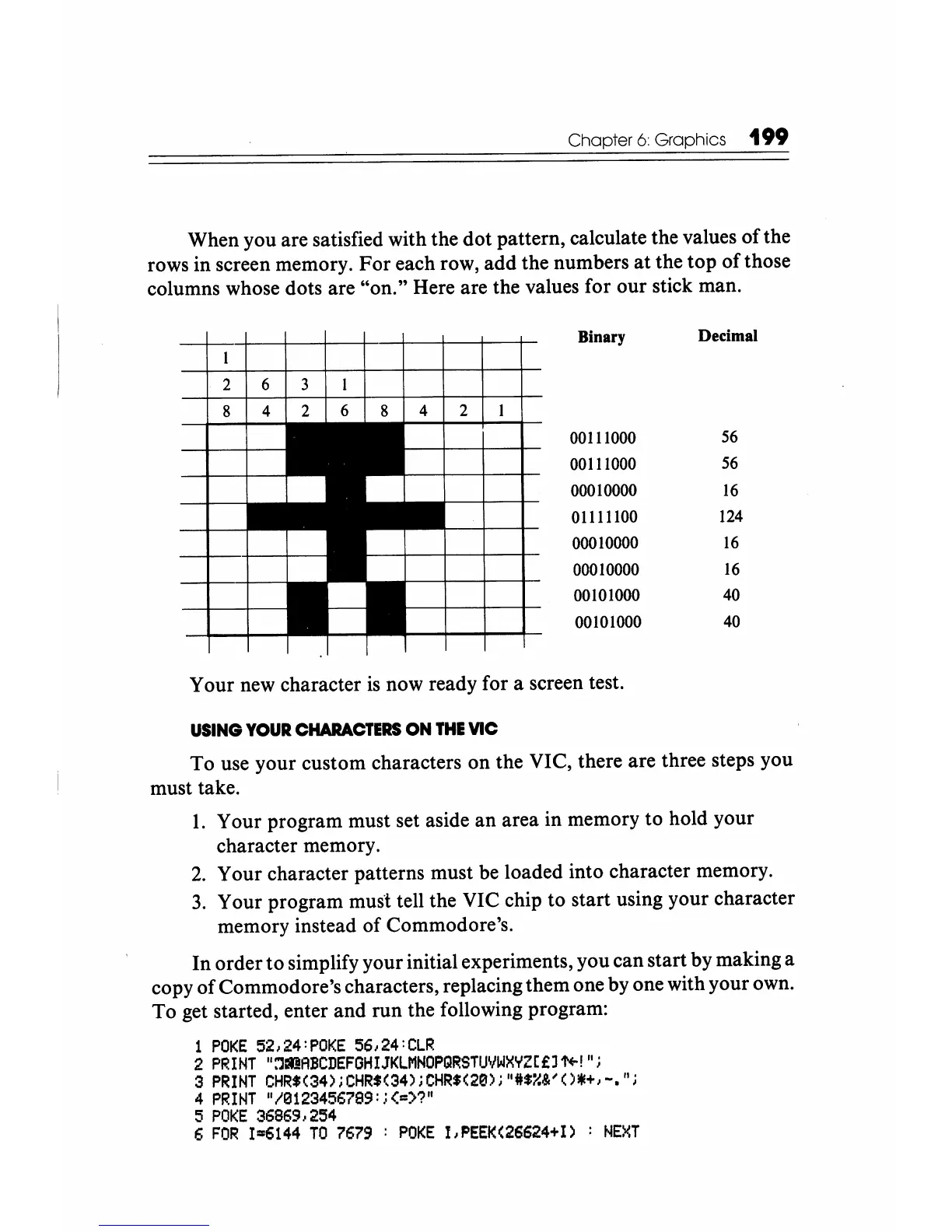
When
you
are
satisfied
with
the
dot
pattern,
calculate
the
values
of
the
rows
in
screen memory.
For
each
row,
add
the
numbers
at
the
top
of
those
columns whose
dots
are
"on."
Here
are
the values
for
our
stick
man.
Binary Decimal
2 6 3
00111000
56
00111000
56
00010000
16
01111100
124
00010000
16
00010000
16
00101000
40
00101000
40
Your
new
character
is
now
ready
for
a screen test.
USING
YOUR
CHARACTERS
ON
THE
VIC
To
use
your
custom
characters
on
the
VIC,
there
are
three
steps
you
must
take.
1.
Your
program
must
set aside
an
area
in
memory
to
hold
your
character
memory.
2.
Your
character
patterns
must
be
loaded
into
character
memory.
3.
Your
program
musl tell
the
VIC
chip
to
start
using
your
character
memory
instead
of
Commodore's.
In
order
to
simplify
your
initial experiments,
you
can
start
by
making
a
copy
of
Commodore's
characters, replacing
them
one
by
one
with
your
own.
To
get started,
enter
and
run
the
following program:
1
POKE
52,24:POKE
56,24:CLR
2
PRIHT
1:,]IIDABCDEFGHIJKLMHOPQRSTUVWXYZ[£l1'+-'"i
3
PRINT
CHR$(34);CHR$(34)iCHR$(20);
1*$~&/O!ll+,_.";
4
PRINT
1/0123456799:i(=>?"
5
POKE
36869,254
6
FOR
1-6144
TO
7679
:
POKE
1,PEEK(26624+I)
:
HEXT

Other manuals for Commodore VIC-20

Related product manuals