210
The
VIC
20
User
Guide
220
PRINT
";[:KS[#+3;"
230
PRINT
"aIDLTU,4("
240
PRINT
"£MUJ~-5="
250
PRINT
"ilFNVt&.6)"
260
PR
I
NT
":!J.30W~1
171"
Now the upper left corner
of
the screen has become a high-resolution work
area, where you can start to experiment.
Changing the
Dots
In
the
High-Resolution
Work
Area
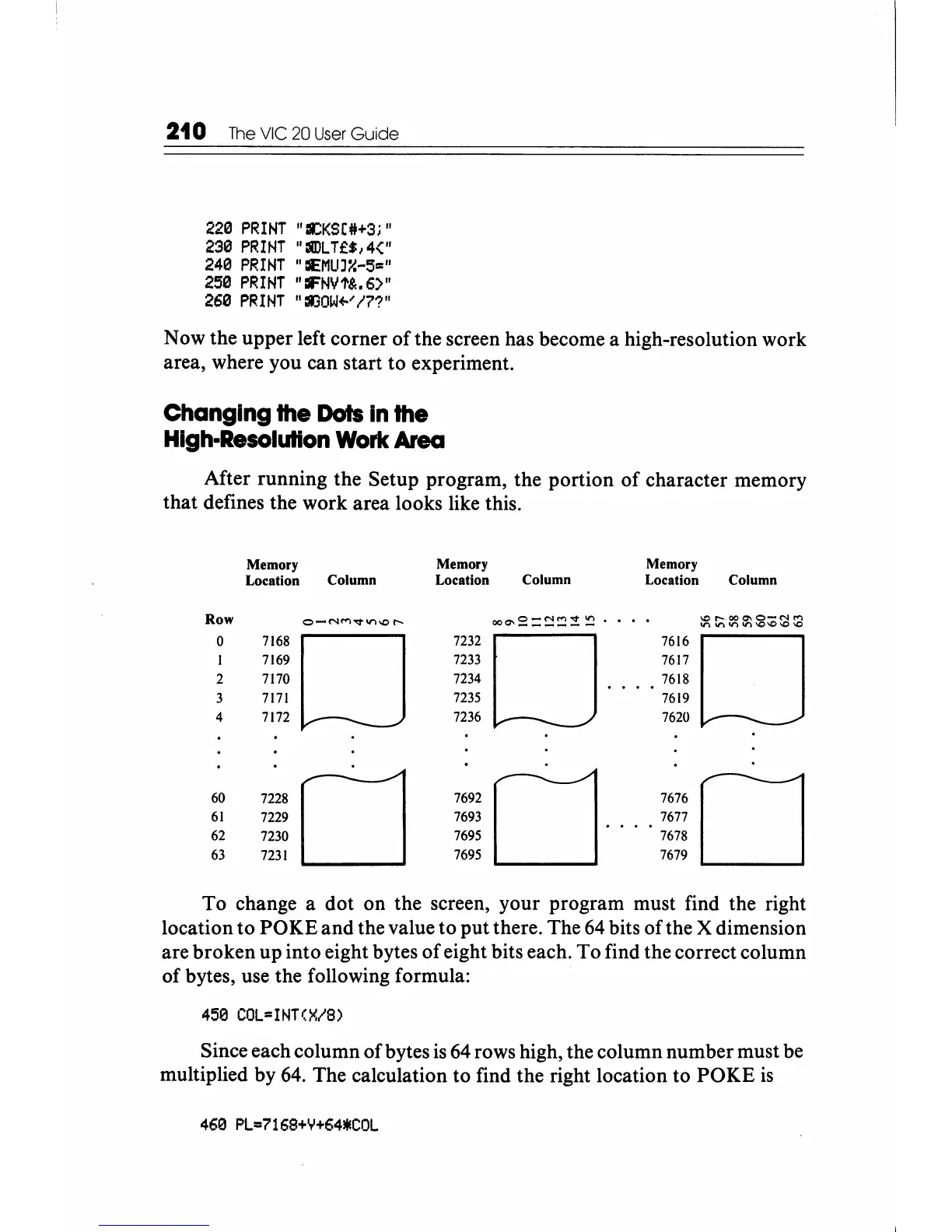
After running the Setup program, the portion
of
character memory
that defines the work area looks like this.
Memory
Memory
Memory
Location
Column Location
Column Location Column
Row
o-r'H"1vt.n-..o,.....
ooQ\S:=~~:!
~
.
-...0
r-.OO
C'o
0-('1
('f")
V)
'-"\.11")11')\0\0\0\0
0
7168
0
7232
0
7616
0
7169
7233
7617
2
7170
7234
7618
3
7171
7235
7619
4
7172
7236
7620
60
7228
0
7692
0
7676
0
61
7229
7693
7677
62
7230
7695
7678
63
7231
7695
7679
To
change a dot on the screen, your program must find the right
location to
POKE
and
the value to put there. The
64
bits
of
the X dimension
are broken up into eight bytes
of
eight bits each. To find the correct column
of bytes, use the following formula:
450 COL=INT(X/8)
Since each column
of
bytes
is
64
rows high, the column number must be
multiplied by
64.
The calculation to find the right location to
POKE
is
460
PL=7168+Y+64*COL






 To Next Page