306
The
VIC
20
User
Guide
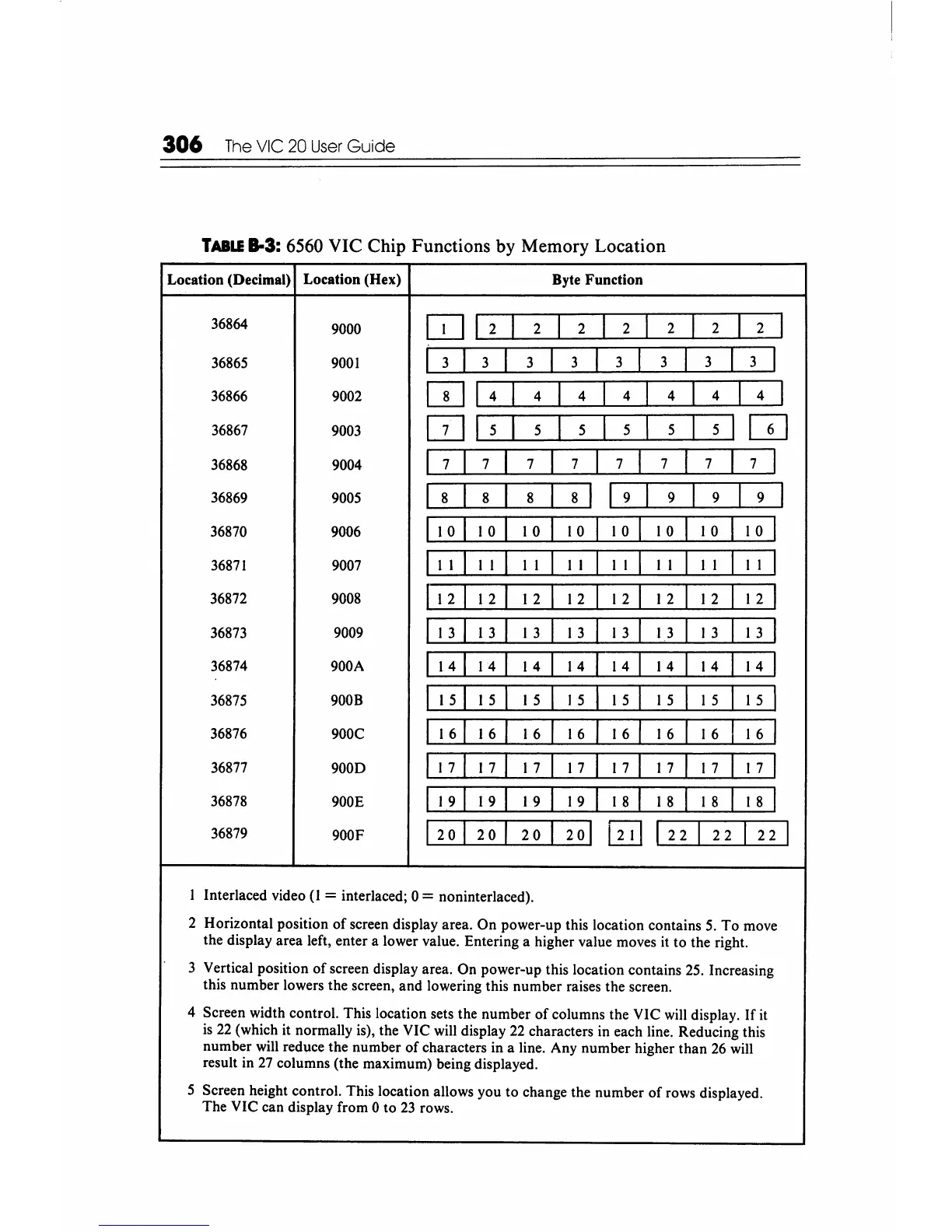
TABLE
8-3: 6560 VIC Chip Functions by Memory Location
Location (Decimal)
Location (Hex)
Byte Function
36864
9000
[U
12
I
2
I
2
I
2
I
2
I
2
I
2
I
36865
9001
I
3
I
3
I
3
I
3
I
3
I
3
I
3
I
3
I
36866 9002
wi
4
I
4
I
4
I
4
I
4
I
4
I
4
I
36867
9003
[Ill
5
I
5
I
5
I
5
I
5
I
5
I
GJ
36868
9004
7 7
7 7
I
7
I
7
I
7
I
7
I
36869
9005 8 8 8 8
I
I 9
I
9
I
9
I
9
I
36870
9006
10 10
10
10 10
10
10
10
36871
9007
II
II II
II
II
II
II
II
36872
9008
112
12
12
12
12 12 12
12
36873
9009
13
13
13 13
13
13
13 13
36874 900A
14
14 14
14
14
14
14 14
36875
9008
15
15 15
15
15
1 5
I 5
15
36876
900C
16
16
16
16 16 16 16
16
36877
9000
17
17
17
17
17
17
17 17
36878
900E
19 19
19
19 18
18
I 8
18
36879
900F
20
20
20
20
~
I 2
I
22
I
2
I
I Interlaced video (I = interlaced; 0 = noninterlaced).
2 Horizontal position
of
screen display area. On power-up this location contains
5.
To move
the display area left, enter a lower value. Entering a higher value moves
it
to the right.
3 Vertical position
of
screen display area. On power-up this location contains
25.
Increasing
this number lowers the screen, and lowering this number raises the screen.
4 Screen width control. This location sets the number
of
columns the VIC
will
display.
If
it
is
22
(which it normally is), the VIC will display
22
characters in each line. Reducing this
number will reduce the number
of
characters in a line. Any number higher than
26
will
result in
27
columns (the maximum) being displayed.
5 Screen height control. This location allows you to change the number
of
rows displayed.
The VIC can display from 0 to
23
rows.






 To Next Page