CommRadio CR-1a User Manual – New Edition: 1 May 2014
4
3: Frequency Tuning Knob [T]
Description: Rotary Encoder-15 increments
(no detents) per revolution
With push-in switch.
Primary Use: Frequency Selection.
Secondary Use: Push once to highlight frequency cursor.
Then, rotate to re-position frequency cursor.
Push again to exit.
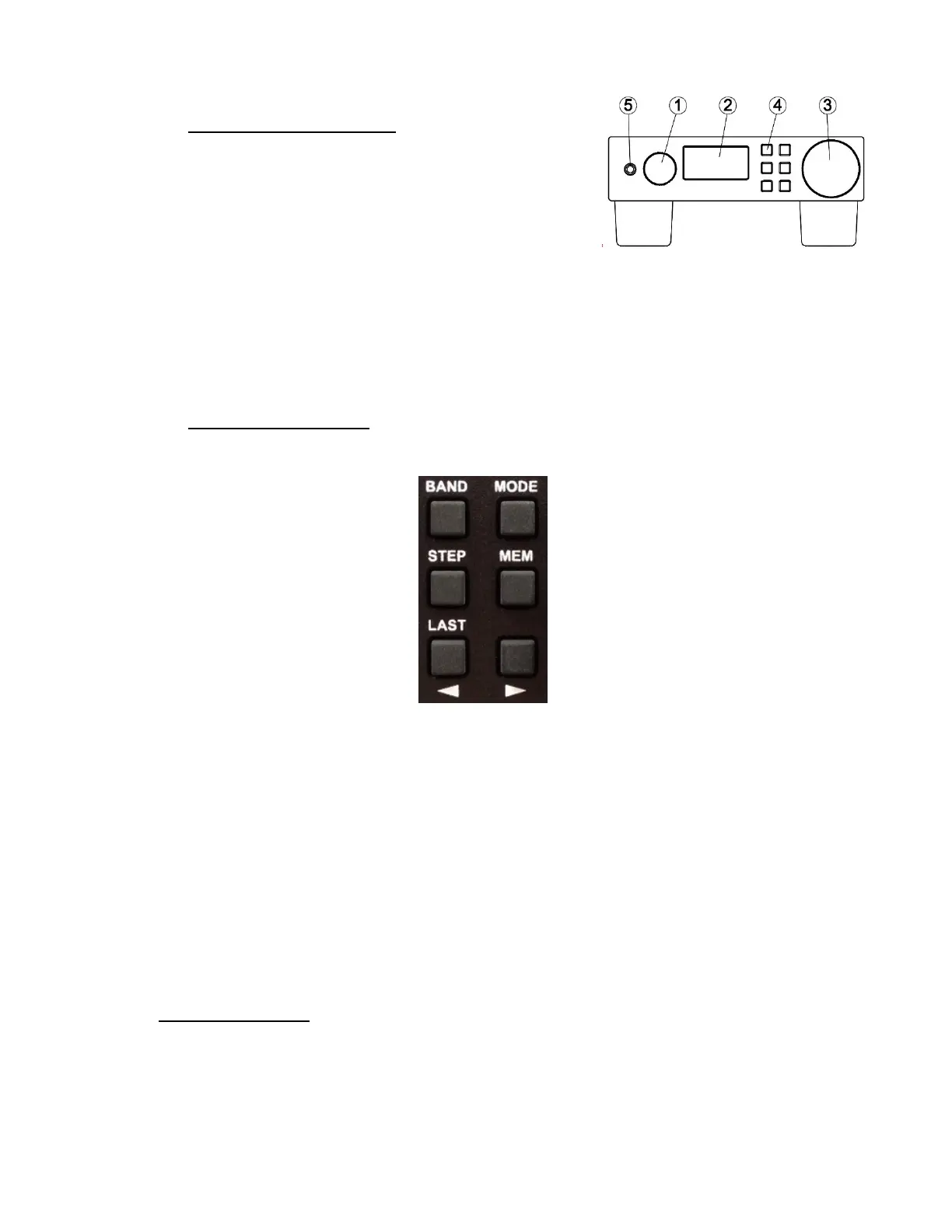
4: Key-Pad Radio Controls:
[BAND] Change Bands [MODE] AM-CW-LSB-USB-FM
[STEP] Frequency Stepping [MEM] Frequency Save-Recall
[<] Left Arrow-Selection [>] Right Arrow-Selection
[<] and [>] positions the highlighted cursor as a default.
When [BAND] [MODE] [STEP] or [MEM] are pushed, then [<] and [>] are used for
associated selections by viewing the change on the display.
[LAST]: Holding the [<] key will return the radio to the last frequency that was
maintained for at least 5 seconds prior to pushing the key. This allows a rapid return
to a prior frequency, regardless of band.
5. Headphone Socket: 3.5 mm (1/8”) female-stereo-socket. Conventionally wired for
typical ear-buds or headphones. Delivers: 40 mW into 16 Ohms. Use this output for
amplified speakers or sound-card interfaces.


 To Next Page
 Loading...