EasyManua.ls Logo

Community Veris Series - User Manual

Community Veris Series
64 pages
Print Icon
To Next Page IconTo Next Page
Loading...
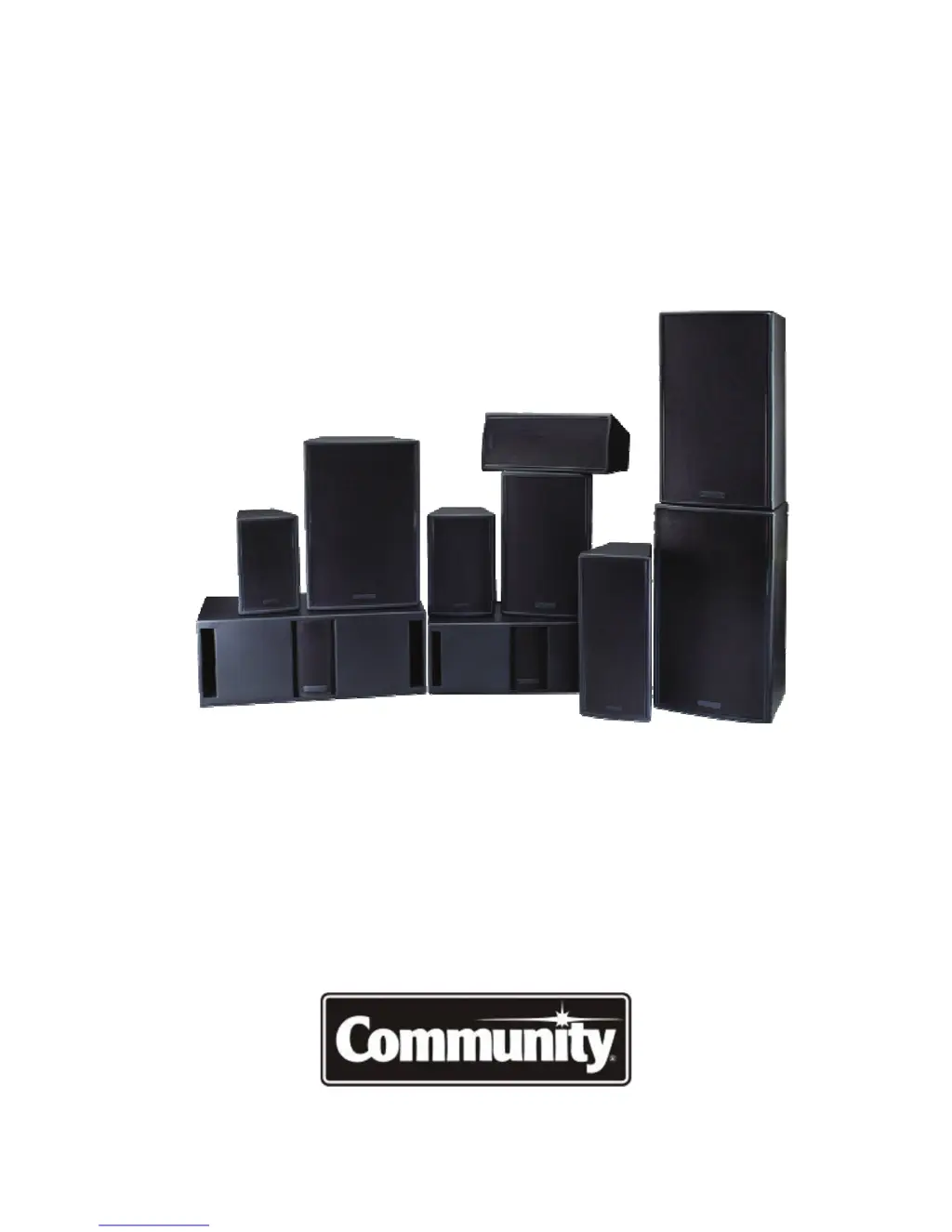
VERIS Series
VERsatile Installation Systems
Exquisite Performance… Exceptional Value
Operation Manual

Questions and Answers

  • R
    Rachel HuangAug 19, 2025
    Why is there no sound coming from my Community Speakers?
    • T
      Thomas NicholsAug 19, 2025
      If your Community loudspeaker produces no sound, ensure the amplifier is powered on and the loudspeaker is correctly connected to it. The issue might stem from the amplifier being off or the loudspeaker not being properly connected.
  • M
    Meghan StephensAug 21, 2025
    What to do if Community Veris sound cuts in and out at high levels?
    • M
      Michael FreyAug 21, 2025
      If you experience sound cutting in and out at high levels with your Community Speakers, it's likely the crossover protection circuits have been activated due to the loudspeaker being overdriven. Reduce the volume level to prevent this protective measure from engaging.
  • K
    Kerry McdonaldAug 25, 2025
    Why Community Veris Speakers distorting at high volume?
    • J
      Joseph DavidsonAug 25, 2025
      If your Community loudspeaker is producing distortion at higher volume levels, it might be due to the amplifier not having enough power. Either lower the volume or switch to a more powerful amplifier.
  • J
    Jennifer SmithAug 26, 2025
    How to fix low volume on Community Speakers?
    • P
      Paul ElliottAug 26, 2025
      If your Community Speakers have low volume, verify that the audio signal reaching the amplifier is strong enough and inspect all volume/level controls and gain switches, including the amplifier input attenuator, to ensure they are properly set.
  • V
    Vanessa JohnstonAug 28, 2025
    How to stop Community Speakers from buzzing?
    • M
      mandycunninghamAug 28, 2025
      If your Community loudspeaker is producing noises like buzzes or rattles, check that the front grille screws are securely seated and that any external mounting hardware is tightened to prevent vibrations.
  • M
    Marcus KellyAug 30, 2025
    Why is there a sudden drop in sound level from my Community Veris Speakers?
    • J
      justin08Aug 30, 2025
      If you experience a sudden 6 dB loss in sound level from your Community loudspeaker, it typically indicates that the crossover protection circuits have been activated. This occurs when the loudspeaker is consistently overdriven. To restore the full dynamic range, reduce the volume level.
  • K
    Kiara FordSep 1, 2025
    What to do if Community Veris have no sound?
    • B
      Brittany CostaSep 1, 2025
      If your Community Speakers have no sound or very low volume, ensure that all audio equipment in the signal chain is powered on and that all gain controls are correctly positioned.
  • M
    Megan KirkSep 3, 2025
    Why do my Community Speakers keep cutting out?
    • M
      Mike HunterSep 4, 2025
      If the Community loudspeaker sound cuts in and out, inspect all connections and cabling for shorts or loose connections. A small wire strand shorting the +/– signal terminals anywhere in the system can cause this issue.
  • T
    Thomas RuizSep 5, 2025
    How to troubleshoot distortion in Community Speakers?
    • M
      Megan JohnsonSep 5, 2025
      If your Community loudspeaker exhibits high distortion, low output, or no output from any or all drivers, use an ohmmeter to check the wiring continuity to the loudspeaker. If the wiring is intact, remove the input panel and inspect all solder joints on the crossover and wiring to the drivers. Look for cold solder joints that may malfunction under high current and repair as necessary.
  • B
    Brian CruzSep 8, 2025
    What to do if Community Speakers distort at moderate volume?
    • M
      Michael CummingsSep 8, 2025
      If your Community loudspeaker is producing distortion at moderate to high volume levels, test each driver to isolate the problem using a sine wave oscillator or wide range program at moderate levels, and replace any malfunctioning driver as needed.

Summary

EC Statement of Conformity

Important Safety Information

Introduction and Technology

Introduction

Overview of the VERIS Series loudspeakers and the operation manual.

VERIS Technology

Details advanced technologies incorporated into VERIS loudspeakers.

Product Features and Specifications

Unpacking and Inspection

Procedures for safely unpacking and inspecting VERIS loudspeakers upon arrival.

VERIS Specifications

Comprehensive technical specifications for all VERIS loudspeaker models.

Getting Acquainted

Physical Features of VERIS Full-Range Models

Details the physical features of VERIS full-range loudspeaker models.

Physical Features of VERIS Subwoofers

Details the physical features of VERIS subwoofer models.

Core Technologies and Features

General Description

Overview of VERIS Series loudspeaker design and intended applications.

DYNA-TECH Driver Protection System

Explains the advanced multi-stage driver protection circuitry.

COOL-COIL TECHNOLOGY

Details heat evacuation technology for improved driver performance and reliability.

HIGH-PASS FILTERS

Recommended settings for high-pass filters to protect drivers from low frequencies.

Connecting and System Setup

Connecting the Amplifier to the Loudspeaker

Guide on how to connect amplifiers to VERIS loudspeakers using available connectors.

PIN DESIGNATIONS

Explains connector pin assignments for amplifier connection.

USING POWER TAPS

Instructions on using power taps for autoformer-equipped models.

70.7 V and 100 V SYSTEMS

Information on constant voltage system standards.

WIRING NEUTRIK TYPE CONNECTORS

Details on wiring Neutrik Speakon connectors for loudspeaker connection.

Amplifier and Wire Considerations

KNOW YOUR AMPLIFIER

Guidance on selecting and understanding amplifier capabilities for VERIS.

CHOOSING LOUDSPEAKER WIRE

Advice on selecting appropriate loudspeaker wire and cable for optimal performance.

The Effect of Wire Gauge on Damping Factor

Explains how wire gauge impacts amplifier damping factor and sound quality.

Selecting Amplifiers

Recommendations for choosing suitable amplifiers for VERIS models.

Applications and System Design

VERIS APPLICATIONS

Guidance on selecting VERIS models for different venue types and applications.

Positioning Subwoofers

Best practices for subwoofer placement for optimal sound output.

Polarity

Importance of phase relationship and polarity testing for system performance.

System Optimization and Commissioning

Choosing the Right Loudspeakers and Electronics

Criteria for selecting loudspeakers and associated electronics for optimal system performance.

Commissioning the System

Steps for optimizing system performance post-installation, including equalization.

Rigging, Suspension, and Safety

Mounting Brackets and Accessories

Troubleshooting Guide

Technical Drawings

VERIS 6

Technical drawings and dimensions for the VERIS 6 model.

VERIS 8

Technical drawings and dimensions for the VERIS 8 model.

VERIS 26

Technical drawings and dimensions for the VERIS 26 model.

VERIS 28

Technical drawings and dimensions for the VERIS 28 model.

VERIS 12

Technical drawings and dimensions for the VERIS 12 model.

VERIS 15

Technical drawings and dimensions for the VERIS 15 model.

VERIS 32

Technical drawings and dimensions for the VERIS 32 model.

VERIS 35

Technical drawings and dimensions for the VERIS 35 model.

VERIS 210 S

Technical drawings and dimensions for the VERIS 210S subwoofer.

VERIS 212 S

Technical drawings and dimensions for the VERIS 212S subwoofer.

Service and Warranty

Servicing VERIS Loudspeakers

Procedures for servicing VERIS loudspeakers, including driver and crossover access.

Warranty Information and Service

Details of the limited warranty and procedures for obtaining service in the USA.

Warranty Information and Service for Countries Other Than the USA

Information on obtaining warranty and service for international customers.

Yoke Mounting Bracket Guide

VERIS 6 Yoke Mounting Dimensions

Technical drawings and dimensions for the VERIS 6 yoke mounting.

VERIS 8 Yoke Mounting Dimensions

Technical drawings and dimensions for the VERIS 8 yoke mounting.

VERIS 26 Yoke Mounting Dimensions

Technical drawings and dimensions for the VERIS 26 yoke mounting.

VERIS 28 Yoke Mounting Dimensions

Technical drawings and dimensions for the VERIS 28 yoke mounting.

VERIS 6;8;26;28 Yoke Assembly Instructions

Step-by-step instructions for assembling yoke brackets to VERIS loudspeakers.

Community Veris Series Specifications

General IconGeneral
Nominal Impedance8 ohms
Type2-way, full-range loudspeaker
Coverage Pattern90° x 60°
Input ConnectionsDual NL4
Enclosure Materialplywood
FinishBlack textured paint
LF Driver12"
HF Driverexit compression driver
Dimensions (H x W x D)24.5" x 15" x 14.5"

Related product manuals