The Compal Broadband Networks (CBN) CH6640E/CG6640E Wireless Gateway is a versatile device designed for home, home office, or small business/enterprise environments, supporting one or more computers with wireless connectivity. This user guide provides a comprehensive overview of the product, including setup, installation, and configuration of wireless LAN, Ethernet, router, DHCP, and security settings.
Function Description
The CH6640E/CG6640E Wireless Gateway integrates five separate products into one compact unit:
- EURO DOCSIS® 3.0 Cable Modem: Provides high-speed internet access with faster data transfer than traditional dial-up or ISDN modems.
- IEEE 802.11b/g/n Wireless Access Point: Enables Wi-Fi connectivity for laptops, cellular telephones, printers, PDAs, and desktops without the need for network wiring.
- Ethernet 10/100/1000 Base-T Connections: Features four 10/100/1000Base-T Ethernet uplink ports supporting half- or full-duplex connections with auto-MDIX capability, allowing connection of up to 253 client computers via wired or wireless LAN.
- Two VoIP Internet Telephone Connections (CH6640E only): Provides digital VoIP services for making telephone calls, supporting basic functions like three-way calling, voice mail, and fax transmissions.
- Firewall: Offers advanced network security against internet attacks, including stateful-inspection, intrusion detection, DMZ, denial-of-service attack prevention, and Network Address Translation (NAT).
The device also includes a built-in DHCP server for easy configuration of a combined wired and/or wireless Class C private LAN. Virtual private network (VPN) pass-through operation supports IPSec, PPTP, or L2TP for secure remote computer connections over the internet. The CH6640E/CG6640E Configuration Manager (CMGR) provides a graphical user interface (GUI) for easy configuration of wireless, Ethernet, router, DHCP, and security settings.
Important Technical Specifications
- Wireless Standard: IEEE 802.11n wireless access point, supporting Wi-Fi 2.4G single-band mode.
- Ethernet Ports: Four 10/100/1000Base-T Ethernet uplink ports with auto-MDIX.
- USB Port: USB 2.0 host port supporting print server and network storage functions with FTP and Samba servers. File systems supported include FAT16, FAT32, and NTFS.
- VoIP Connections (CH6640E only): Two TEL 1/2 ports for single or two-line telephones.
- Network Capacity: Supports up to 253 client computers.
- IP Addressing: DHCP server for automatic IP address assignment, or static IP configuration.
- Security: WEP, 802.1x, WPA, or WPA2 wireless security. Mixed WPA-PSK/WPA2-PSK is the default. Advanced firewall with IP Filtering, MAC Filtering, Port Filtering, Port Forwarding, Port Triggers, DMZ Host, Dynamic DNS, and Intrusion Detection System (IDS).
Usage Features
- Easy Connectivity: Connects to a cable outlet or splitter via a 75-ohm coaxial cable with F-type connectors. Power is supplied via an AC electrical outlet.
- Wireless LAN (WLAN): Allows Wi-Fi enabled devices to connect wirelessly, eliminating the need for extensive wiring. Supports various wireless adapters for laptops and desktops.
- Wired Ethernet LAN: Connects PCs, hubs, or switches using Ethernet cables (Category 5 or better). Supports auto-MDIX for flexible cabling.
- Front Panel LEDs: Provide status information for power, communication (Receive, Send, Online), and telephone lines (TEL1, TEL2), as well as wireless activity.
- WPS Button: Simplifies Wi-Fi Protected Security (WPS) configuration for compatible clients.
- Configuration Manager (CMGR): Web-based GUI accessible via
http://192.168.0.1 for managing settings. Default privileged accounts are admin/admin (gateway pages access) and root/compalbn (operator mode, provisioning pages, more configuration).
- USB Device Support: Allows plugging in USB memory sticks or hard-disk drives for print server and network storage functions, accessible via FTP client or Windows Explorer.
- DMZ Host: Configurable to allow one PC to be an "Exposed Host" for applications with random port numbers or interactive games, while protecting the rest of the network.
- Dynamic DNS: Supports
http://www.dyndns.org service to provide internet users with a name instead of an IP address to access virtual servers.
- Wireless Band Mode: Selectable 2.4GHz band or option to turn off wireless functionality.
- Wireless Basic Settings: Configurable network name (SSID), option to hide network from active scans, WMM (Wi-Fi Multimedia) for latency control, and selection of working channel.
- Wireless Security: Supports WEP, 802.1x, WPA, and WPA2 encryption methods (TKIP, AES, or TKIP+AES).
- Wireless Access Control: Allows defining a list of MAC addresses for clients either allowed or denied access to the wireless network.
- Remote Management Control: Enables configuration of the gateway from the internet via a web browser by specifying a WAN interface port number.
- Loopback IP: Configurable Loopback IP on WAN for management convenience, and a Secondary LAN Interface for routing.
Maintenance Features
- Reset Button: Press and hold for five seconds or longer to restore factory default settings. Note that this will erase all custom configurations.
- Troubleshooting Guide: Provides solutions for common issues such as power loss, inability to send/receive data, and slow wireless performance.
- LED Indicators: Front-panel LEDs assist in diagnosing power, communication, and error conditions.
- System Logs: CABLE MODEM Logs page lists critical system events in chronological order for diagnostic purposes.
- Telephone Log (CH6640E only): Displays diagnostic messages generated by the MTA and call signaling messages for troubleshooting VoIP services.
- Wall Mounting Option: The device can be wall-mounted using a template, with specific screw dimensions and spacing requirements for secure installation.
- Ventilation: Designed with ventilation holes to prevent overheating; users are advised not to block these holes.
- Software Updates: The device's firmware version and Wi-Fi driver version are displayed in the HELP Cable Modem Page.
- Security Best Practices: Recommendations include encrypting wireless LAN transmissions (WPA/WPA2 preferred over WEP), restricting wireless LAN access, and placing wireless components away from windows to decrease signal strength outside the intended area.

 Need help?
 General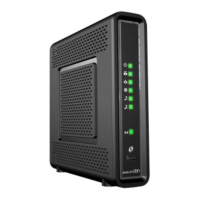

 To Next Page