Compaq.com - Compaq Presario 1200 Series Maintenance and Service Guide - Models: 1255, 1256, 1260, 1262, 1266, 1267, 1272, 1273, 1274, and 1275
Maintenance & Service Guide
Presario 1200 Series
Models: 1255, 1256, 1260, 1262, 1266, 1267, 1272, 1273, 1274, and 1275
| Home Page | Notice | Preface | Product Description | Troubleshooting
Illustrated Parts Catalog | Removal & Replacement Procedures | Specifications
Pin Assignments | Battery Pack Operations
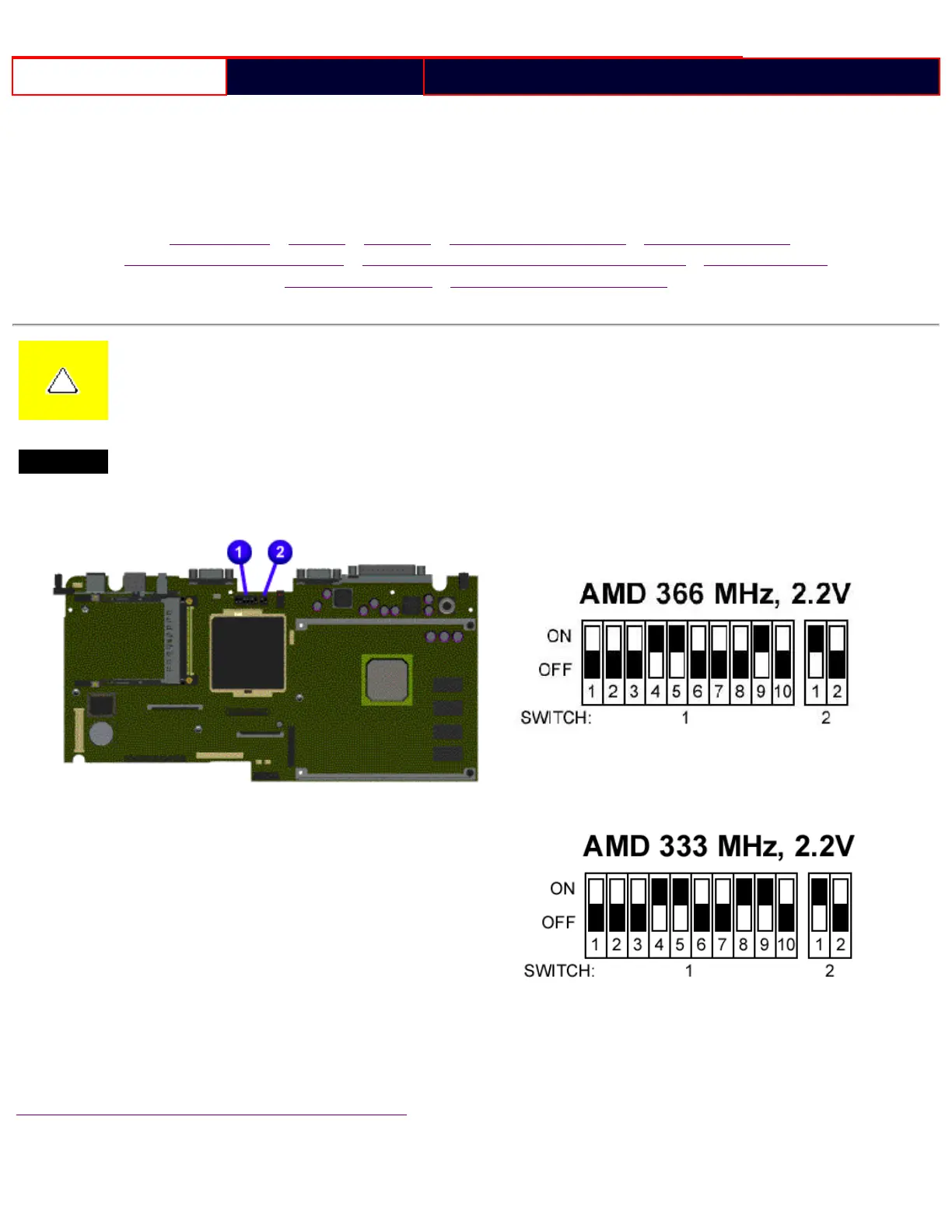
CAUTION: When replacing the system board, ensure the dip switch voltage settings on the system
board are correct for the computer model and processor voltage marked on the processor chip. If the
system board
dip switch voltage settings are not correct, damage may occur to the computer and/or system board.
NOTE:
The black area on the dip switch indicates the position of the switch.
For Models 1272, 1273, 1274, 1275:
For Models 1255, 1256, 1260, 1262,
1266, 1267:
Return to Removal & Replacement Procedures
file:///C|/SERVICE%20MANUALS/COMPAQ%20_%20check...1272,%201273,%201274,%20and%201275/step161.html (1 of 2)6/28/2004 9:23:48 AM










 To Next Page