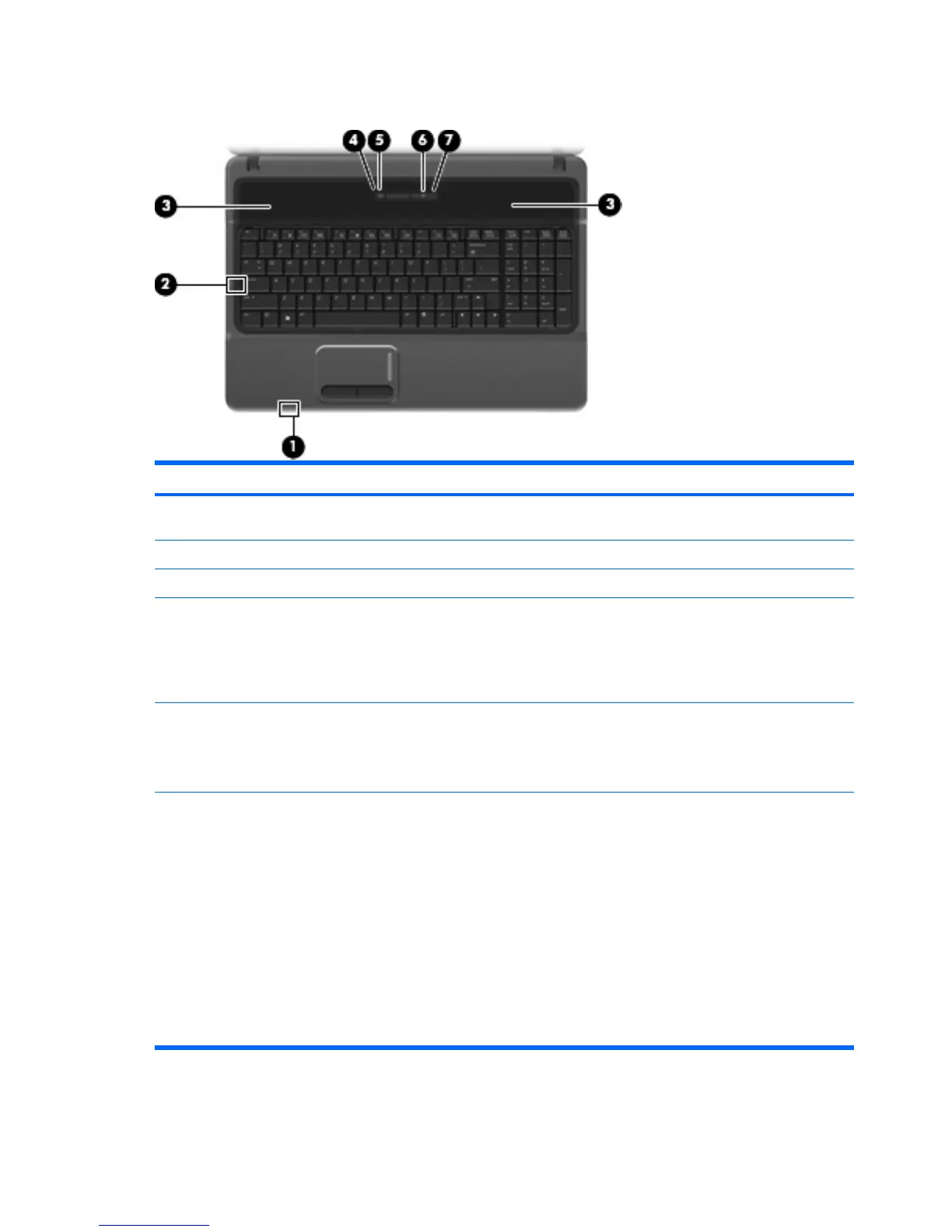
Buttons, switch, lights, and speakers
Item Component Function
(1) Internal display switch Turns off the display if the display is closed while the power
is on.
(2) Caps lock light On: Caps lock is on.
(3) Speakers (2) Produce sound.
(4) Wireless light
●
Blue: An integrated wireless device, such as a
wireless local area network (WLAN) device, the HP
Broadband Wireless Module, and/or a Bluetooth®
device, is on.
●
Amber: All wireless devices are off.
(5) Wireless button Turns the wireless feature on or off, but does not establish
a wireless connection.
NOTE: You must set up or access a wireless network to
establish a wireless connection.
(6) Power button
●
When the computer is off, press the button to turn on
the computer.
●
When the computer is on, press the button to turn off
the computer.
●
When the computer is in the Sleep state (Windows
Vista) or in Standby (Windows XP), press the button
briefly to exit the Sleep state or Standby.
●
When the computer is in Hibernation, press the button
briefly to exit Hibernation.
If the computer has stopped responding and Windows®
shutdown procedures are ineffective, press and hold the
power button for at least 5 seconds to turn off the computer.
10 Chapter 2 External component identification





 To Next Page