28 Version 1.2
4.4 Switching off the compressor
To stop the compressor in the case of emergency, press the emer-
gency stop button on the control panel.
After remedying the fault, unlock the button by pulling it out before
restarting.
After emergency shutdown of the compressor, it can only be re-
started again no sooner than 10 minutes later.
Press button
”Shutdown“ on the control panel.
The compressor stops. LCD display is switched off.
Close the air outlet valve.
Switch off the voltage.
5. Maintenance
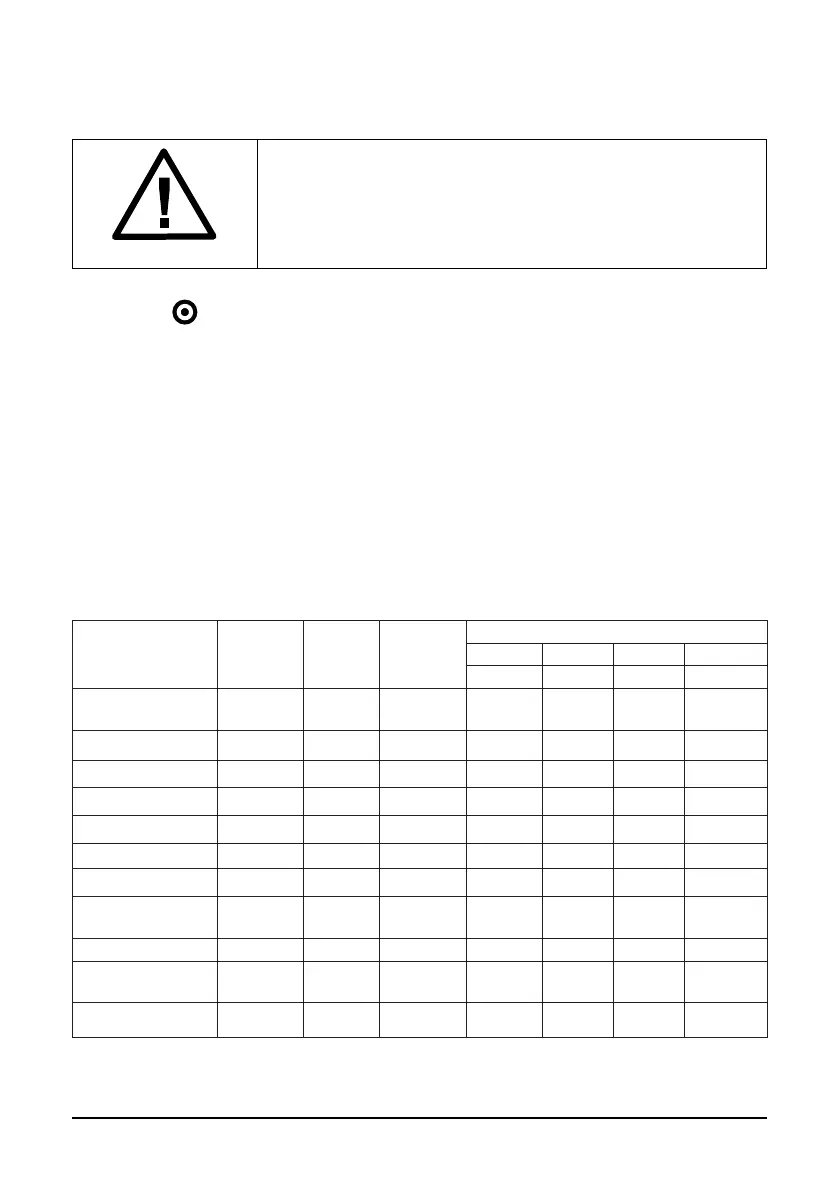
5.1 Maintenance schedule
Maintenance schedule
Daily Monthly Yearly
Interval in work hours
M-1 M-2 M-3 M-2
500 2000 4000 6000
Oil level Check/
Rell
Compressor oil Replace Replace Replace Replace
Air lter Cleaning Replace Replace Replace
Oil lter Replace Replace Replace Replace
Ait-Oil Separator Replace
Drive belt Check
Heat exchanger Cleaning
Bearings of electric
motor
Lubricate
Intake valve Check
Minimum pressure
valve
Check
Safety valve Check



 To Next Page