Compressor Supreme Force Feedback
User Manual
Page 4
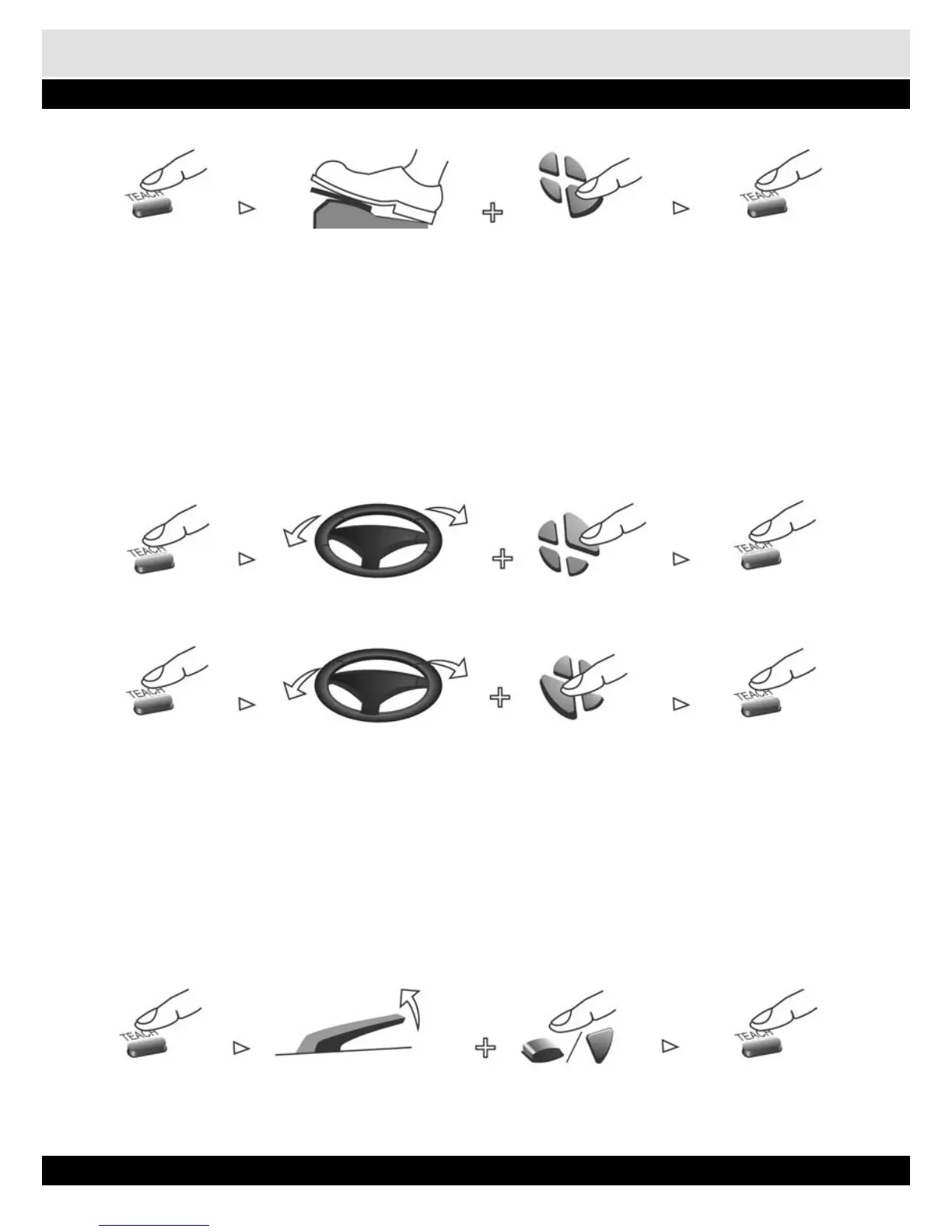
Press „Teach” button, Hold a pedal Press „Down” button Press „Teach” button to
Orange light on to select right joystick original operating mode
6. Programming the Steering Wheel
In Dual Shock 2/Dual Shock mode,
1. Press the „TEACH” button. The orange light will turn on.
2. Turn steering wheel to full left or full right.
3. Press Left or Right button of Direction pad. Left button represents left joystick, while Right but-
ton represents right joystick. Compressor Supreme will vibrate to indicate completion of pro-
gramming.
4. Press the „TEACH” button again. Red light is on.
Press „Teach” button, Turn left or right Press „Right” button Press „Teach” button to
Orange light on to select right joystick original operating mode
Press „Teach” button, Turn left or right Press „Left” button Press „Teach” button to
Orange light on to select right joystick original operating mode
7. Programming the Hand Brake
1. Some games have hand brake feature. Find out the Hand Brake button from the game.
2. Press the „TEACH” button. The orange light will turn on.
3. Pull and hold the Hand Brake.
4. Press the button that was identified as the Hand Brake button. Compressor Supreme vibrates to
indicate completion of programming.
5. Press the „TEACH” once to original operating mode..
Press „Teach” button, Hold the hand brake Press „Fire” button Press „Teach” button to
Orange light on original operating mode


 To Next Page