Compressor Supreme Force Feedback
User Manual
Page 3
If you need to program the configuration of your buttons, please follow
the steps below:
5. Programming the Foot Pedals
Foot Pedals are preprogramed already. Please check the setting in the previous section.
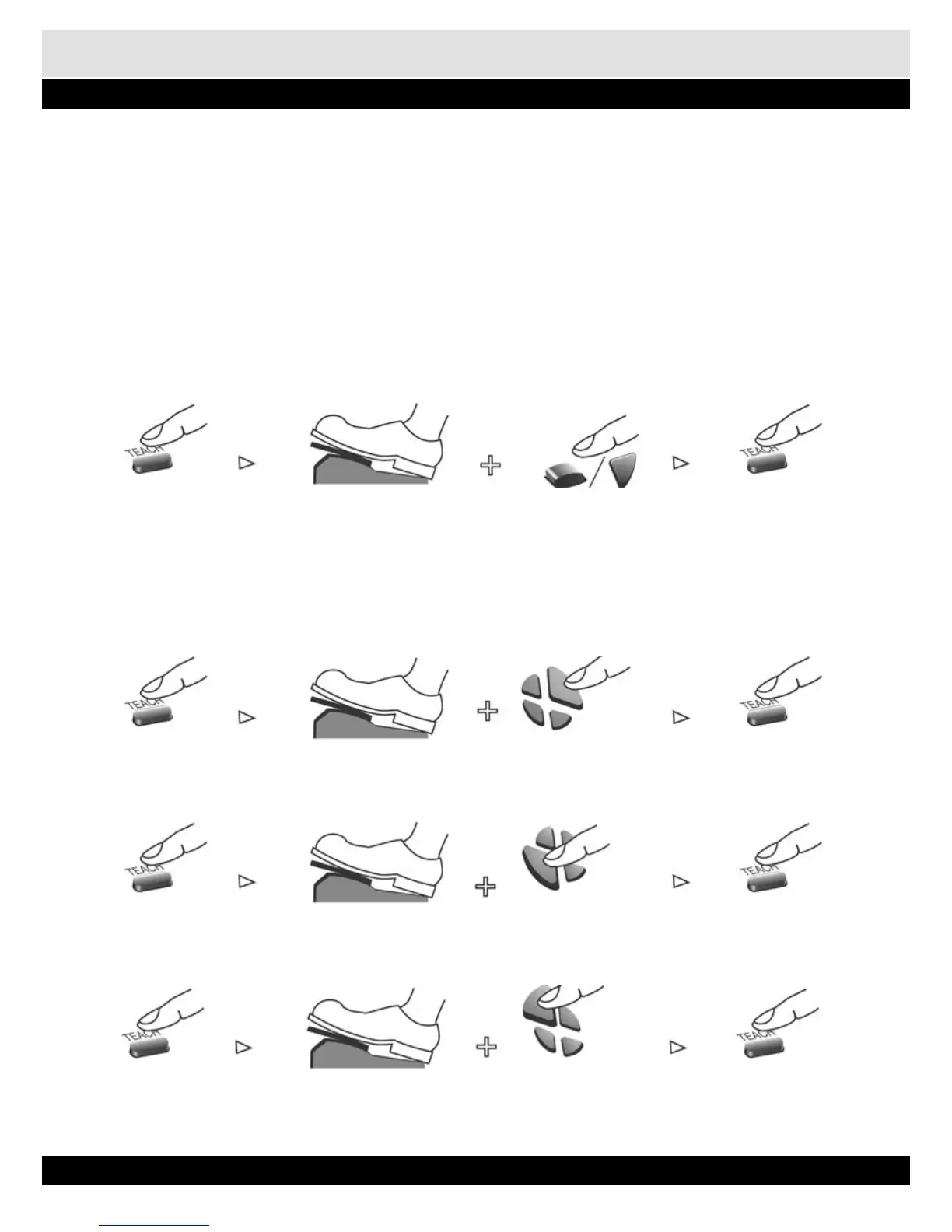
1. Identify the button that is used as the accelerator.
2. Press the „TEACH” button. The orange light will light up.
3. Press and hold the Foot Pedal which you want to use as the accelerator.
4. Now press the button that was used as the accelerator at the beginning of the game. Compres-
sor Supreme will vibrate to indicate that programming is done.
5. Press the „TEACH” button once to original operating mode.
Press „Teach” button, Hold a pedal Press a „Fire” button Press „Teach” button to
Orange light on original operating mode
Repeat the above steps to program the brake pedal.
In Dual Shock 2/Dual Shock mode, direction pad is used to select left or right; upper or low-
er section of joystick.
Press „Teach” button, Hold a pedal Press „Right” button Press „Teach” button to
Orange light on to select right joystick original operating mode
Press „Teach” button, Hold a pedal Press „Left” button Press „Teach” button to
Orange light on to select right joystick original operating mode
Press „Teach” button, Hold a pedal Press „Up” button Press „Teach” button to
Orange light on to select right joystick original operating mode


 To Next Page