LETTER
8.5” X 11”
SBDR1502–Duke OH IT801 Thermostat Installer Manual (DirectLink)
Piece: Manual
Quantity: XXXXX
Size: 8.5 x 11”
Colors: 4/4
Finishing: Fold, Trim
Mail: N/A
CREATIVE PROOFREADER COPY COPYWRITER CREATIVE ACCOUNT
DIRECTOR SUPERVISOR SERVICES MANAGER
MANAGER
Program Specific Checklist
Name: Date:
®
Phone Number _________ _________
®
URL _________ _________
®
Program Details _________ _________
SBDR1502
IT801 Install Manual (DirectLink)
Job Opened: May 8, 2015
Requested In-Home Date: ______________
Latest Revision: August 26, 2015 October 5, 2015
November 2, 2015
Approved: November 2, 2015
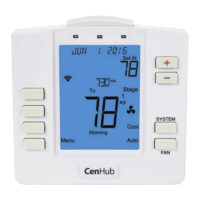
IT801 Web-Programmable Thermostat Manual
PROGRAMMING THE THERMOSTAT
Set Clock
Follow the steps below to set the day of the week and current time:
1. Press MENU.
2. Press CLOCK.
3. Time Zone will be flashing. Use the or key to select the current time zone.
4. Press NEXT.
5. Daylight Saving Time is flashing. Use the or key to select ON or OFF. Press NEXT.
6. The current HOUR is flashing. Use the or key to select the current hour. When using a 12-hour clock, make
sure the correct a.m. or p.m. choice is selected. Press NEXT.
7. The current MINUTES is flashing. Use the or key to select the current minutes. Press NEXT.
8. The current MONTH is flashing. Use the or key to select the current month. Press NEXT.
9. The current DATE is flashing. Use the or key to select the current date. Press NEXT.
10. The current YEAR is flashing. Use the or key to select the current year.
11. Press DONE when completed.


 To Next Page