The Concept Smoke Screen Sentinel S35v6 is a security fogging system designed to protect property and premises by rapidly obscuring visibility. It is an effective deterrent against intruders and can be integrated into existing alarm systems or configured as a standalone unit.
Function Description
The Sentinel S35v6 operates by passing a non-toxic fluid through an efficient heat exchanger to create a thermally generated fog. This fog rapidly obscures visibility, making it difficult for intruders to navigate or steal items. The system is designed to defeat criminals and secure premises, having been in service for over 35 years.
The Smoke Screen can be activated by an alarm panel (Set, Alarm, Hold-off inputs) or a dedicated Panic input. For smoke production, all three alarm panel inputs (Set, Alarm, Hold-off) must be in an "open circuit" state (default setting, which can be inverted to "closed = activate"). This default setting ensures activation even if alarm cables are tampered with. The Panic input, typically connected to a momentary button, provides instant activation.
The system includes a "Settle Timer" (0-60 seconds) to prevent activation immediately after the system is set, and a "Smoke Delay" (0-60 seconds) for sequencing activations in multi-machine installations. Re-triggering options (Delay or Instant) are available for subsequent activations initiated by a hold-off input. Smoke production can be stopped by restoring the 'Set' input to a non-alarm state. A "Service Mode" dip switch prevents smoke production during maintenance.
Important Technical Specifications
- Fluid Consumable: Accommodates a 500ml 'Smoke Fluid' consumable.
- Power Supply: Requires an unswitched 13 amp fused spur connected to a dedicated breaker.
- Battery Backup: Fitted with a battery to power electronic circuits and the pump for at least 1 hour during mains power failure (fluid heater is not powered). The battery power switches off 1.5 hours after mains failure to prevent deep discharge.
- Smoke Time: Programmable from 5 to 360 seconds in 1-second intervals.
- Panic Smoke Time: Programmable from 5 to 360 seconds in 1-second intervals (default 0 seconds to prevent inadvertent activation if not used).
- Delay Timer: Programmable from 0 to 60 seconds.
- Settle Timer: Programmable from 0 to 60 seconds.
- Verification Timer: Programmable from 0 to 3600 seconds in 5-second intervals.
- Nozzles: Delivered with a single-hole straight nozzle and an extra 1-hole 30-degree angle down nozzle. Other options include 2-hole horizontal, 3-hole horizontal, and 2-hole 30-degree angle down nozzles.
- Outputs: Clean contact outputs for 'Mains Fail', 'Temp Status', 'Empty Fluid', 'Battery Output', 'Tamper', 'Verification Output', and 'Low Fluid'.
- Inputs: Set, Alarm, Hold-off, Panic.
- Tamper Protection: Internal tamper circuits on covers and an external tamper input on the PCB.
- Operating Temperature: Heats up to operating temperature in approximately 20 minutes.
Usage Features
- Mounting: Can be wall or ceiling mounted using the supplied bracket.
- Wall Mounting: Optimum at 2.5 meters above the floor, facing the protected area, using the 30-degree angle nozzle. Maximum recommended height is 3 meters, minimum 1 meter. No obstacles within 1 meter of the nozzle. Minimum 150mm clearance to the ceiling.
- Ceiling Mounting: Optimum at 2.5 meters above the floor, using the standard straight nozzle. Maximum recommended height is 3 meters, minimum 1 meter. No obstacles within 1 meter of the nozzle.
- Suspension Mounting: Achieved with a 'Suspension Kit' (unistrut, threaded bar, and fixings) for installations above a ceiling.
- Nozzle Changing: Nozzles can be changed using a 10mm ring spanner, sealed with PTFE tape, ensuring correct orientation for angled nozzles.
- Energy Saving Mode (ESM):
- ESM Disable: Maintains normal running temperature.
- ESM: Lowers temperature to a standby level when the alarm panel is "Unset" to reduce power consumption. Heats to normal operating temperature when "Alarm Set" input is received.
- Extreme: Heater is off when "Unset," reducing temperature to ambient. Heats to normal operating temperature when "Set" input is received, introducing a delay before fog production.
- Warning: ESM and Extreme modes should not be used with a Panic input.
- Screen Sensor: An optional "Screen Sensor" can be connected to the Hold Off input to detect drops in fog density and re-trigger the Sentinel to maintain fog levels. Requires installation in an area of maximum fog coverage.
- Inverting Triggers: Set, Alarm, Hold-off, and Panic triggers can be configured as 'open = activate' (default for Set, Alarm, Hold-off) or 'closed = activate' (default for Panic).
- LCD Display and LED Indicators: Provides 'Live Status' indications, including current time/date, operating status, and fault codes (e.g., Temp Status, Verify Smoke, Mains Fault, Battery Fault, Empty Fluid, Low Fluid, Tamper Internal, Set, Alarm, Hold-off, Panic, Service Mode, Energy Save Mode). A multicolour LED (Green for ready, Yellow for heating/tamper fault, Red for faults) and sounder provide additional status indications.
- Programming: Accessed via LCD display and operating buttons. Allows setting time/date, smoke timing, trigger modes, battery/ESM enable/disable, smoke delay, settle timer, and verification timer.
- Standalone Test: The Smoke Screen can be tested using buttons on the PCB (PB1 or PB2) when ready to operate and not in "Service Mode."
Maintenance Features
- Servicing Access: Front cover can be removed by unscrewing set screws to access PCB connections, programming panel, mounting holes, batteries, and fluid.
- Fluid Management: An on-board timer measures fluid consumption. The timer is reset when a new consumable is inserted and the micro switch is cycled. The system will not produce fog if fluid is empty.
- Fluid Consumable Replacement:
- Ensure only battery power is applied.
- Remove front cover.
- Unscrew consumable support and neck holder retaining screws.
- Swing retaining gate away.
- Remove glue on rubber bung.
- Push fluid pipe connector probe into the hole until it reaches the shoulder.
- Carefully locate consumable neck in the holder.
- Close retaining gate and tighten retaining screw.
- Ensure consumable neck is held correctly and fluid micro switch is closed.
- Battery power must be applied to reset the fluid timer.
- Warning: Always replace with a full consumable when the micro switch is reset to prevent pump damage.
- Thermal Cut-Out (TCO) Reset: In case of overheating, the TCO trips to protect the machine. It can be reset by pressing a button accessed through a hole in the protective cover after turning off mains power. If the TCO trips again, the Smoke Screen should be checked for faults.
- Battery Replacement: Batteries should be changed every 2 years or if a battery fault is indicated. Only batteries supplied by Concept Smoke Screen should be used.
- Service Intervals: Annual servicing by a Concept Smoke Screen certified engineer is required to maintain full operation and warranty validity. Fluid consumables should be changed every 12 months (best practice) or 2 years (minimum), or if a Low or Empty Fluid fault is displayed, or after 2 or more activations since replenishment.
- Reboot: The system can be rebooted via the menu in "Service Mode" to clear critical faults, retaining all settings.
- Environmental Policy: Complies with WEEE Regulations 2013. Products are labeled with the crossed-out wheelie bin symbol. Equipment can be returned to Concept Smoke Screen Ltd for disposal or recycled locally according to guidelines.

 Need help?
 General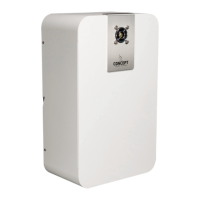

 To Next Page