EasyManua.ls Logo

CONCORD XC6010 - User Manual

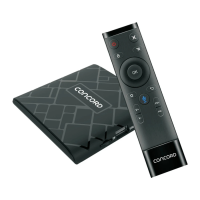
CONCORD XC6010
15 pages
Print Icon
To Next Page IconTo Next Page
Loading...
XC6010
Question and Answer IconNeed help?

Do you have a question about the CONCORD XC6010 and is the answer not in the manual?

Summary

IMPORTANT SAFETY INSTRUCTIONS

Important Safeguards

Key safety precautions to prevent risks like electric shock and damage.

Chapter 2: Remote Control

2.1 Introduction

Overview of the remote control buttons and their functions.

2.2 Using your mobile phone to control the box

Instructions for using a smartphone app as a remote control.

Chapter 3: System Connection

3.1 Installation guide

Visual guide to connecting the TV box, identifying ports, and accessories.

3.2 Connect TV box to TV and connect network

Steps for connecting the device to a TV and establishing a network connection.

3.3 Set up your TV box

Guide through the initial setup process, including language and Wi-Fi.

3.4 Sign into your account

Steps for signing into or creating a Google account for the device.

Chapter 4: Main User Interface

4.1 Google assistant

Introduction to using the Google Assistant feature on the TV box.

4.1.1 Setting up the language for voice commands

How to configure the language for voice commands with Google Assistant.

4.1.2 Operating voice commands

Instructions on how to use voice commands via the remote control.

4.2 Preloaded Apps

List and description of applications pre-installed on the TV box.

4.3 Settings, Internet status and the App drawer

Overview of accessing settings, network status, and the app list.

4.3.1 Device setting

Details on configuring network settings, sound, and app management.

4.3.2 Preference setting

Customizing date, time, language, keyboard, and other preferences.

4.3.3 Remote & accessories

How to add or unpair Bluetooth accessories like remotes.

4.3.4 Personal setting

Managing location services, security, and app installation restrictions.

4.3.5 Accounts setting

How to manage Google accounts on the device.

4.4 Internet status

Checking and configuring network and internet connection settings.

4.5 App drawer

Accessing and viewing all applications installed on the TV box.

Chapter 5: How to Install; Uninstall Apps

5.1 How to install Apps from the Play store or through an APK installer

Guide to installing applications from the Google Play Store or via APK files.

5.2 How to uninstall Apps

Steps to remove applications from the TV box.

Chapter 6: Browse

Chapter 7: How to manage your files-ES File Explorer

Chapter 8: Tips on pairing your remote

8.1 Connecting the TV box to a keyboard

How to connect an external keyboard for system navigation.

8.2 Add accessory

Steps to add Bluetooth accessories like remotes or game controllers.

8.3 Activating pairing mode

How to put the remote control into Bluetooth pairing mode.

8.4 Pairing

The process of pairing the Bluetooth remote with the TV box.

8.5 Pairing completed

Confirmation of successful Bluetooth pairing and navigation.

Chapter 9: Troubleshooting

Chapter 10: Specification

Summary

IMPORTANT SAFETY INSTRUCTIONS

Important Safeguards

Key safety precautions to prevent risks like electric shock and damage.

Chapter 2: Remote Control

2.1 Introduction

Overview of the remote control buttons and their functions.

2.2 Using your mobile phone to control the box

Instructions for using a smartphone app as a remote control.

Chapter 3: System Connection

3.1 Installation guide

Visual guide to connecting the TV box, identifying ports, and accessories.

3.2 Connect TV box to TV and connect network

Steps for connecting the device to a TV and establishing a network connection.

3.3 Set up your TV box

Guide through the initial setup process, including language and Wi-Fi.

3.4 Sign into your account

Steps for signing into or creating a Google account for the device.

Chapter 4: Main User Interface

4.1 Google assistant

Introduction to using the Google Assistant feature on the TV box.

4.1.1 Setting up the language for voice commands

How to configure the language for voice commands with Google Assistant.

4.1.2 Operating voice commands

Instructions on how to use voice commands via the remote control.

4.2 Preloaded Apps

List and description of applications pre-installed on the TV box.

4.3 Settings, Internet status and the App drawer

Overview of accessing settings, network status, and the app list.

4.3.1 Device setting

Details on configuring network settings, sound, and app management.

4.3.2 Preference setting

Customizing date, time, language, keyboard, and other preferences.

4.3.3 Remote & accessories

How to add or unpair Bluetooth accessories like remotes.

4.3.4 Personal setting

Managing location services, security, and app installation restrictions.

4.3.5 Accounts setting

How to manage Google accounts on the device.

4.4 Internet status

Checking and configuring network and internet connection settings.

4.5 App drawer

Accessing and viewing all applications installed on the TV box.

Chapter 5: How to Install; Uninstall Apps

5.1 How to install Apps from the Play store or through an APK installer

Guide to installing applications from the Google Play Store or via APK files.

5.2 How to uninstall Apps

Steps to remove applications from the TV box.

Chapter 6: Browse

Chapter 7: How to manage your files-ES File Explorer

Chapter 8: Tips on pairing your remote

8.1 Connecting the TV box to a keyboard

How to connect an external keyboard for system navigation.

8.2 Add accessory

Steps to add Bluetooth accessories like remotes or game controllers.

8.3 Activating pairing mode

How to put the remote control into Bluetooth pairing mode.

8.4 Pairing

The process of pairing the Bluetooth remote with the TV box.

8.5 Pairing completed

Confirmation of successful Bluetooth pairing and navigation.

Chapter 9: Troubleshooting

Chapter 10: Specification

CONCORD XC6010 Specifications

General IconGeneral
ModelXC6010
ManufacturerCONCORD
ColorBlack
Warranty1 Year
TypeSet-top box
Operating Temperature0°C to 40°C
Storage Temperature-20°C to 60°C
Humidity5% ~ 95% RH (Non-condensing)