User manual
LASER DISTANCE METER
User manual
LASER DISTANCE METER
User manual
LASER DISTANCE METER
User manual
LASER DISTANCE METER
User manual
LASER DISTANCE METER
User manual
LASER DISTANCE METER
User manual
LASER DISTANCE METER
User manual
LASER DISTANCE METER
User manual
LASER DISTANCE METER
User manual
LASER DISTANCE METER
User manual
LASER DISTANCE METER
User manual
LASER DISTANCE METER
User manual
LASER DISTANCE METER
User manual
LASER DISTANCE METER
User manual
LASER DISTANCE METER
CONDTROL SMART
60 CONDTROL SMART
60 CONDTROL SMART
60
CONDTROL SMART
60 CONDTROL SMART
60 CONDTROL SMART
60CONDTROL SMART
60
CONDTROL SMART
60 CONDTROL SMART
60 CONDTROL SMART
60CONDTROL SMART
60
CONDTROL SMART
60 CONDTROL SMART
60 CONDTROL SMART
60CONDTROL SMART
60
SAFETY REGULATIONS
The user manual should be read carefully before you use the
product for the first time. Unintended use of the product can
be dangerous for human’s health and cause serious injury.
Keep this user manual. If the product is given to somebody for
temporary use, be sure to enclose user manual to it.
- Do not misuse the product
- Do not remove warning signs and protect them from abrasion,
because they contain information about safe operation of the
product.
The device belongs to
laser product class 2 in
accordance with
EN 60825-1 with a 630-
670 nm wavelength.
- Do not look into the laser beam or its reflection, with
unprotected eye or through an optical instrument. Do not
point the laser beam at people or animals without the need.
You can dazzle them.
- To protect your eyes close them or look aside.
- It is prohibited to disassemble or repair the product yourself.
Intrust product repair to qualified personnel and use original
spare parts only.
- Do not use the product in explosive environment, close to
flammable materials.
- Avoid heating the batteries to avoid the risk of explosion and
electrolyte leakage. In case of liquid contact with skin, wash
it immediately with soap and water. In case of contact with
eyes, flush with clean water during 10 minutes and consult the
doctor.
CARE AND MAINTENANCE
Attention! The instrument is a precision device and requires
careful handling. The following recommendations will extend
the life of the product:
- Do not point the product at the sun
- Protect the product from bumps, falls, excessive vibration;
do not let liquids, construction dust and foreign objects get
inside the product.
- Do not expose the product to extreme temperatures.
- If liquids get inside the product first remove the batteries,
then contact a service center.
- Do not store or use the product under high humidity
conditions for a long time.
- Clean the product with soft wet cloth.
- Keep device optics clean and protect it from mechanical
damage.
- Сarry out control measurements occasionally, especially
if the product is subject to excessive mechanical or other
impact, before and after taking important measurements.
UTILIZATION
Expired tools, accessories and package should be passed
for waste recycle. Please send the product to the following
address for proper recycle:
CONDTROL GmbH
Wasserburger Strasse 9
84427 Sankt Wolfgang
Germany
Do not throw the product in municipal waste!
According to European directive 2002/96/ЕC expired
measuring tools and their components must be collected
separately and submitted to environmentally friendly recycle
of wastes.
WARRANTY
All CONDTROL GmbH products go through post-production
control and are governed by the following warranty terms. The
buyer’s right to claim about defects and general provisions of
the current legislation do not expire.
1) CONDTROL GmbH agrees to eliminate all defects in the
product, discovered during the warranty period, that represent
the defect in material or workmanship in full volume and at its
own expense.
2) The warranty period is 36 months and starts from the date
of purchase by the end consumer (see the original supporting
document).
3) The warranty does not cover defects resulting from wear
and tear or improper use, malfunction of the product caused
by failure to observe the instructions of this user manual,
untimely maintenance and service and insufficient care, the
use of non-original accessories and spare parts. Modifications
in design of the product relieves the seller from responsibility
for warranty works. The warranty does not cover cosmetic
damage, that doesn’t hinder normal operation of the product.
4) CONDTROL GmbH reserves the right to decide on
replacement or repair of the device.
5) Other claims not mentioned above, are not covered by the
warranty.
6) After holding warranty works by CONDTROl GmbH warranty
period is not renewed or extended.
7) CONDTROL GmbH is not liable for loss of profit or
inconvenience associated with a defect of the device, the
rental cost of alternative equipment for the period of repair.
This warranty applies to German law except provision of the
United Nations Convention on contracts for the international
sale of goods (CISG).
In warranty case please return the product to retail seller or
send it with defect description to the following address:
CONDTROL GmbH
Wasserburger Strasse 9
84427 Sankt Wolfgang
Germany
Congratulations on your purchase of laser distance meter
CONDTROL SMART 60.
Safety instructions can be found in the end of this user manual
and should be carefully read before you use the product for
the first time.
FUNCTIONS/APPLICATIONS
Laser distance meter SMART 60 is intended to measure
distance, lengths, heights, calculate area and volume of
measured objects as well as to carry out indirect measurements
(Pythagoras’ Theorem). The product is suitable for use at both
indoor and outdoor building areas.
SET
1. Laser distance meter – 1pc.
2. Carry pouch with a strap - 1 pc.
3. User manual – 1 pc.
4. Batteries LR3 (AAA) – 2 pcs.
SPECIFICATIONS
Working range 0,05 – 60 m*
Measuring accuracy ± 1,5 mm**
Smallest unit displayed 1 mm
Automatic shutdown
Laser
Instrument
45 sec
180 sec
Display backlight √
Continuous distance measuring
(Tracking)
√
Addition/Subtraction of measurements √
Area/volume calculation √
Indirect measurement
(Pythagoras’ Theorem)
√
Laser type
650 nm, < 1 mW,
class II
Working temperature 0 °С ... +40 °С
Storage temperature –20 °С ... +60 °С
Battery 105х47х27 mm
Dimensions 83 г
Weight
2х1,5 V AAA LR3
(alkaline)
* Use a target plate to increase the measurement range during
daylight or if the target has poor reflection properties.
** Accuracy can decrease in unfavorable conditions, such as
intense sunshine or when measurements are made against
glossy or transparent surfaces, moving objects, objects with
rough surface.
In unfavourable conditions or when measured distance is over
100 m the maximum permissible accuracy is calculated in the
following way:
± (Y + 0,25хDх10-3) mm, where
D (mm) - measured distance
Y (mm) - permissible accuracy according to technical data.
INSERT/REPLACE BATTERIES
Insert the batteries,
observing correct
polarity. Use alkaline
batteries only, both
batteries must be of
the same brand with
the same charge level.
Charge level is shown
on display. Replace
batteries when you
see symbol on the
display.
SWITCH ON/OFF
To switch on the product press . The product will switch
on and enter measuring mode.
To switch of the product press and hold .
In order to save battery power the product will switch off
automatically within 3 minutes after the last operation.
PRODUCT
DESCRIPTION
2
3
4
6
Display
OPERATION
Reference point
It is possible to set the reference point - from the top or bottom
end of the product.
The default reference point is the bottom end of the product.
To select reference point press and hold button during 1
second. Indicator will appear on the display.
Switch on/off sound signal
To switch on/off sound signal press and hold during 2
seconds.
MEASUREMENTS
Single distance measurement
Switch on the product. Short press to switch on laser
beam, point it at the target and press again for single
distance measurement.
Short press to switch off laser beam, if it is on.
CALCULATIONS
The last measurement can be cancelled by and made
again in modes of area and volume calculation, indirect
measurement mode (Pythagoras’ Theorem). If you double
press in any of the above mentioned modes, the product
will enter single distance measuring mode.
Addition/Subtraction
Addition/Subtraction function is used for addition and
subtraction of lengths.
Make a single distance measurement, activate Addition/
Subtraction mode by short pressing , then make the next
single distance measurement. Calculation result will be shown in
the main line on the display. The next measurements will also be
added/subtracted to/from
the next measuring result.
Press to exit
Addition/Subtraction mode.
MESSAGE CODES
While operation, the following codes/symbols may appear on
the display:
Message Cause Solution
301 Distance is out of range
Keep in correct
measuring range
302 Reflected signal is too weak Use reflecting plate
303
Measuring result cannot
be displayed (negative or
exceeds 99999)
Repeat measurements
304
Pythagorean theorem
calculation error
Make measurements in
correct succession
305 Low battery Replace batteries
306 Temperature is too low Warm up the product
307 Temperature is too high Cool down the product
308 Ambient light is too strong
Make measurements in
less illuminated zone
1 Bubble level
2 Display
3 Switch on / activate laser beam/ measurement / continuous
measurement (tracking).
4 Addition/subtraction / switch on/off sound signal.
5 Area/volume calculation/indirect measurement (Pythagoras’
Theorem).
6 Switch off/clear
7 Strap location
1
5
7
1 Secondary line for
displaying measuring
results, maximal and
minimal values.
2 Symbol of Addition/
subtraction mode
3 Symbol indicating
area and volume
calculation, indirect
measurement mode.
4 Main line for
displaying measuring
results
5 Battery charge level
6 Reference point
7 Unit of measurement
Continuous distance measurement (Tracking)
Press and hold . The product
will take measurements one after
another, showing the last measured
value. Besides it will show maximal and
minimal measured values.
To exit the mode press or .
Area
Press . Symbol will appear on display. Make 2
measurements one by one (length and width). Area
(composition of length and width) will be calculated and shown
in the main line on the display.
Volume
Press twice. Symbol
will appear on display. Make 3
measurements one by one (length,
width, height). Volume (composition
of length, width and height) will be
calculated and shown in the main line
on the display.
Indirect measurement (Pythagorean Theorem)
If it is impossible to make direct measurement (there is some
obstruction) required length can be calculated with the help
of 2 others.
Press 3 times. Symbol
will appear on display. Measure
length of segments A and B.
Segment B must be perpendicular
to segment C and can’t be longer
than segment A. Length of
segment C
is calculated
according to
Pythagoras’
Theorem.
1
2
3
6
4
5
7

 Need help?
 General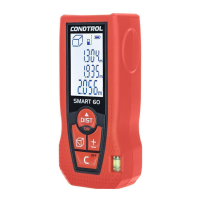

 To Next Page