1
This stereo wireless speaker system uses the latest 863 MHz wireless technology to
enable you to enjoy music and TV sound anywhere inside or outside your home. You
can simply connect the system to any audio source such as radio, TV, video, hi-fi,
surround sound, MP3 player, VCD or DVD player without complicated wiring and
installation. You'll be enjoying thrilling, lifelike stereo sound in minutes.
Features and benefits
● 863 MHz RF technology speaker system, giving operating distance up to 100 metres (in
ideal conditions) with no line of sight limitation - giving you virtually interference-free stereo
quality sound reproduction
● Phase Lock Loop (PLL) technology on transmitter to maintain accurate tuning of your system
● Automatic level control and auto ON/OFF control
● Auto tuning - speakers will scan for best signal from receiver
● Bass boost function - enhance the bass sound depending on your own music preferences
Contents
● 2 x speakers ● transmitter ● 3 x mains adapters ● aerial tube ● 6.3mm stereo adapter ●
3.5mm to independent left/right plugs adapter ● owner’s manual
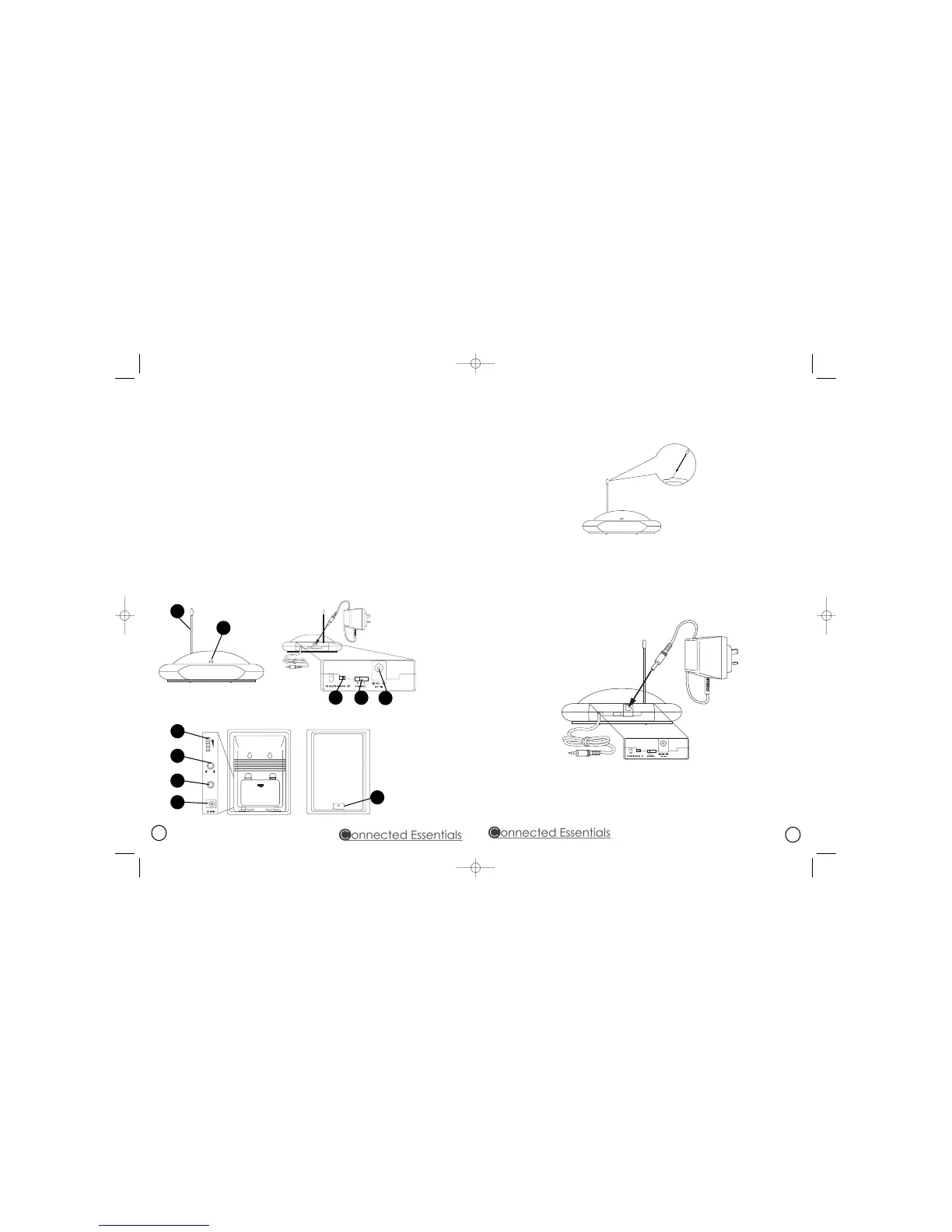
What's what on the equipment
1. transmitter - connects to your audio equipment and transmits the audio signal to the
speakers
2. speaker receivers - receives and broadcasts the audio signal from the transmitter
1. volume on/off knob
2. bass boost
3. auto scan
4. mains power input
5. power on / off indicator
1. aerial
2. power on / off indicator
3. mono / stereo selector
4. channel selector
5. mains power input
1
3
2
4
5
1
2
3
4
5
Getting Started
Setting Up The Transmitter
1. Insert the aerial wire into the rigid aerial tube (diagram 1).
diagram 1
2. There is an audio cord connected to the rear of the transmitter. This can be plugged into the
audio output socket of a TV, monitor, VCR, radio recorder, CD, MP3, VCD or DVD player, or to
any 3.5mm headphone/earphone socket. If your system has a 6.3mm socket or stereo outputs
please use the additional adapters provided.
3. Plug the supplied AC power adapter into the input socket located on the rear of the
transmitter (diagram 2).
diagram 2
4. Plug the power adapter into a wall socket.
5. As soon as the transmitter is receiving the audio signal, it will automatically switch on and the
red LED will illuminate.
2



 To Next Page
 Loading...