The ConnectSense Smart Power Cord and Mini Cord are intelligent devices designed to monitor and control electrical appliances, providing users with detailed power consumption data and remote control capabilities through a cloud-based application. Manufactured by Grid Connect Inc., these devices offer a comprehensive solution for smart home and industrial applications, enabling efficient energy management and enhanced operational control.
Function Description:
The primary function of both the Smart Power Cord and the Mini Cord is to provide real-time monitoring of electrical parameters and remote control of connected devices. They act as intermediaries between an electrical outlet and an appliance, allowing users to turn devices on or off, track energy usage, and set up automated rules.
The Smart Power Cord is a more feature-rich device, offering detailed power signature analysis, which captures high-resolution voltage and current waveforms. This allows for in-depth diagnostics of connected equipment, identifying transient voltage, in-rush current, and other electrical anomalies. It also includes a push button for manual control and a relay to toggle power to the connected device. The Smart Power Cord supports a wider range of functionalities, including advanced display modes (Pump Mode, Appliance Mode, Advanced Mode) and the ability to set up rules for automated actions and notifications.
The Mini Cord is a more compact and simplified version, primarily focused on basic monitoring and control. It features over-current protection and a button for local on/off control. While it provides essential power monitoring, it does not offer the advanced power signature analysis or the extensive rule-setting capabilities of the Smart Power Cord. Its single LED indicates connection status and load switch status.
Both devices connect to the ConnectSense Cloud application via Wi-Fi, enabling remote access and data visualization through a web browser. The cloud application serves as the central hub for managing multiple cords, viewing historical data, and configuring device settings.
Important Technical Specifications:
While specific numerical values for current, voltage, and power ratings are not explicitly detailed in the provided excerpts, the manual indicates the following:
- Voltage Compatibility: The Smart Power Cord handles up to 240VAC, with an example showing 120VAC connection.
- Connectivity: Both devices utilize Wi-Fi for network connection to the ConnectSense Cloud (AWS IoT).
- LED Indicators:
- Smart Power Cord: Features two LEDs: a Wi-Fi LED (upper left) and a Status LED (upper right).
- Status LED (Blue): Indicates relay on/off status. Blue LED is on when the relay is on.
- Wi-Fi LED:
- Solid red for 1 second, then off: On factory reset.
- Solid green for 1 second, then off: On reboot.
- Yellow slow (2x) flash: In provisioning state.
- Yellow fast (20x) flash: Connecting to Wi-Fi.
- Yellow solid: Failed to connect Wi-Fi.
- Green slow (2x) flash: Connecting to AWS.
- Green on for 5 seconds, then off: Connection to AWS.
- Red slow (2x) flash: Failure to connect AWS.
* Mini Cord: Features a single LED. When not connected, it flashes between blue and red. Once connected, the LED color indicates load switch status (Blue for ON, Red for OFF).
- Power Signature Resolution: The Smart Power Cord captures power signature data at 2.0 kHz, displaying 200 entries on demand.
- Compliance: Both devices are FCC/IC compliant (FCC ID: 2AFC3-CSSC01, IC ID: 22503-CSSC01) and are designed to meet regulatory standards for radio frequency emissions and immunity. They are also RoHS2 and REACH compliant.
- Manufacturing: Made in North America.
Usage Features:
- Cloud Application: Users interact with the devices through the ConnectSense Cloud application (cord.connectsense.com), accessible via a web browser.
- Account Management: The application allows for user account creation, sign-in, and email verification.
- Device Provisioning: A step-by-step process guides users through connecting the Smart Power Cord or Mini Cord to their Wi-Fi network and the ConnectSense Cloud. This involves:
- Powering the cord.
- Plugging in a test device.
- Signing into the ConnectSense Cloud application.
- Performing a factory reset on the cord (holding the push button for ~15 seconds until the Wi-Fi LED flashes red) to enable SoftAP mode.
- Connecting a host computer's Wi-Fi to the cord's SoftAP (SSID: "CS-CORD-XXXXX" or "CS-MINI-CORD-XXXXX").
- Selecting the desired local Wi-Fi network from a scanned list and providing the passphrase.
- The cord then connects to the Wi-Fi AP and establishes a secure connection to AWS.
- Display Modes (Smart Power Cord):
- Pump Mode: Displays load cycles, pump status, and serial number, suitable for monitoring pumps.
- Appliance Mode: Shows total energy, instant current, instant voltage, instant power, instant power factor, and serial number, ideal for general appliance monitoring.
- Advanced Mode: Provides cumulative values (total cord runtime, total energy, relay cycles, total relay ON time, load cycles, total load ON time) and instant values (status, relay ON time, load status, load ON time, instant current, instant voltage, instant power, instant power factor, temperature).
- Graphical Interface: The Dashboard tab within the application allows users to visualize various parameters over time, including current, power, power factor, and voltage.
- Power Signature (Smart Power Cord): Enables viewing of high-resolution voltage and current waveforms, with options to refresh data, turn the load ON to capture power-on transients, or turn the load OFF to capture power-off transients. Data can be exported to a CSV file.
- Rules (Smart Power Cord): Users can set up rules to automatically turn off the relay based on various conditions (e.g., current less than 0 mA, current greater than 20000 mA, voltage less than 1090 V, power factor less than 0, temperature greater than 40 C, load active for 3600 seconds). These rules can also trigger notifications (text/email) to specified contacts.
- Miscellaneous Settings: Allows users to change the name of the cord, adjust the reporting frequency, and remove the device from their account.
- Manual Control:
- Smart Power Cord: A push button allows for manual toggling of the relay (on/off) for the connected device (1-second press). It also supports reboot (5-second press), soft reset (Wi-Fi credentials reset, 10-second press), and full factory reset (15-second press).
- Mini Cord: A push button provides local on/off control.
Maintenance Features:
- Firmware Updates: The "Miscellaneous Settings" section indicates a "Firmware Version" field, implying that firmware updates are managed through the application, though the process is not detailed in the provided excerpts.
- Troubleshooting: The manual provides guidance on LED indicators for diagnosing connection issues and reset procedures (soft and factory reset) to resolve potential problems.
- Technical Support: Contact information for technical support (phone and web) is provided for assistance with any issues.
- Warranty: A "Smart Power Cord Warranty" section is mentioned, directing users to the website for details.

 Need help?
 General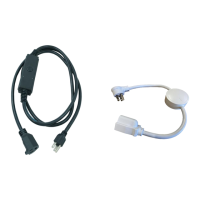

 To Next Page