3. Medical safety
- The radio waves of mobile phones may aect some medical devices, such as pacemakers,
cochlear implants, hearing aids, etc. The mobile phone and these medical devices should be kept
at least 20 cm away. Feel free to consult the restricons on the use of mobile phones with
manufacturer when excepon occurs.
USE TIPS 1
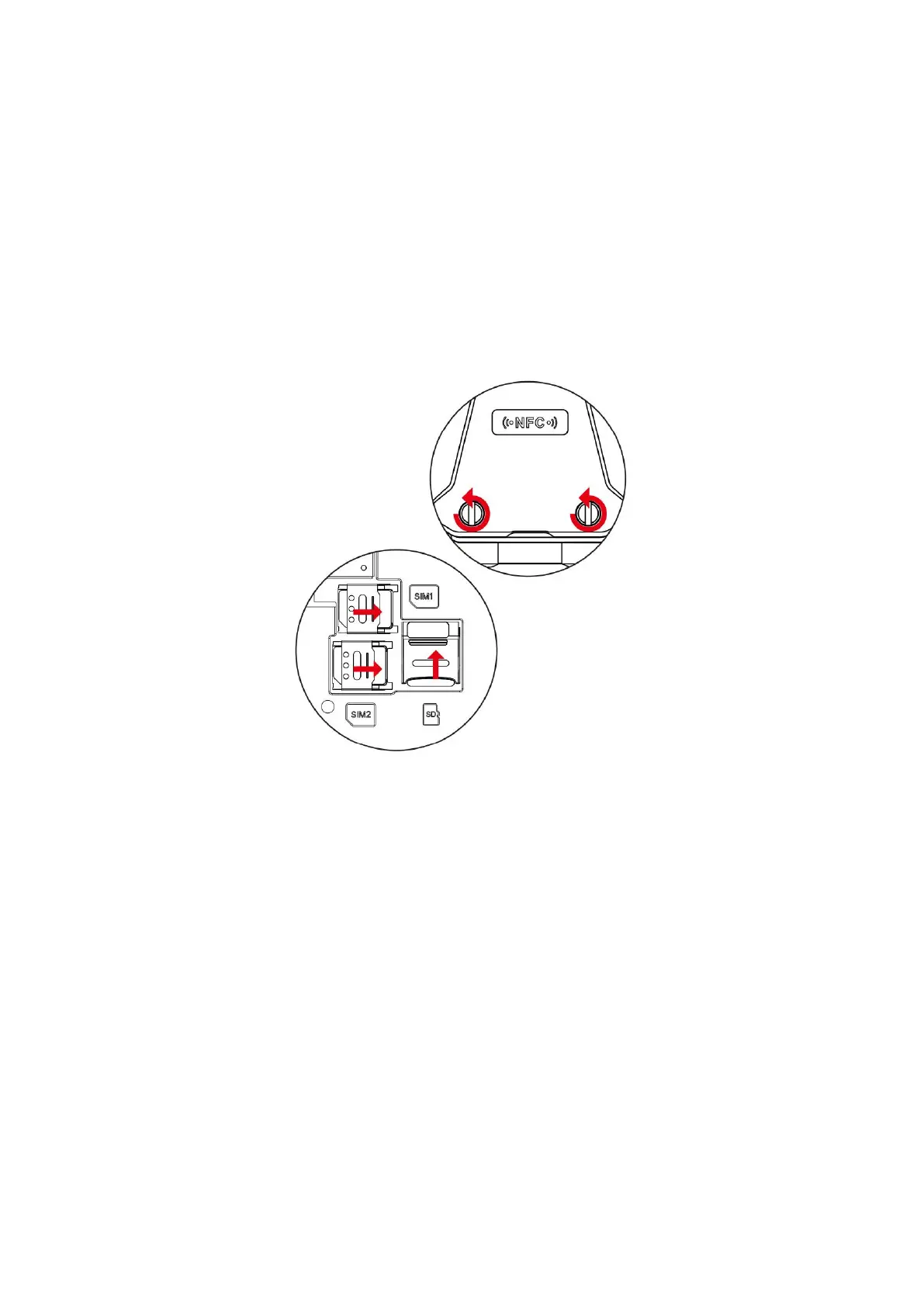
Quick Install SIM Card/SD Card
Please do the following with the power o:
1. Turn the screw counterclockwise to open the back cover.
2. Both SIM1 and SIM2 covers slide to the right to open the SIM cover. Aer unlocking the SIM
cover, place the SIM card in the designated posion, then close the SIM cover and turn the SIM
cover to the le to lock it to complete the SIM installaon.
3. The right slot is the TF card slot,TF card maximum can support 2TB. First open the TFcover,
then put the TF card in the designated posion , and then cover the TF cover to lock it to
complete the TF installaon.


 To Next Page