Operating the appliance en
29
1Operating the appliance
Operating the appliance
In this section, you can find out how to set the hotplates.
The table shows heat settings and cooking times for
various meals.
Switching the hob on and off
The main switch is used to switch the hob on and off.
To switch on: Touch the # symbol. An audible signal
sounds. The indicator light above the main switch and
the ‹ displays light up. The hob is ready for use.
To switch off: Touch the # symbol until the display light
above the main switch and the displays go out. All
hotplates are switched off. The residual heat indicator
remains on until the hotplates have cooled down
sufficiently.
Notes
■ The hob switches off automatically if all hotplates
have been switched off for more than 20 seconds.
■ The settings remain stored for 4 seconds after the
hob has been switched off. If you switch it on again
during this time, the hob will operate using the
previously stored settings.
Setting a hotplate
Use the + and - symbols to set the desired heat setting.
Heat setting 1 = lowest setting
Heat setting 9 = highest setting
There is an intermediate setting between each heat
setting. This is identified by a dot.
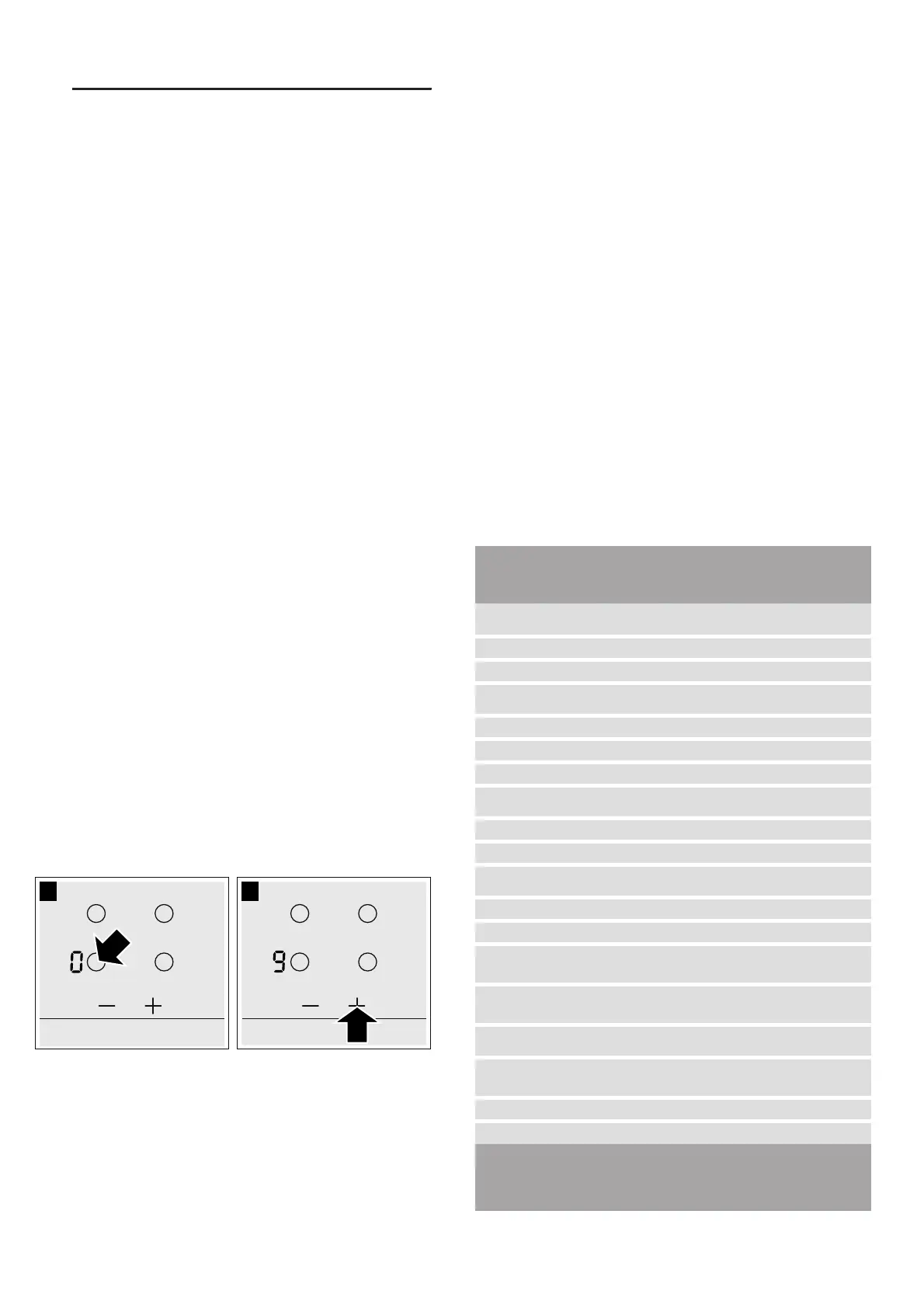
Setting the heat setting
The hob must be switched on.
1. Touch the $ symbol to select the hotplate.
2. Touch the+or - symbol within the next 10 seconds.
The basic setting appears.
+ symbol: Heat setting 9
- symbol: Heat setting 4
3. To change the heat setting: Touch the + or - symbol
until the desired heat setting appears.
Switching off the hotplate
There are 2 ways to switch off the hotplate:
■ Briefly touch the $ symbol on the hotplate 2x one
after the other. ‹ appears in the heat setting display.
After about 10 seconds, the residual heat indicator
appears.
■ Use the $ symbol to select the hotplate. Touch @ or
A until ‹ appears. After about 10 seconds, the
residual heat indicator appears.
Note: The last selected hotplate remains activated. You
can set the hotplate without selecting it again.
Table of cooking times
The following table provides some examples.
Cooking times and heat settings may vary depending
on the type of food, its weight and quality. Deviations
are therefore possible.
For bringing liquids to the boil, use heat setting 9.
Stir thick liquids occasionally.
Food that needs to be seared quickly or food which
loses a lot of liquid during initial frying is best seared in
several small portions.
Tips for energy-saving cooking can be found in the
Environmental protection section.~ Page 27
Ongoing
cooking set-
ting
Ongoing cook-
ing time in min-
utes
Melting
Chocolate coating 1-1. -
Butter, honey, gelatine 1-2 -
Heating and keeping warm
Stew (e.g. lentil stew) 1-2 -
Milk** 1.-2. -
Heating sausages in water** 3-4 -
Defrosting and heating
Frozen spinach 2.-3. 10-20 min
Frozen goulash 2.-3. 20-30 min
Poaching, simmering
Dumplings 4.-5.* 20-30 min
Fish 4-5* 10-15 min
White sauces, e.g. béchamel
sauce
1-2 3-6 min
Whisked sauces, e.g. sauce Béar-
naise, hollandaise
3-4 8-12 min
Boiling, steaming, braising
Rice (with double the quantity of
water)
2-3 15-30 min
Rice pudding 1.-2. 35-45 min
Unpeeled boiled potatoes 4-5 25-30 min
* Ongoing cooking without a lid
** Without lid
*** Turn frequently



 To Next Page