English - 33 -
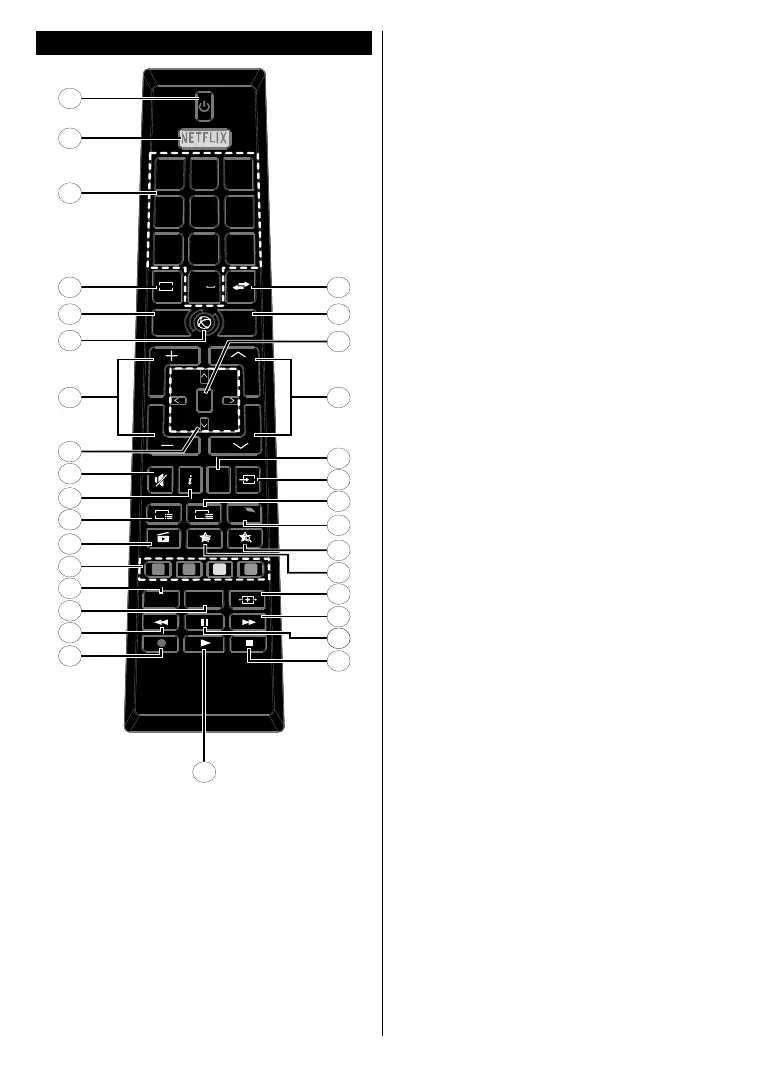
Remote Control
OK
V
V
P
P
LANG. SUBT.
EPG
TXT
Q.
MENU
MENUBACK
EXIT
.,/@
2
1
ABC
3
DEF
4
GHI
5
JKL
6
MNO
7
PQRS
8
TUV
9
WXYZ
0
TV
19
20
21
22
23
24
25
26
27
28
30
29
31
8
7
6
5
4
3
2
1
9
10
11
12
13
14
15
16
17
18
32
(*) MY BUTTON 1 & MY BUTTON 2:
These buttons may have default functions depending on the
model. However you can set a special function to these buttons
bypressingonthemforvesecondswhenonadesiredsource
orchannel.Aconrmationmessagewillbedisplayedonthe
screen. Now the selected MY BUTTON is associated with the
selected function.
Note that if you perform First Time Installation, MY BUTTON
1&2 will return to their default function.
1. Standby: Switches On / Off the TV
2. Netix:LaunchestheNetixapplication
3. Numeric buttons: Switches the channel, enters a
number or a letter in the text box on the screen.
4. TV: Switches to TV Source
5. Back/Return: Returns to previous screen, opens index
page (in TXT mode)
6. Internet: Opens the portal page, where you can reach
many web based applications
7. Volume +/-
8. Directional buttons: Helps navigate menus, content etc.
and displays the subpages in TXT mode when pressed
Right or Left
9. Mute: Completely turns off the volume of the TV
10. Info: Displays information about on-screen content,
shows hidden information (reveal - in TXT mode)
11. EPG (Electronic programme guide): Displays the
electronic programme guide
12. Media browser: Opens the media browsing screen
13. Coloured Buttons: Follow the on-screen instructions for
coloured button functions
14. Language: Switches among sound modes (analogue
TV), displays and changes audio/subtitle language (digital
TV, where available)
15. Subtitles: Turns subtitles on and off (where available)
16. Rapid reverse: Moves frames backwards in media
such as movies
17. Record: Records programmes
18. Play: Starts to play selected media
19. Stop: Stops the media being played
20. Pause: Pauses the media being played, starts timeshift
recording
21. Rapid advance: Moves frames forward in media such
as movies
22. Screen: Changes the aspect ratio of the screen
23. My button 1 (*)
24. My button 2 (*)
25. Quick Menu: Displays a list of menus for quick access
26. Text: Displays teletext (where available), press again
to superimpose the teletext over a normal broadcast
picture (mix)
27. Source: Shows all available broadcast and content
sources
28. Exit: Closes and exits from displayed menus or returns
to previous screen
29. Programme +/-
30. OK: Conrmsuserselections,holdsthepage(inTXT
mode), views channel list (DTV mode)
31. Menu: Displays TV menu
32. Swap: Quickly cycles between previous and current
channels or sources


 To Next Page