
 Need help?
Do you have a question about the Contour Design ShuttlePROv2 and is the answer not in the manual?
Provides instructions for installing the Shuttle device software, recommending installation before connecting the device.
Details the user interface of the Shuttle Device Control Panel and its primary functions for managing device settings.
Explains the method to access the Shuttle device Control Panel using the Task bar Helper icon.
Describes the two main sections of the Control Panel: settings management and device events control.
Guides users on how to view and understand the definitions of Shuttle components for specific applications.
Explains how to generate an HTML file with detailed information about application settings for reference.
Details the process of assigning functions to Shuttle components through the User Action and Computer Response menus.
Provides steps to change the functions assigned to Shuttle components within an existing application setting.
Explains how to configure Global Settings, which apply to applications without specific profiles.
Describes how to switch between different application settings or modes using the Shuttle device Helper.
Covers the setup and usage of multiple Shuttle devices, including primary and secondary device roles.
Guides on creating new application settings, either by copying existing ones or starting from scratch.
Explains how to rename an application setting for better organization and identification.
Details how to modify the executable file linked to an application setting.
Allows tagging settings to specific devices (primary, secondary) for multi-device setups.
Restores a modified setting to its original factory configuration.
Provides instructions for deleting an application setting from the target application list.
Describes the process of importing previously exported or downloaded settings files.
Explains how to export application settings for sharing or backup.
Resets all Shuttle device settings to the default factory-provided configuration.
Guides on creating a macro with a single sequence of actions for automating tasks.
Details how to create step-by-step macros with multiple action groups for complex task automation.
Instructions for updating from older versions, including necessary uninstallation steps.
Covers updating from version 2.x onwards, noting that uninstallation is not required.
Manual procedure to update the application settings list by downloading from the website.
Step-by-step guide to remove the Shuttle device software from the computer.
 General
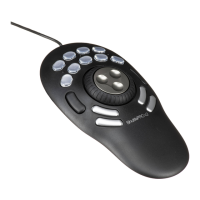
| Type | Multimedia Controller |
|---|---|
| Number of Buttons | 15 |
| Connectivity | USB |
| Compatibility | Windows, Mac OS |
| Dimensions | 5.8 x 4.5 x 1.7 inches |
| Weight | 0.9 lbs |
| Jog/Shuttle Wheel | Yes |
| Number of Dials | 1 |
| Jog Wheel | Yes |
| Programmable Buttons | Yes |
| Cable Length | 6 feet |
| Connectivity Technology | USB |

 To Next Page