EasyManua.ls Logo

Contour Camera - User Manual

Contour Camera
10 pages
Print Icon
To Next Page IconTo Next Page
Loading...
Getting to know your Camera
What’s In The Box?
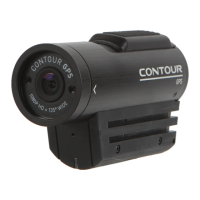
The ContourGPS camera comes with:
Camera
2GB microSD Card
2 Rotating Surface Mount
1 Goggle Mount
1 Li-ion Battery
1 USB Cable
1 Lens Cap
CONTOURGPS
QUICKSTART GUIDE+
Question and Answer IconNeed help?

Do you have a question about the Contour Camera and is the answer not in the manual?

Summary

Getting to know your Camera

Whats In The Box?

Lists all included accessories and components with visual icons.

About The Camera

Set Up The Camera

Understanding Camera Status Lights

Explains LED indicators for status and battery.

Recording and microSD Card

microSD Card Formatting

Detailed procedure for formatting microSD cards for the camera.

About the GPS Feature

Troubleshooting GPS Lock Issues

Provides steps to resolve problems obtaining a GPS position fix.

The 1-2 Switch and Firmware

Firmware Update Procedure

Instructions for updating the camera's firmware for improved performance.

Using the Bluetooth Feature

Configure Camera for Bluetooth

Steps to enable and assign a Bluetooth ID to the camera.

ConnectView Card Installation

Instructions for installing the ConnectView card for iOS connectivity.

Connecting the Camera to Your Device

Pairing Fails and Triple Beeps

Addresses common connection errors and troubleshooting steps.

App Usage and Bluetooth Considerations

Dropped Connections Troubleshooting

Solutions for intermittent Bluetooth connection drops.

See What You Shot

Getting Ready for Next Time

Tips on charging and managing storage for future use.

Summary

Getting to know your Camera

Whats In The Box?

Lists all included accessories and components with visual icons.

About The Camera

Set Up The Camera

Understanding Camera Status Lights

Explains LED indicators for status and battery.

Recording and microSD Card

microSD Card Formatting

Detailed procedure for formatting microSD cards for the camera.

About the GPS Feature

Troubleshooting GPS Lock Issues

Provides steps to resolve problems obtaining a GPS position fix.

The 1-2 Switch and Firmware

Firmware Update Procedure

Instructions for updating the camera's firmware for improved performance.

Using the Bluetooth Feature

Configure Camera for Bluetooth

Steps to enable and assign a Bluetooth ID to the camera.

ConnectView Card Installation

Instructions for installing the ConnectView card for iOS connectivity.

Connecting the Camera to Your Device

Pairing Fails and Triple Beeps

Addresses common connection errors and troubleshooting steps.

App Usage and Bluetooth Considerations

Dropped Connections Troubleshooting

Solutions for intermittent Bluetooth connection drops.

See What You Shot

Getting Ready for Next Time

Tips on charging and managing storage for future use.

Contour Camera Specifications

General IconGeneral
BrandContour
ModelCamera
CategoryDigital Camera
LanguageEnglish

Related product manuals