EasyManua.ls Logo

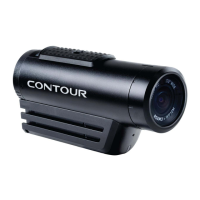
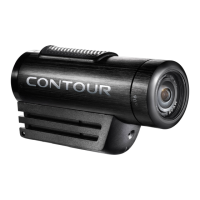
Contour ROAM3 - User Manual

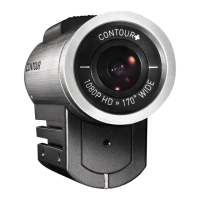
Contour ROAM3
6 pages
Print Icon
To Next Page IconTo Next Page
Loading...
WATERPROOF HD ACTION CAMERA
USER MANUAL
Question and Answer IconNeed help?

Do you have a question about the Contour ROAM3 and is the answer not in the manual?

Summary

Camera Diagram Key

Recording Indicator

Identifies the camera's recording status indicator light.

Record Slider

Controls the start and stop of video recording.

Record Slider Lock

Secures the record slider to prevent accidental activation.

Rotating Lens

Allows adjustment of the camera's field of view or focus.

Laser Line & Recording Indicator

Indicates laser line status and recording activity.

Microphone

Captures audio for video recordings.

Status Button

Activates camera functions like laser line or photo mode.

Reset Button

Used to reset the camera to its default settings.

USB Port

Port for charging and connecting to a computer.

microSD Card Slot

Location for inserting the memory card.

Card Format Button

Initiates the formatting process for the memory card.

Door Lock

Secures the camera's access door.

Memory Status Indicator

Indicates the status of the memory card.

Battery Status Indicator

Shows the current charge level of the camera's battery.

Photo Mode Status

Indicates when the camera is in photo mode.

Settings Switch

Allows selection between two preset camera configurations.

Quick Start Guide

Unlock Camera Door

Unlocking the camera door by moving the lock to the left.

Open Camera Door

Opening the camera's main access door upwards.

Insert microSD Card

Inserting the memory card into the designated slot.

Close Camera Door

Closing the camera's access door after inserting the card.

Lock Camera Door

Securing the camera door by moving the lock to the right.

Start;Stop Recording

Operating the record slider to start and stop video recording.

Engage Photo Mode

Activating photo mode by holding the status button.

Setting Up Your Contour ROAM3

Download Contour Storyteller

Instructions for downloading the software to configure the camera.

Charging the Battery

Guide to charging the camera's internal battery using a USB cable.

Formatting the microSD Card

Procedure to format the memory card for optimal performance.

microSD Card Compatibility

Details on compatible microSD card types and capacities.

Camera Status Indicators

Explanation of LED indicators for battery, memory, and status.

Camera Settings Adjustment

How to adjust video, audio, and lighting settings via software.

Recording and Photo Mode

Information on starting, stopping, and photo mode recording.

Instant Photo Mode Operation

Activating Instant Photo Mode

How to enable photo mode by holding the status button.

Taking Photographs

Procedure for capturing still images in photo mode.

Turning Off Instant Photo Mode

Steps to disable photo mode and return to normal operation.

Mounting Your Camera

Camera Mounting Options

Information on various mounts for positioning the camera.

Alignment with Laser Line

Using the laser line for proper horizon alignment.

Adhesive Mounts

Instructions for applying adhesive mounts for secure attachment.

Waterproof Capabilities

Cautions and Warranty Information

Important Product Information Guide

Contains regulatory, safety, handling, disposal, and warranty details.

General Safety Warnings

Advises on risks of fire, electric shock, injury, or damage from misuse.

Battery and Handling Precautions

Information on the non-removable battery and safe charging practices.

Product Disposal Guidelines

Guidelines for environmentally responsible disposal of the product.

Leash Use Warnings

Warnings and liability disclaimers regarding leash attachment and use.

FCC Compliance Information

Operation Conditions

Stipulates conditions for device operation regarding interference.

Interference Mitigation

Explains potential radio frequency interference and how to mitigate it.

CE Marking Compliance

Indicates compliance with European Electromagnetic Compatibility directives.

Industry Canada Compliance

States compliance with Canadian Interference-Causing Equipment Regulations.

Repair and Modification Policy

Contour Limited Warranty

Warranty Coverage Details

Covers defects in materials and workmanship for one year.

Warranty Exclusions

Lists conditions like alteration, damage, or misuse that void the warranty.

Warranty Service Procedure

Outlines the procedure for returning products for warranty service.

Purchasers Exclusive Remedy

Details the exclusive remedies available to the purchaser for defects.

Manufacturer Liability Limitations

States limitations on manufacturer liability for data loss or damages.

Contour Product Usage Disclaimer

High-Risk Activity Endorsement

Contour does not promote or endorse high-risk activities.

Liability for Misuse or Illegal Use

Contour is not liable for misuse or illegal video capture.

Product Primary Purpose

Primary purpose is recording legal sports activities.

Intellectual Property Rights

Mentions patents and trademarks protecting Contour products.

Technical Support and Contact

Provides contact information for technical support and warranty service.

Summary

Camera Diagram Key

Recording Indicator

Identifies the camera's recording status indicator light.

Record Slider

Controls the start and stop of video recording.

Record Slider Lock

Secures the record slider to prevent accidental activation.

Rotating Lens

Allows adjustment of the camera's field of view or focus.

Laser Line & Recording Indicator

Indicates laser line status and recording activity.

Microphone

Captures audio for video recordings.

Status Button

Activates camera functions like laser line or photo mode.

Reset Button

Used to reset the camera to its default settings.

USB Port

Port for charging and connecting to a computer.

microSD Card Slot

Location for inserting the memory card.

Card Format Button

Initiates the formatting process for the memory card.

Door Lock

Secures the camera's access door.

Memory Status Indicator

Indicates the status of the memory card.

Battery Status Indicator

Shows the current charge level of the camera's battery.

Photo Mode Status

Indicates when the camera is in photo mode.

Settings Switch

Allows selection between two preset camera configurations.

Quick Start Guide

Unlock Camera Door

Unlocking the camera door by moving the lock to the left.

Open Camera Door

Opening the camera's main access door upwards.

Insert microSD Card

Inserting the memory card into the designated slot.

Close Camera Door

Closing the camera's access door after inserting the card.

Lock Camera Door

Securing the camera door by moving the lock to the right.

Start;Stop Recording

Operating the record slider to start and stop video recording.

Engage Photo Mode

Activating photo mode by holding the status button.

Setting Up Your Contour ROAM3

Download Contour Storyteller

Instructions for downloading the software to configure the camera.

Charging the Battery

Guide to charging the camera's internal battery using a USB cable.

Formatting the microSD Card

Procedure to format the memory card for optimal performance.

microSD Card Compatibility

Details on compatible microSD card types and capacities.

Camera Status Indicators

Explanation of LED indicators for battery, memory, and status.

Camera Settings Adjustment

How to adjust video, audio, and lighting settings via software.

Recording and Photo Mode

Information on starting, stopping, and photo mode recording.

Instant Photo Mode Operation

Activating Instant Photo Mode

How to enable photo mode by holding the status button.

Taking Photographs

Procedure for capturing still images in photo mode.

Turning Off Instant Photo Mode

Steps to disable photo mode and return to normal operation.

Mounting Your Camera

Camera Mounting Options

Information on various mounts for positioning the camera.

Alignment with Laser Line

Using the laser line for proper horizon alignment.

Adhesive Mounts

Instructions for applying adhesive mounts for secure attachment.

Waterproof Capabilities

Cautions and Warranty Information

Important Product Information Guide

Contains regulatory, safety, handling, disposal, and warranty details.

General Safety Warnings

Advises on risks of fire, electric shock, injury, or damage from misuse.

Battery and Handling Precautions

Information on the non-removable battery and safe charging practices.

Product Disposal Guidelines

Guidelines for environmentally responsible disposal of the product.

Leash Use Warnings

Warnings and liability disclaimers regarding leash attachment and use.

FCC Compliance Information

Operation Conditions

Stipulates conditions for device operation regarding interference.

Interference Mitigation

Explains potential radio frequency interference and how to mitigate it.

CE Marking Compliance

Indicates compliance with European Electromagnetic Compatibility directives.

Industry Canada Compliance

States compliance with Canadian Interference-Causing Equipment Regulations.

Repair and Modification Policy

Contour Limited Warranty

Warranty Coverage Details

Covers defects in materials and workmanship for one year.

Warranty Exclusions

Lists conditions like alteration, damage, or misuse that void the warranty.

Warranty Service Procedure

Outlines the procedure for returning products for warranty service.

Purchasers Exclusive Remedy

Details the exclusive remedies available to the purchaser for defects.

Manufacturer Liability Limitations

States limitations on manufacturer liability for data loss or damages.

Contour Product Usage Disclaimer

High-Risk Activity Endorsement

Contour does not promote or endorse high-risk activities.

Liability for Misuse or Illegal Use

Contour is not liable for misuse or illegal video capture.

Product Primary Purpose

Primary purpose is recording legal sports activities.

Intellectual Property Rights

Mentions patents and trademarks protecting Contour products.

Technical Support and Contact

Provides contact information for technical support and warranty service.

Contour ROAM3 Specifications

General IconGeneral
Video Resolution1080p
Field of View170 degrees
Battery LifeUp to 3 hours
ConnectivityUSB 2.0
WaterproofWaterproof up to 33ft (10m) without additional housing
StorageMicroSD card up to 32GB
Frame Rate30/60 fps (depending on resolution)

Related product manuals