9 10
Manual 650W 90327_A USINTL
This warranty is valid in the Continental United States only if purchased through an
authorized CookTek Representative or Dealer. This warranty is valid outside of the
Continental United States only if purchase through an Authorized CookTek
International Distributor. Warranty Service is provided only through the Authorized
Agent from which the unit was purchased.
For additional information and other details concerning warranty, please contact our
Service Department:
In the United States:
CookTek
Toll Free: +1 (888) COOKTEK (266-5835)
Toll Free Fax: +1 (888) COOKFAX (266-5329)
Outside of the United States:
Phone: +1 (312) 563-9600
Fax: +1 (312) 432-6220
Worldwide Web
www.CookTek.com
Email: customerservice@cooktek.com
“D” and “R” Models
“S” Model
Your CookTek Induction Buffet is easy to keep clean. Be sure to follow these easy
instructions:
● Turn the unit OFF and remove the plug from any power outlets prior to cleaning.
● When the unit cools, wipe the glass off with a damp cloth.
● To clean the glass surface, use a mild detergent or glass cleaning cream.
● Never immerse the buffet in water or put in in the dishwasher.
In the event of a possible malfunction, your CookTek Buffet will display an error
code on the alphanumeric display. Some models will beep a specific number of
times, indicated by the error and flash the lights on the control box. Please consult
the following table when encountering an error code. “R” models will display text
for some error conditions instead of an error code.
To reset error conditions, remove the pan from the unit and press the Power button,
or unplug the unit.
Error Error Cause Displayed Message Troubleshooting
1
Broken
Temperature
Sensor
E-01 Service required
2
Broken Temp
Sensor, Glass
Temp Too High
E-02
Remove any pans from the buffet
surface and let cool. Turn unit off
and on to reset error. If problem
persists, contact service provider.
3
Over current (peak) E-03
Try different cookware. Service
may be required.
6
High line voltage E-06
To reset, unplug unit, wait 5
seconds, and plug in again. If
problem persists, have an
electrician monitor the line
voltage.
7
Harware failure E-07 Service required.
8
Zero cross failure E-08
Turn unit off, then on. Plug unit
into outlet on different circuit
breaker. If problem persists,
service is required on device
10
Magneeto™ I or II
RTD Failure
E-10 or “Bad Tag”
Magneeto™ I or II needs repair.
Service needed for Magneeto™ I
or II.
11
Tag communication E-11 or “Lost Tag”
Ensure the RFID tag on the pan is
properly located.
12
RFID reader failure E-12 Service required.
13
User interface
error
E-13
Check control panel
connection, cycle power.
Service required
16 Critical error E-16
Call dealer for service.
Service required.
ERROR CODES
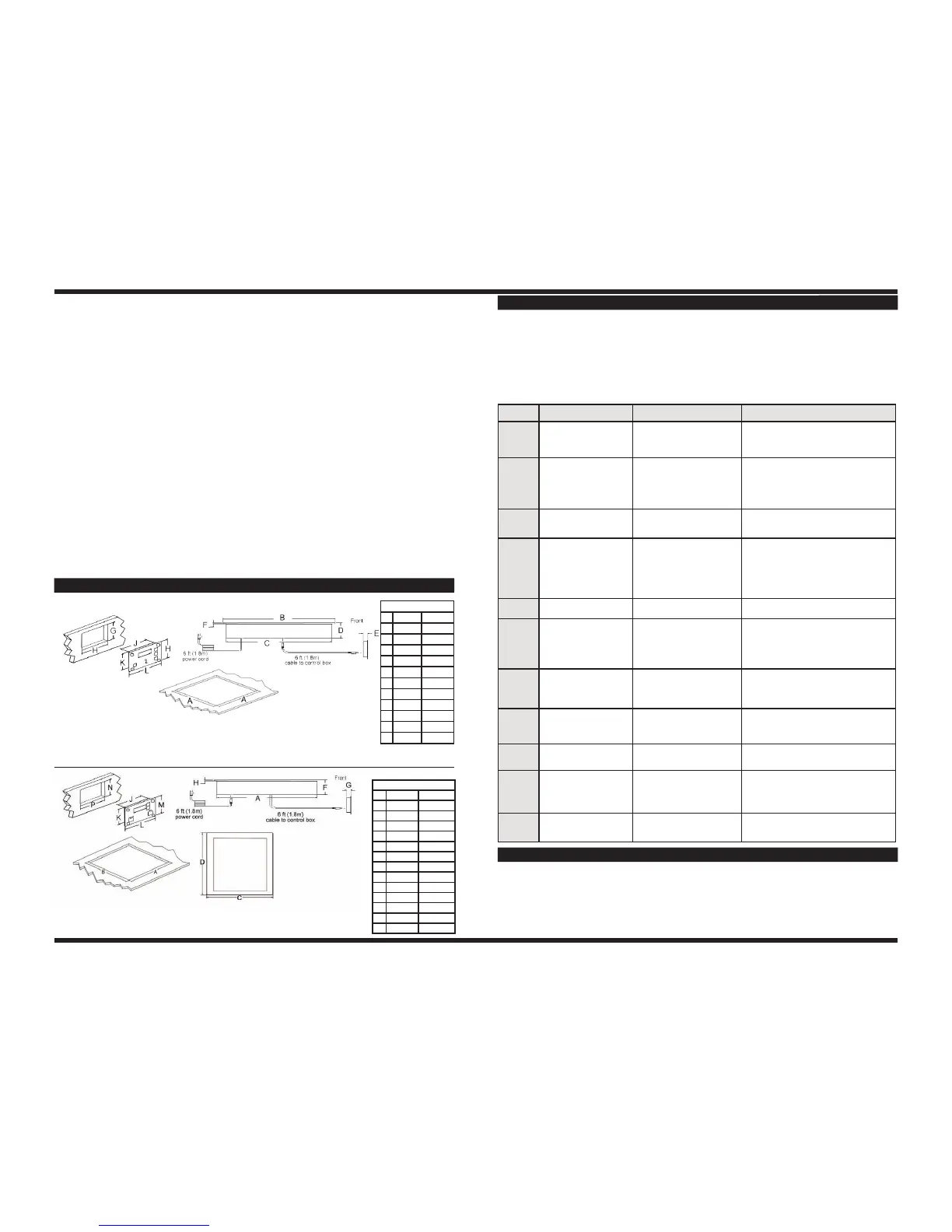
UNIT DIMENSIONS
Dimensions
inches mm
A 12.50 317
B 11.63 295
C 13.38 339
D 12.63 320
F 3.82 96
G 0.97 24
H 0.28 7
J 4.86 123
K 2.57 65
L 6.47 164
M 3.07 77
N 2.67 67
P 4.96 125
Dimensions
inches mm
A 14.30 363
B 15.00 381
C 14.10 358
D 3.75 95
E 0.60 15
F 0.22 5
G 3.50 88
H 4.00 101
J 3.90 99
K 3.40 86
L 5.00 127
CARE AND CLEANING


 To Previous Page
 Loading...