Issue 2 26/07/2021 9
BASIC OVEN OPERATION
The oven can be used in a similar manner to a conventional electric
oven to bake, roast and grill food.
1. Place the oven on a stable, flat, heat resistant surface and away
from any flammable materials.
2. Fit the crumb tray into the base of the oven.
3. Check that the TIMER knob is in the ‘OFF’ position.
4. Fully unwind the cable and plug in. For safety do not allow the
cable to dangle over the edge of units.
5. Turn the TEMPERATURE control knob and select the desired
cooking temperature (100 - 220°C).
6. Turn the FUNCTION (selector) control knob and select the
desired cooking method.
7. Turn the TIMER control knob, select the cooking time required
and the power indicator will illuminate to show that the cooker is
now operational.
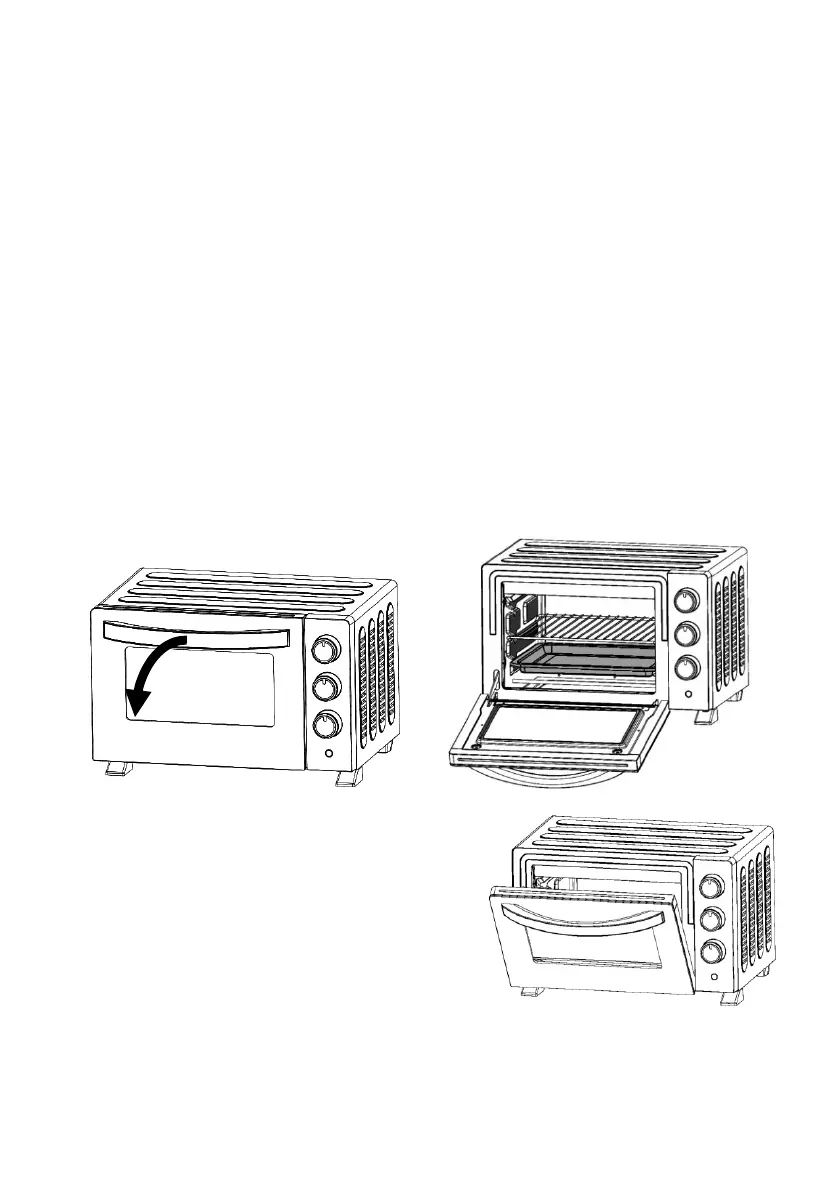
8. Open the oven door (Fig. 5 & 6) and place the food into the oven
using the grill rack and / or baking tray.
Fig. 5 Fig. 6
9. If baking or roasting, close the
oven door.
10. If grilling or toasting, leave the
oven door ajar (fig. 7).
11. If the timer has been selected –
when the cooking time has
finished, a bell will sound and
the oven will turn off
automatically.
12. If ‘stay on’ has been selected – it will be necessary to turn off the
oven after use.


 To Next Page