
 Need help?
Do you have a question about the Cool Cat! CF-2 FUZZ and is the answer not in the manual?
Describes DIP Switch #3 for two green LEDs, offering high clipping and sustain.
Provides example settings for sounds like 'Light & Fizzy', 'Wooly Mammoth', and 'Birmingham Smithy'.
Details the Fuzz, Treble/Bass, Volume, and Bypass controls of the pedal.
Explains 'Under the Hood' features: Input Sensitivity and 3 Position DIP Switch.
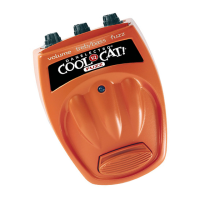
The Cool Cat CF-2 Fuzz is a guitar effects pedal designed to deliver a wide range of fuzzy tones, from subtle to extreme, with a focus on touch sensitivity and dynamic control. This pedal is engineered to provide a rich, full sound with ample sustain, a crunchy top end, and a robust bottom end, making it versatile for various musical styles.
The primary function of the Cool Cat CF-2 Fuzz is to introduce fuzz distortion to a guitar signal. Fuzz is a type of audio effect that produces a distorted, "fuzzy" sound, often characterized by its thick, compressed, and sometimes aggressive tonal qualities. This pedal achieves this by clipping the guitar signal, which alters its waveform and creates harmonic overtones. The CF-2 is designed to be highly touch-sensitive, meaning the intensity of the fuzz can respond dynamically to the player's picking attack and guitar volume knob adjustments, allowing for expressive playing. It also features a true bypass footswitch, ensuring that when the effect is disengaged, the guitar signal passes through unaffected, preserving the instrument's natural tone.
The Cool Cat CF-2 Fuzz offers a comprehensive set of controls, both external and "under the hood," to shape its sound.
FUZZ: This knob controls the amount of fuzz distortion applied to the signal. Turning it counter-clockwise reduces the fuzz, while turning it clockwise increases it. Higher settings not only add more distortion but also boost the volume and thicken the tone. The behavior of this control is further influenced by the "Under the Hood" Input Sensitivity setting.
TREBLE / BASS: These are stacked controls, with the inner knob adjusting Treble and the outer knob adjusting Bass. They allow for precise shaping of the frequency extremes of the fuzz sound. Turning a knob counter-clockwise cuts the selected frequency range, while turning it clockwise boosts it. A specific technique is recommended for adjusting the Bass: turn both knobs simultaneously until the Bass is at the desired level, then fine-tune the Treble. This design often leads to the use of extreme Treble/Bass settings to achieve unique tones.
VOLUME: This knob controls the overall output level of the pedal when the fuzz effect is active. It offers a wide range, allowing for significant volume boosts or cuts, even with low fuzz settings. Users are advised to start with their amplifier and the pedal's Volume control turned down, as the pedal can produce a high output. Like the Fuzz control, the Volume's behavior is also modified by the "Under the Hood" Input Sensitivity control.
BYPASS Footswitch: This is a true bypass footswitch that engages or disengages the fuzz effect. When engaged, the LED indicator illuminates. When disengaged, the signal passes directly through the pedal without any coloration.
These controls require opening the pedal's battery compartment and are designed for more advanced tonal customization.
INPUT SENSITIVITY (Trim Pot): This small, adjustable potentiometer (requiring a Phillips head screwdriver) fine-tunes the level of the guitar signal entering the fuzz circuitry. Turning it counter-clockwise reduces sensitivity, while turning it clockwise increases it. This control acts as a crucial interface between the guitar and the pedal, allowing players to optimize the CF-2's response to their specific instrument. For guitars with a high output, reducing the Input Sensitivity can prevent the sound from becoming too muddy, while for low-output guitars, increasing it can help achieve a fuller fuzz. This setting also influences how the Fuzz control behaves; higher Input Sensitivity settings result in more distortion for a given Fuzz knob position. It can effectively function as an additional gain stage for achieving extreme fuzz levels. Experimentation is encouraged to find the ideal balance between guitar output and Input Sensitivity.
3 POSITION DIP SWITCH: This switch allows users to introduce different combinations of LEDs into the fuzz circuit. Adding LEDs generally constricts the dynamic range, similar to a compressor, resulting in increased sustain and a reduction in overall volume. The Volume control will need to be adjusted accordingly when using these settings.
DIP SWITCH #1: TWO RED LED'S: Activating this switch introduces two red LEDs into the circuit. This setting provides a high amount of signal clipping, leading to significant sustain. A noticeable drop in volume will occur, necessitating an adjustment of the Volume control.
DIP SWITCH #2: FOUR GREEN LED'S: Engaging this switch adds four green LEDs to the circuit. This setting results in a lower amount of clipping compared to the red LEDs, offering a more subtle increase in sustain. The pedal's basic character is largely preserved with this setting.
DIP SWITCH #3: TWO GREEN LED'S: Similar to DIP Switch #1, this setting introduces two green LEDs. It provides a high amount of clamping and sustain but with a brighter tonal quality compared to the red LEDs.
The manual provides several "sample settings" to help users explore the pedal's capabilities:
"Light & Fizzy": A cool, slightly "broken transistor radio" sound with good beef. Settings: Fuzz - 9:30, Treble/Bass - 3:00/9:00, Volume - 10:00, Input Sensitivity - minimum, DIP switches - all OFF.
"Wooly Mammoth": A huge, primitive sound that transforms a soulful ballad into a beast. Settings: Fuzz - 2:00, Treble/Bass - 9:00/3:00, Volume - 11:00, Input Sensitivity - maximum, DIP switches - #1 ON, #2 & #3 OFF.
"Birmingham Smithy": A heavy, goods-delivering sound suitable for a wide range of tones, encouraging the use of the guitar's volume control. Settings: Fuzz - 12:30, Treble/Bass - 11:00/2:00, Volume - 10:30, Input Sensitivity - middle, DIP switches - #1 & #3 OFF, #2 ON.
While the manual doesn't explicitly detail "maintenance features" in the traditional sense, it offers crucial advice for optimal performance and longevity:
Placement in Signal Chain: The manual suggests that the Fuzz pedal often yields better results when placed first in the effects chain, rather than second or third. This is because fuzz pedals typically prefer to receive the raw, unaltered guitar signal directly from the instrument.
Interacting with Guitar Controls: Players are encouraged to experiment with their guitar's volume and tone controls while using the CF-2. Reducing these controls can unlock even more tonal variations, which is highlighted as a key to mastering fuzz.
Power Supply: The pedal is designed to operate with a 9V DC power supply (indicated by "dc 9v" on the pedal). Using the correct power supply is essential to prevent damage and ensure proper operation.
FCC Compliance: The product complies with FCC Part 15 rules, indicating it has been tested and found to meet the limits for a Class B digital device, designed to provide reasonable protection against harmful interference in a residential installation. Users are informed that operation is subject to the condition that the product does not cause harmful interference and must accept any interference received.
EEC Agent Information: Contact details for the EEC Agent (John Hornby Skewes & Co., Ltd.) are provided for regulatory and support purposes within the European Economic Community.
The Cool Cat CF-2 Fuzz is a robust and versatile pedal that empowers guitarists to sculpt a wide array of fuzzy textures, from subtle warmth to aggressive saturation, with a high degree of control and responsiveness. Its combination of intuitive external knobs and advanced internal adjustments makes it a powerful tool for sonic exploration.
 General
| Type | Fuzz Pedal |
|---|---|
| Effect | Fuzz |
| Controls | Volume, Fuzz, Tone |
| Bypass | True Bypass |
| Input | 1/4 inch |
| Output | 1/4 inch |
| Power Supply | 9V DC (Battery or Adapter) |

 To Next Page