Copyright 2015 © Cooler Master Corporation. All Rights Reserved.
Software: Macro
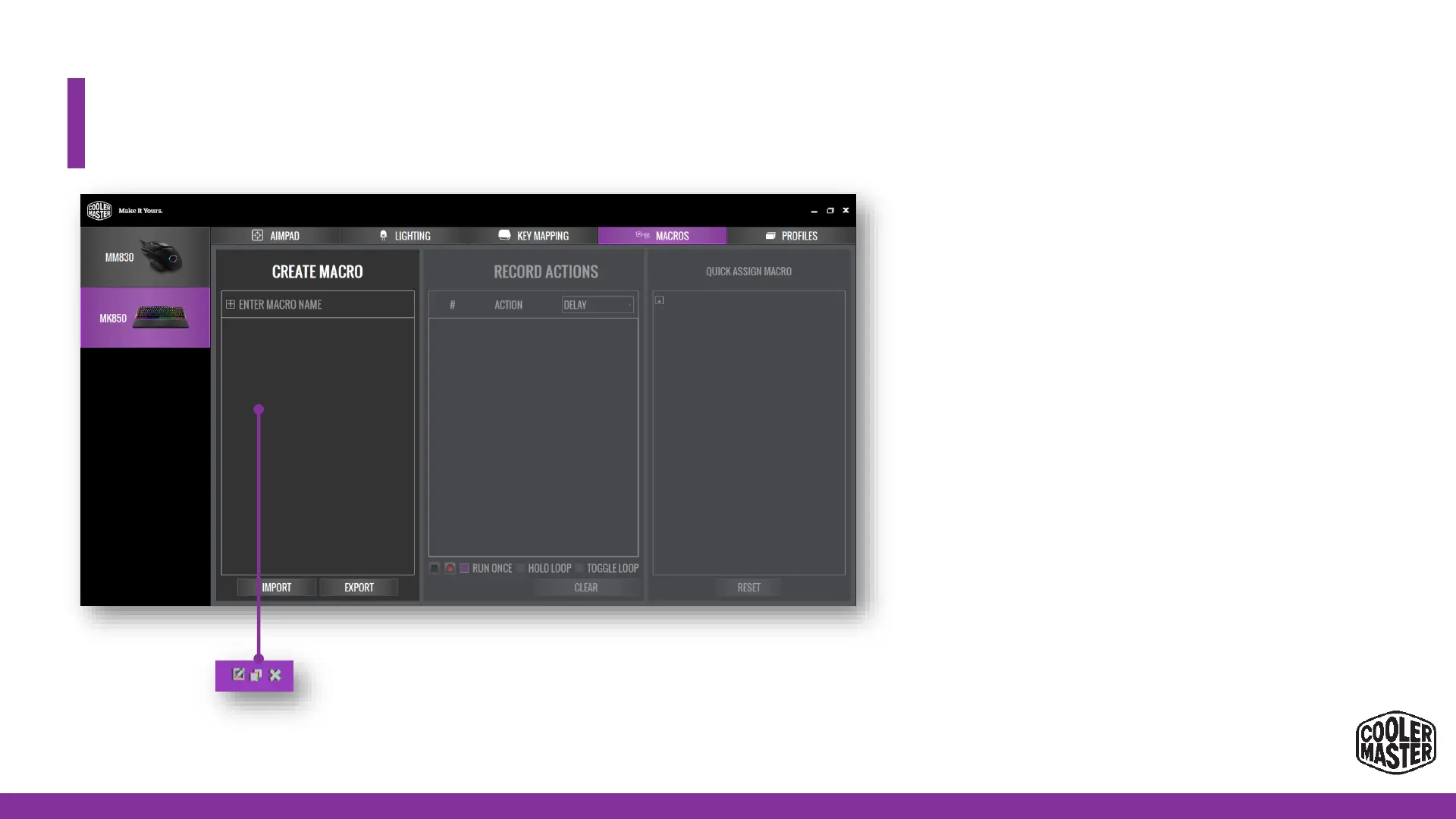
• How to set a Macro through the
Software Application:
1. Press + in section 1 and type in the name of the
Macro
2. Press ‘record’ to start.
• Now type in the macro sequence and press STOP when
done.
3. Now you can select the requested delay for the
Macro.
• Delay = as inputted
• No delay = God Mode (0 ms)
• Custom
4. Now you can select the requested delay for the
Macro.
• Run Once
• Hold Loop (Macro will run while key is pressed)
• Toggle Loop (Macro will run when key is pressed untill
5.Press Save if the macro is complete, and Reset if you
want to re-record
6.Press + in section 3 and bind it to the requested Key*.
The original function of this key will be overwritten
7.Press APPLY to Save and Exit.
*Also the 4 media keys can be set at Macro Keys
1 = Edit Macro Name
2 = Duplicate / Copy
Macro
3 = Delete Macro


 To Next Page