10
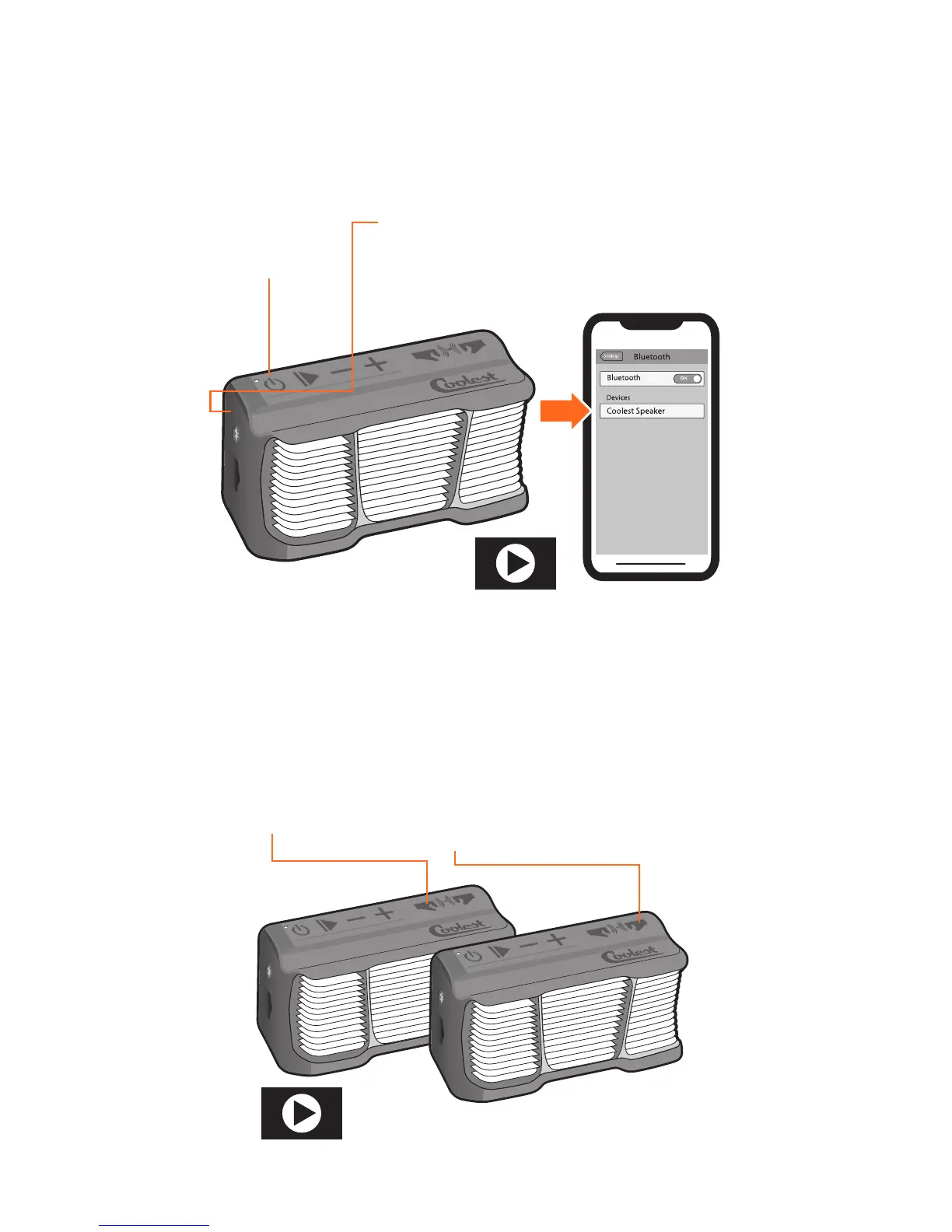
BLUETOOTH® SPEAKER CONNECTION
Order a Second Coolest
Speaker at COOLEST.com
SEARCH
Press and hold
until
LED Flashes
RED & BLUE.
CONNECT
Turn on Bluetooth
®
Settings on your device
and select
“Coolest Speaker”
POWER UP
Press and hold
to power on.
SEARCH
Press and hold
until vocal prompt
“Party Pairing
Initiated.
PAIR
Press and hold
until vocal prompt
“Listening for a
Second Party Pairing
Speaker.”
PLAY
Pairing successful.
both Speakers’
vocal prompt
“Party Pairing
Successful.”
Always make sure your Coolest speaker is charged or connected to a
USB power source for successful Bluetooth
®
or Party Pairing.
BLUETOOTH® CONNECTION STEPS
PARTY PAIRING INSTRUCTIONS
1.
1.
2.
2.
3.
3.
WATCH DEMO AT
COOLEST.COM
WATCH DEMO AT
COOLEST.COM
Stream music to two speakers up to 30 feet apart. Make sure only
one Coolest Speaker is Bluetooth
®
connected to your music playing
device. Party Pairing is enabled 10 seconds after each unit is powered
on.


 To Next Page