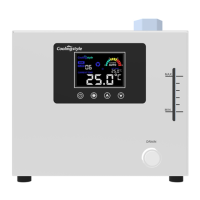
The Coolingstyle Chiller is a compact and efficient cooling device designed for various industrial applications. It comes in several models, including CS-MRC-Q420AC01, CS-MRC-Q420AC02, CS-MRC-Q580AC01, and CS-MRC-Q580AC02, offering different cooling capacities and specifications to suit diverse needs.
Function Description:
The chiller's primary function is to maintain a stable and precise temperature for external systems by circulating a cooled liquid. It features a refrigeration system that actively cools the circulating fluid, ensuring optimal performance for connected equipment. The device includes a display screen for monitoring and setting parameters, an internal pump for fluid circulation, and various safety features to prevent damage and ensure reliable operation. It can operate in both cooling and heating modes, indicated by dedicated icons on the display, allowing for flexible temperature control. The chiller also incorporates an alarm system to notify users of potential issues such as high/low temperature, low flow, or insufficient liquid level.
Important Technical Specifications:
The Coolingstyle Chiller operates on a rated voltage/frequency of 220V/50Hz/1Φ. Key specifications vary by model:
- Rated Power:
- CS-MRC-Q420AC01: 250W
- CS-MRC-Q420AC02: 260W
- CS-MRC-Q580AC01: 280W
- CS-MRC-Q580AC02: 300W
- Maximum Power:
- CS-MRC-Q420AC01: 320W
- CS-MRC-Q420AC02: 330W
- CS-MRC-Q580AC01: 350W
- CS-MRC-Q580AC02: 370W
- Nominal Cooling Capacity:
- CS-MRC-Q420AC01/CS-MRC-Q420AC02: 420W
- CS-MRC-Q580AC01/CS-MRC-Q580AC02: 580W
- Temperature Range: 10~35°C
- Temp Accuracy: ±0.1°C
- Refrigerant: R134a
- Pump Head:
- CS-MRC-Q420AC01/CS-MRC-Q420AC02: 13m
- CS-MRC-Q580AC01/CS-MRC-Q580AC02: 20m (for Q580AC01) and 25m (for Q580AC02)
- Maximum Flow of Water Pump:
- CS-MRC-Q420AC01/CS-MRC-Q420AC02: 23L/min
- CS-MRC-Q580AC01: 24L/min
- CS-MRC-Q580AC02: 25L/min
- Type of Liquid can be Used: Water/Glycol Aqueous Solution
- Working Temperature: 0~45°C
- Storage Temperature: -10°C~60°C
- Size (without handle): 345mm(L)×248mm(W)×215mm(H)
- Package Size: 410mm(L)×313mm(W)×273mm(H)
- Net Weight: 10kg (for Q420 models) / 10.5kg (for Q580 models)
Usage Features:
The chiller is designed for user-friendly operation with a clear display and intuitive controls.
- Installation:
- Upon first use, users should unpack and inspect the machine and accessories.
- Pure water or clean antifreeze (up to 1.8L) should be added to the liquid window, ideally close to the maximum liquid level for optimal performance.
- External waterway connections are made via G1/2 internal threads, requiring quick couplings or pagoda joints.
- After connecting to a 220V power supply, the chiller powers on in a stopped state, requiring activation via the display screen.
- Initial startup may cause a slight drop in water level due to pipeline filling, which can be replenished.
- Display Setting: The display screen is divided into a display area and an operation area.
- Display Area: Shows real-time water flow (e.g., "06" for 6.0-6.9L/min), fault codes (e.g., "E4" for flow alarm, "E5" for high temperature alarm, "E6" for low temperature alarm), compressor speed, cooling/heating indications, high temperature alarm, set target temperature, and real-time water temperature.
- Operation Area: Features four buttons:
- On/Off: Toggles the chiller power.
- Setting: Enters the setting interface, allowing adjustment of target temperature (F0), high temperature alarm threshold (F1), low temperature alarm threshold (F2), and flow alarm threshold (F3). The display cycles through these codes, showing the set value. If no operation occurs for 10 seconds, the display returns to normal.
- Up: Increases the setting value (F0-F3) or continuously increases when held.
- Down: Decreases the setting value (F0-F3) or continuously decreases when held. It also silences the buzzer alarm for E5 or E6 faults for 10 minutes.
- Data Interface (Optional): A 9-pin serial port on the back cover supports RS485 communication, with defined pins for A, B, and GND.
- Fault Code and Output Port Description: When a fault or alarm occurs, the fault status indicator lights up, the fault code is displayed, and the buzzer sounds. Two 3-pin aviation plug signal ports on the back cover output corresponding on-off signals, with signal port 1 being active by default.
- E1 (Temperature sensor failure): Alarm repeating, connection to signal pin 1, 2.
- E2 (Temperature sensor failure): 2 times alarm repeating, connection to signal pin 1, 2.
- E3 (Insufficient liquid level in water tank): 3 times alarm repeating, connection to signal pin 1, 2.
- E4 (Flow lower than set threshold): 4 times alarm repeating, connection to signal pin 1, 2.
- E5 (Water temperature higher than high temperature alarm threshold): 5 times alarm repeating, connection to signal pin 1, 2.
- E6 (Water temperature lower than low temperature alarm threshold): 6 times alarm repeating, connection to signal pin 1, 2.
- Precautions:
- Ensure stable working voltage (220-240V, 50Hz) and proper grounding.
- Use pure or deionized water; avoid impurities to protect the pump. Do not run the pump without water.
- Ensure external connection pipes are free of wrinkles and folds, and clamps are fixed.
- Add water slowly to prevent overflow (internal tank volume ~1.8L). Do not operate below minimum liquid level.
- Ambient temperature should not exceed 50°C; avoid corrosive environments.
- Keep air inlet and outlet unobstructed (50cm clearance behind, 30cm in front).
- Address condensation by raising water temperature or insulating pipes/device if water temperature is lower than ambient temperature and humidity is high.
- Replace circulating water every 45 days.
- Handle the glass touch display carefully.
- Always turn off the chiller via the button before cutting power.
- In case of abnormal sounds or conditions, stop operation and contact after-sales support.
- Do not disassemble or modify the machine without permission.
- This is an industrial device and should only be operated by professionals.
Maintenance Features:
Regular maintenance ensures the chiller's longevity and optimal performance.
- Air Inlet Filter: Clean regularly, ideally once a month.
- Circulating Water: Replace every 45 days. The drain port is a quick-connect female connector. To drain, open the filler cap and connect a standard male connector to the drain port. During drainage, pipeline cleaning can be performed by repeating "add water-running the chiller for a short time-drain" 2-3 times, or by using compressed air to blow out remaining water.
- Troubleshooting: The manual provides a comprehensive troubleshooting guide for common issues such as power connection problems, flow alarms, high/low temperature alarms, and slow drainage, offering solutions like checking connections, adding water, cleaning filters, ensuring ventilation, and adjusting power supply or heat load.


 To Next Page
 General