28
OPERATION PANEL
3
1
2
4
5
7
8
3
1.
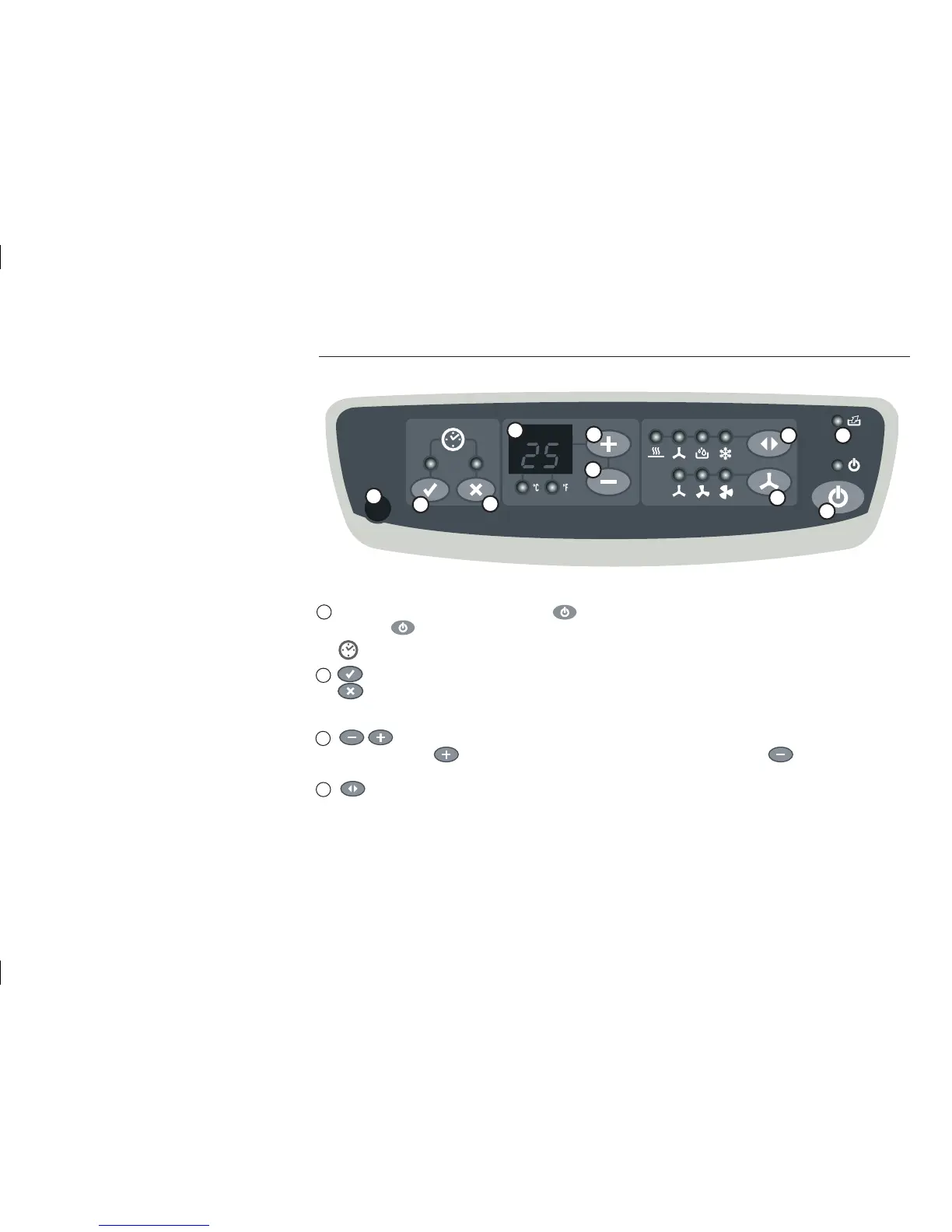
You can switch the appliance on by pressing , the adjacent control light lights up now.
Press the key again to deactivate the appliance, the control light goes off.
2.
key: This key is used to determine when the appliance will be switched on automatically.
key: By pressing this key you can determine when the appliance will be switched off automatically.
The control lights on the two keys indicate whether these functions were selected.
3.
key: These keys are used to adjust the desired cooling temperature. The temperature increases by 1°C each
time you press the key, the temperature decreases by 1°C each time you press the key.
4.
key: You can select the mode of the appliance by pressing this key. The mode changes each time you press this
key in the following sequence: Cool – Dehumidify – Fan – Heat.
The currently set mode can be identified from the control light that is illuminated next to the symbol. The Heat mode is
to be selected only in appliances that are equipped with the heating function.
Timer
2
6


 To Next Page