Getting Started
Before plugging in the cooler/warmer unit: make sure the switch on the back of the unit is
set to the OFF setting.
A minimum 2" vent clearance is required for proper ventilation.
Plugging in your unit:
Turning on your unit:
1.
2.
3.
4.
5
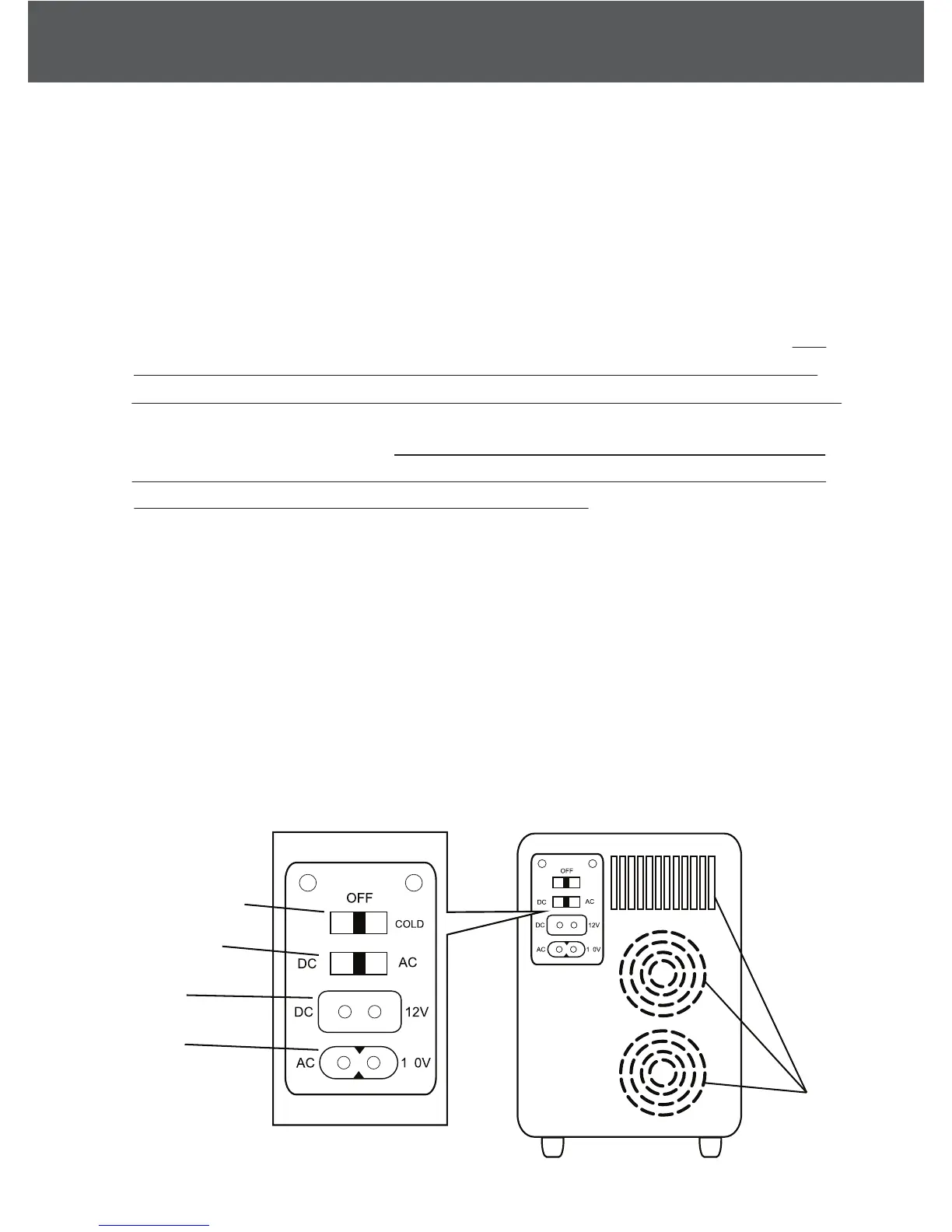
For home application: use the supplied AC power cord (see Fig. 2) by inserting AC
connector int
o unit’s AC port (see Fig. 5) and inserting AC plug into wall outlet. This
unit ONLY works on 100-120V (in compliance with North American standards). Unit
will sustain damage and warranty will be void if unit is plugged into a 220-230 volt outlet.
For motor vehicle application: Car engine MUST be turned on first before plugging
in the cooler/warmer. This precaution prevents a power surge that can lead to the
unit overheating and/or becoming a potential fire risk. Use the supplied DC power
cord (see Fig. 3) and insert DC connector into unit’s DC port (see Fig. 5) and the DC
plug into the appropriate cigarette-lighter outlet.
For Cooling: Set the power switch to the COLD setting. A green light will turn on to
indicate that the unit is in cooling mode.
For Warming: Set the power switch to the HOT setting. A red light will turn on to
indicate that the unit is in warming mode.
Fig. 5
Vents
HOT/COLD SWITCH
DC/AC SWITCH
DC PORT
AC PORT
Fig. 6
HOT
2
2
HOT
COLD


 To Next Page