EasyManua.ls Logo

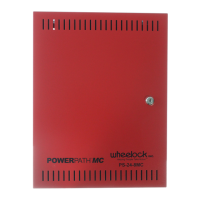
Cooper Wheelock POWERPATH PS-24-8MC - User Manual

Cooper Wheelock POWERPATH PS-24-8MC
28 pages
Print Icon
To Next Page IconTo Next Page
Loading...
POWERPATH
PS-24-8MC
POWER BOOSTER
POWER SUPPLY
Installation Instructions
273 Branchport Avenue, Long Branch, NJ 07740-6899 Ph: (800) 631-2148 Fax: (732) 222-8707
Web Site:
www.cooperwheelock.com e-mail: info@cooperwheelock.com
A84661-001A
Copyright 2007 Cooper Wheelock, Inc. All rights reserved
Thank you for using our products.
Use this product according to this instruction manual.
Please keep this instruction manual for future reference.

Other manuals for Cooper Wheelock POWERPATH PS-24-8MC

Questions and Answers

  • B
    bblanchardAug 13, 2025
    Why is the AC LED off on my Cooper Wheelock POWERPATH PS-24-8MC Power Supply?
    • S
      Steven FowlerAug 13, 2025
      If the AC LED is OFF on your Cooper Wheelock Power Supply, it indicates there is no AC power. You should check the AC power source to ensure it is properly connected and functioning.
  • M
    Mary BonillaAug 16, 2025
    What to do if the DC LED is off on Cooper Wheelock POWERPATH PS-24-8MC Power Supply?
    • M
      Matthew JonesAug 17, 2025
      If the DC LED is OFF on your Cooper Wheelock Power Supply, it means there is no DC output. To resolve this, check the wiring to the AC power source to ensure it is correctly connected.
  • A
    Ashley VaughnAug 21, 2025
    What does it mean when the GND FAULT LED is on for Cooper Wheelock Power Supply?
    • E
      Erin HoffmanAug 21, 2025
      If the GND FAULT LED is ON on your Cooper Wheelock Power Supply, it indicates a ground fault. You should check the output circuits to identify and resolve the ground fault.
  • K
    Kayla RojasAug 25, 2025
    What to do if OUT1, OUT2, OUT3, OUT4 LED's are on during standby on Cooper Wheelock POWERPATH PS-24-8MC?
    • A
      Anna MendozaAug 26, 2025
      If the OUT1, OUT2, OUT3, and OUT4 LEDs are ON during standby on your Cooper Wheelock Power Supply, it indicates a trouble condition on the output. Check the output supervision voltage and the output EOLR (End-of-Line Resistor).
  • G
    garciadanielAug 28, 2025
    Why is the CLASS “A” circuit not functioning properly with optional PS-4CA module on Cooper Wheelock Power Supply?
    • J
      Jason TravisAug 28, 2025
      If a CLASS “A” circuit is not functioning properly on your Cooper Wheelock Power Supply (with optional PS-4CA module), ensure the MODE selection is identical for each Class “A” output circuit and that SW7 POS 1 and POS 2 on the main board are set to the “OFF” position.
  • C
    Charles WellsSep 1, 2025
    Why is the CLASS “A” circuit not functioning properly without optional PS-4CA module on Cooper Wheelock POWERPATH PS-24-8MC?
    • A
      Alyssa LarsonSep 1, 2025
      If a CLASS “A” circuit is not functioning properly on your Cooper Wheelock Power Supply (without optional PS-4CA module), make certain MODE selection is identical for each Class “A” output circuit. Class “A” OUT1 uses outputs 1 and 3; Class “A” OUT2 uses outputs 2 and 4. Also, check SW7 POS 1 and POS 2 on the board for the “ON” position.
  • L
    Laura WhiteSep 5, 2025
    What causes CLASS “B” circuit to malfunction on Cooper Wheelock POWERPATH PS-24-8MC Power Supply?
    • V
      Victoria KennedySep 5, 2025
      If a CLASS “B” circuit is not functioning properly on your Cooper Wheelock Power Supply, check SW7 POS 1 and POS 2 on the board to ensure they are in the “OFF” position.
  • X
    xhernandezSep 8, 2025
    What to do if INP1, INP2 LED’s do not light in ALARM on Cooper Wheelock POWERPATH PS-24-8MC?
    • C
      Calvin RodriguezSep 9, 2025
      If the INP1 and INP2 LEDs do not light in ALARM on your Cooper Wheelock Power Supply, there may be no input signal on terminals IN1+IN1- and IN2+IN2-. Check the input and input wiring to resolve this.

Summary

Introduction and Specifications

Introduction

Overview of the PS-24-8MC POWERPATH power supply, its purpose, and applications.

Specifications

Detailed technical specifications including approvals, inputs, outputs, and supervision.

Terminology

Definitions of technical terms and acronyms used in the manual for clarity.

Terminal Identification

Identification and function of all terminal blocks on the PS-24-8MC unit for wiring.

LED Status Indicators

Description of LED indicators and their meanings for system status monitoring.

Battery Maintenance

Guidelines for maintaining and replacing the backup batteries for reliability.

Installation Instructions

Unpacking and Inspection

Procedure for unpacking the unit and inspecting for shipping damage.

Mounting Guidelines

Instructions and precautions for physically mounting the POWERPATH unit.

Wiring Procedures

Detailed steps for wiring the PS-24-8MC, including warnings.

DIP Switch Settings

Configuration options using DIP switches for various operational modes.

Trouble Relay Status Connections

Details on connecting trouble relay terminals for AC loss and common troubles.

Operation

Operation Modes

Explanation of different operational modes for the outputs.

Output DIP Switch Settings

Detailed settings for DIP switches that control output modes and inputs.

Circuit Configurations

Details on Class B, Class A (with/without PS-4CA), and combined output circuit configurations.

Master Remote Operation

Instructions for synchronizing multiple PS-24-8MC units as master/remote.

Troubleshooting

Battery Calculation Sheet

Warranty Statement

Cooper Wheelock POWERPATH PS-24-8MC Specifications

General IconGeneral
BrandCooper Wheelock
ModelPOWERPATH PS-24-8MC
CategoryPower Supply
LanguageEnglish