Ⅰ
、Product Introduction
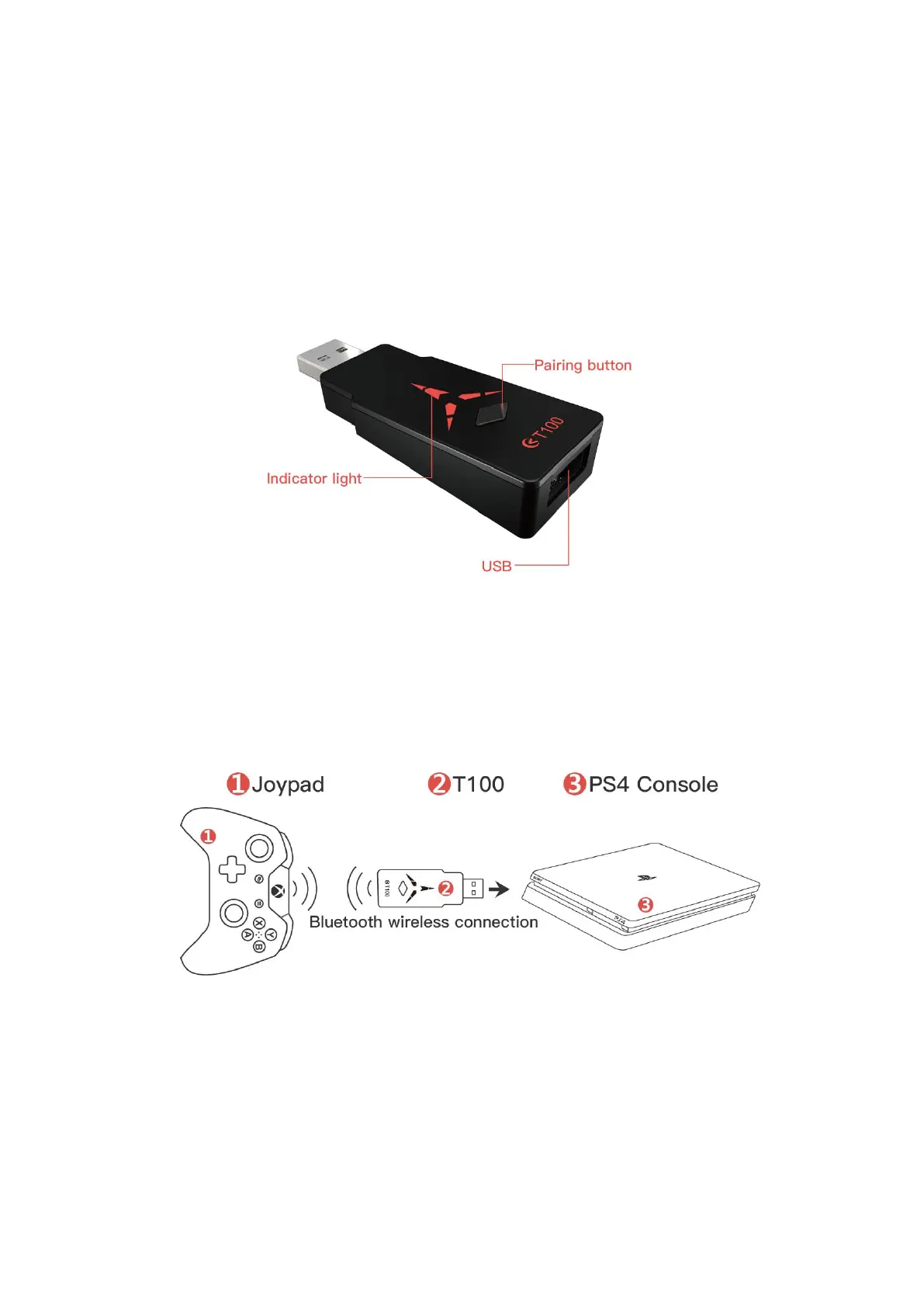
Allowing users to connect to any popular joypad via Bluetooth on the
PS4/SWITCH/PC.
Dual Bluetooth mode:
Wireless A mode and wireless B mode are not universal, and the two modes
can only be used independently. After power-on T100, press and hold the T100
pairing button for 5 seconds to switch modes.
Ⅱ
、PS4 Console (default firmware)
The T100 default factory firmware uses a third-party controller on the PS4 Console, plug
and play.
Wireless B mode: (factory default mode)
T100 Bluetooth wireless connection joypad, the indicator light is red.
1. Disconnecting PS4 original Joypad bluetooth, the method: “Setting - Peripheral Device
- Bluetooth Device - Disconnecting the Joypad”(or applying different PS4 account)
2. Insert the T100 into the PS4 Console as shown in the diagram, press the pairing button,
and the indicator light flashes red (search for Bluetooth status).
3. Press the Joypad pairing button (see the Joypad pairing instructions) until the Joypad
enters the search for Bluetooth status.
4. Wait for 3-5 seconds or so, the Joypad indicator light is always on, and the T100
indicator is always on. At this time, the Bluetooth pairing connection is successful. Press


 To Next Page