4
Mobile App Home Screen
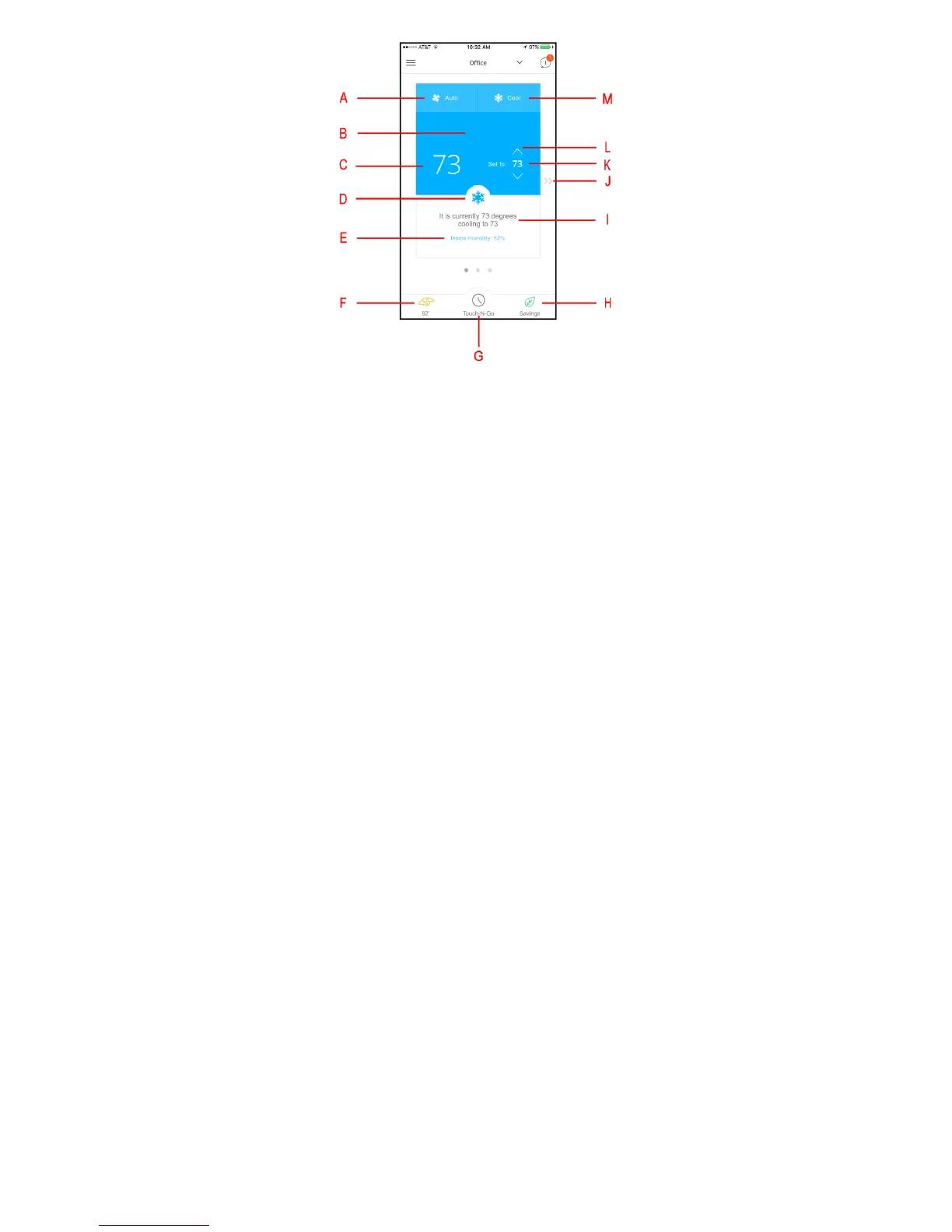
Mobile app home screen identification
A. Fan mode selection.
a. On – the fan operates continuously even if the system is not heating or cooling.
b. Auto – the fan only operates when actively heating or cooling.
c. Air Circulation – allows you to set the minimum number of minutes per hour that the fan runs even if the system is not heating or
cooling.
B. The background color indicates the mode of operation.
a. Blue = Cooling
b. Orange = Heating
c. Gray = Temperature Satisfied and system not running (fan may run during this time if set to On or Air Circulation needs to be
satisfied).
C. Displays the room temperature.
D. Indicates the operating mode as an icon, same as item “M” text.
E. Indoor humidity level. Touch to go to humidity settings screen.
F. Outdoor weather. Touch for current weather.
G. Touch to go to the Touch--N--Go / Hold menu to set “Hold” method or resume schedule.
H. Savings – Touch to see your Scheduled Savings estimate based on your schedule versus a permanent hold of 72_F.
I. Statement of the current condition in the home and current system status. Heating, Cooling or Idle.
J. Arrows will take you to the next or prior screen. From the Home Screen the next is Schedule and the next after that is Reports.
K. Temperature the system will maintain in the home (set point).
L. Up and Down arrows to change the temperature set point.
M. System operating condition. Depending on the equipment installed you could have some or all of these modes:
a. Cool – turns on the air conditioner
b. Heat – turns on the heating (heat pump or gas furnace)
c. Heat & Cool – will maintain the home between the desired heating and cooling setpoints by switching between the heat mode and
cool mode automatically.
d. Auxiliary Heat – will run just the auxiliary heat (electric strip heat or gas furnace depending on equipment installed)
e. Off – turns the system off


 To Next Page