
 Need help?
Do you have a question about the Cordex TOUGHPIX EXTREME and is the answer not in the manual?
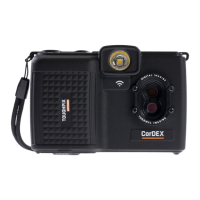
Lists the items included in the TOUGHPIX EXTREME package.
Explains the two modes of operation for the LED flash.
Details the auto-focus sensor for capturing images.
Describes wireless transfer of images, even in hazardous areas.
Details the battery runtime and hot-swapping capability.
Highlights the camera's construction from aircraft-grade aluminium.
Describes the display for viewing images in various conditions.
Explains the ease of navigating menus with the joystick.
Notes the point for attaching the wrist strap for carrying.
Instructions on charging and handling the battery pack.
Details how to turn the camera on and off.
Explains how to navigate menus using the joystick.
Controls visible imaging modes, flash options, and scene settings.
Explains how to interpret the flash charge status indicator.
Describes auto-modes for different shooting situations.
Details settings for time-lapse photography.
Sets the temperature threshold for time-lapse activation.
How to adjust the visible image brightness.
How to adjust the visible image contrast.
How to adjust the visible image saturation.
Shows stored images for review and navigation.
Explains WIFI access point activation for image review.
Instructions for setting the camera's date and time.
Details for updating firmware and aligning images.
Displays the current battery charge status.
Indicates when calibration is due.
Alerts when no memory card is present.
Steps to download images using the memory card.
Instructions for downloading images wirelessly via WIFI.
Explains how the web browser displays and downloads images.
Steps for safely removing the battery pack.
Steps for safely inserting the battery pack.
Instructions for charging the battery pack.
 General
| Sensor Resolution | 16 MP |
|---|---|
| Intrinsically Safe | Yes |
| ATEX Zone | Zone 1 IIC T4 Ga |
| IECEx Zone | Zone 1 IIC T4 Ga |
| Freezeproof | Yes |
| Battery Type | Rechargeable Li-ion |
| Operating Temperature | -20°C to +60°C |
| Shockproof | Yes |
| Display | LCD |
| Video Resolution | 1080p |
| Storage | SD Card (up to 128GB) |
| Waterproof | IP68 (10m for 1 hour) |

 To Next Page